Latest Version
Update
November 06, 2026
November 06, 2026
Developer
Devallone
Devallone
Categories
Tools
Tools
Platforms
Android
Android
Downloads
0
0
License
Free
Free
Package Name
pcmirror.control.dvl
pcmirror.control.dvl
Report
Report a Problem
Report a Problem
More About PC Mirror Control
Android App Description (Google Play / Microsoft Store Android Version)
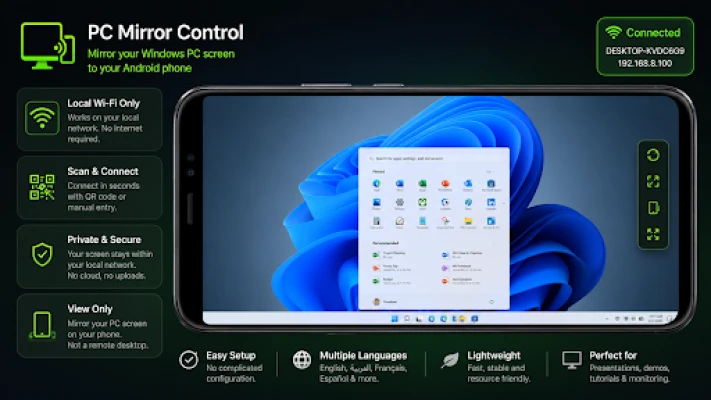
PC Mirror Control lets you view your Windows PC screen directly on your Android phone over the same local Wi-Fi network.
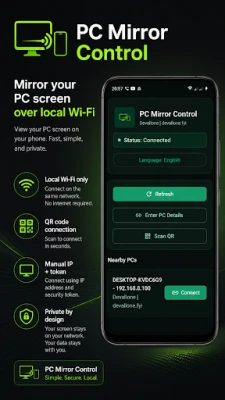
Connect in seconds using a QR code or enter the connection details manually. Once connected, your phone displays the live screen from your PC, making it easy to monitor desktop activity, follow presentations, watch tutorials, or use your phone as a convenient secondary viewing screen.
PC Mirror Control is focused on one thing: simple, reliable PC screen mirroring. No cloud accounts, no complicated setup, and no unnecessary features.
Key Features
✓ View your Windows PC screen on Android in real time
✓ Fast QR code connection
✓ Manual connection using IP address, port, and pairing code
✓ Local Wi-Fi network operation
✓ No cloud account required
✓ Privacy-focused design
✓ Automatic server discovery
✓ Fullscreen viewing mode
✓ Portrait and landscape support
✓ Multiple screen fit modes
✓ Clean dark interface with modern design
✓ Lightweight and easy to use
Simple Connection Process
Install and launch PC Mirror Control Server on your Windows PC.
Start the server and display the QR code.
Open PC Mirror Control on Android.
Scan the QR code or enter the connection details manually.
Instantly view your PC screen on your phone.
Perfect For
• Monitoring your desktop from another room
• Presentations and demonstrations
• Following tutorials while away from your desk
• Viewing desktop activity on the go within your home or office network
• Productivity and multi-screen workflows
• Educational and training environments
Privacy First
PC Mirror Control works entirely within your local Wi-Fi network. Your screen stream remains on your local network and does not require cloud-based screen transmission.
Important
PC Mirror Control is a screen viewing and mirroring application. It does not provide remote desktop control, keyboard input, mouse control, file transfer, or cloud streaming features.
Mirror your Windows PC screen to your Android device quickly, securely, and effortlessly with PC Mirror Control.
Connect in seconds using a QR code or enter the connection details manually. Once connected, your phone displays the live screen from your PC, making it easy to monitor desktop activity, follow presentations, watch tutorials, or use your phone as a convenient secondary viewing screen.
PC Mirror Control is focused on one thing: simple, reliable PC screen mirroring. No cloud accounts, no complicated setup, and no unnecessary features.
Key Features
✓ View your Windows PC screen on Android in real time
✓ Fast QR code connection
✓ Manual connection using IP address, port, and pairing code
✓ Local Wi-Fi network operation
✓ No cloud account required
✓ Privacy-focused design
✓ Automatic server discovery
✓ Fullscreen viewing mode
✓ Portrait and landscape support
✓ Multiple screen fit modes
✓ Clean dark interface with modern design
✓ Lightweight and easy to use
Simple Connection Process
Install and launch PC Mirror Control Server on your Windows PC.
Start the server and display the QR code.
Open PC Mirror Control on Android.
Scan the QR code or enter the connection details manually.
Instantly view your PC screen on your phone.
Perfect For
• Monitoring your desktop from another room
• Presentations and demonstrations
• Following tutorials while away from your desk
• Viewing desktop activity on the go within your home or office network
• Productivity and multi-screen workflows
• Educational and training environments
Privacy First
PC Mirror Control works entirely within your local Wi-Fi network. Your screen stream remains on your local network and does not require cloud-based screen transmission.
Important
PC Mirror Control is a screen viewing and mirroring application. It does not provide remote desktop control, keyboard input, mouse control, file transfer, or cloud streaming features.
Mirror your Windows PC screen to your Android device quickly, securely, and effortlessly with PC Mirror Control.
Rate the App
Add Comment & Review
User Reviews
Based on 0 reviews
No reviews added yet.
Comments will not be approved to be posted if they are SPAM, abusive, off-topic, use profanity, contain a personal attack, or promote hate of any kind.


More »

Popular Apps
phpFoxPHPFOX LLC

Moon Chai StoryOlha Dobel

World War Heroes — WW2 PvP FPSAzur Interactive Games Limited
Govee LiteGovee

AvSeaAvionics Electronics Geeks!

Viking Clan: RagnarokKano Games

Vikings: War of ClansPlarium LLC

Build World AdventureExplore city in cube world

Asphalt 9: LegendsGameloft SE
Dawn of Zombies: Survival GameRoyal Ark
More »
Editor's Choice

Grim Soul: Dark Survival RPGBrickworks Games Ltd

Craft of Survival - Gladiators101XP LIMITED
Last Shelter: SurvivalLong Tech Network Limited
Dawn of Zombies: Survival GameRoyal Ark

Merge Survival : WastelandStickyHands Inc.

AoD Vikings: Valhalla GameRoboBot Studio
Viking Clan: RagnarokKano Games
Vikings: War of ClansPlarium LLC
Asphalt 9: LegendsGameloft SE

Modern Tanks: War Tank GamesXDEVS LTD