





Latest Version
Update
November 06, 2026
November 06, 2026
Developer
SF_SS Studio
SF_SS Studio
Categories
Tools
Tools
Platforms
Android
Android
Downloads
0
0
License
Free
Free
Package Name
com.sfss.calculator.vault.lock
com.sfss.calculator.vault.lock
Report
Report a Problem
Report a Problem
More About Calculator Lock: Video Vault
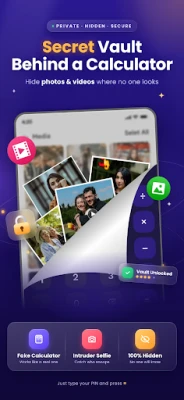
Calculator Lock: Video Vault is a private calculator vault that lets you hide photos, hide videos, hide audio and hide documents behind a working calculator. To everyone else it is just a calculator. Only you know the secret vault inside.
Enter your secret password in the calculator to open your private vault. Use it as a normal calculator any other time.
🔒 WHAT YOU CAN HIDE IN THIS CALCULATOR VAULT
✔ Hide Photos – move private pictures out of your gallery and into a locked photo vault
✔ Hide Videos – keep personal videos safe in your video vault
✔ Hide Audio – lock voice recordings, music and audio files
✔ Hide Documents – protect PDFs, files and important documents
✔ Everything stays in one secure place that only you can open
🎭 CHANGE APP NAME & ICON
Disguise the app as one of 8–10 other everyday apps. Both the app name and the icon change, so the calculator lock blends in with the rest of your phone and does not attract attention.
📸 INTRUDER SELFIE
If someone enters the wrong password, the app takes a selfie with the front camera. You can then see who tried to open your vault and when.
🗑 RECYCLE BIN
Deleted something by mistake? Deleted files go to the Recycle Bin first, so you can restore your photos, videos, audio and documents with one tap.
HOW TO USE
1. Open the app and set your secret password
2. Enter your password in the calculator to open the vault
3. Add the photos, videos, audio or documents you want to hide
4. Choose a disguise icon and name if you want to hide the app itself
5. Turn on Intruder Selfie to catch anyone who tries to enter a wrong password
WHO IS IT FOR?
Calculator Lock: Video Vault is for anyone who wants a private gallery vault: protect personal photos, hide private videos from family or friends, keep documents safe, or simply stop others from looking through your phone.
WHY USERS CHOOSE CALCULATOR VAULT APPS
- Simple, easy-to-use design
- Looks and works like a normal calculator
- Photo vault, video vault, audio vault and document vault in one app
- Smart privacy features: disguised icon, intruder selfie, recycle bin and app locker
PERMISSIONS
- Storage / media access – needed to hide and restore your photos, videos, audio and documents
- Camera – needed only for the Intruder Selfie feature
We never use these permissions for anything else.
IMPORTANT
Please remember your password if forget then press 666666 to reset password. Before uninstalling the app, restore your files back to your gallery, otherwise hidden files may be lost.
Download Calculator Lock: Video Vault now and keep your photos, videos, audio and documents private behind a calculator.
🔒 WHAT YOU CAN HIDE IN THIS CALCULATOR VAULT
✔ Hide Photos – move private pictures out of your gallery and into a locked photo vault
✔ Hide Videos – keep personal videos safe in your video vault
✔ Hide Audio – lock voice recordings, music and audio files
✔ Hide Documents – protect PDFs, files and important documents
✔ Everything stays in one secure place that only you can open
🎭 CHANGE APP NAME & ICON
Disguise the app as one of 8–10 other everyday apps. Both the app name and the icon change, so the calculator lock blends in with the rest of your phone and does not attract attention.
📸 INTRUDER SELFIE
If someone enters the wrong password, the app takes a selfie with the front camera. You can then see who tried to open your vault and when.
🗑 RECYCLE BIN
Deleted something by mistake? Deleted files go to the Recycle Bin first, so you can restore your photos, videos, audio and documents with one tap.
HOW TO USE
1. Open the app and set your secret password
2. Enter your password in the calculator to open the vault
3. Add the photos, videos, audio or documents you want to hide
4. Choose a disguise icon and name if you want to hide the app itself
5. Turn on Intruder Selfie to catch anyone who tries to enter a wrong password
WHO IS IT FOR?
Calculator Lock: Video Vault is for anyone who wants a private gallery vault: protect personal photos, hide private videos from family or friends, keep documents safe, or simply stop others from looking through your phone.
WHY USERS CHOOSE CALCULATOR VAULT APPS
- Simple, easy-to-use design
- Looks and works like a normal calculator
- Photo vault, video vault, audio vault and document vault in one app
- Smart privacy features: disguised icon, intruder selfie, recycle bin and app locker
PERMISSIONS
- Storage / media access – needed to hide and restore your photos, videos, audio and documents
- Camera – needed only for the Intruder Selfie feature
We never use these permissions for anything else.
IMPORTANT
Please remember your password if forget then press 666666 to reset password. Before uninstalling the app, restore your files back to your gallery, otherwise hidden files may be lost.
Download Calculator Lock: Video Vault now and keep your photos, videos, audio and documents private behind a calculator.
Rate the App
Add Comment & Review
User Reviews
Based on 0 reviews
No reviews added yet.
Comments will not be approved to be posted if they are SPAM, abusive, off-topic, use profanity, contain a personal attack, or promote hate of any kind.















More »

Popular Apps

phpFoxPHPFOX LLC

Moon Chai StoryOlha Dobel

World War Heroes — WW2 PvP FPSAzur Interactive Games Limited

Govee LiteGovee

AvSeaAvionics Electronics Geeks!

Viking Clan: RagnarokKano Games

Vikings: War of ClansPlarium LLC

Build World AdventureExplore city in cube world

Asphalt 9: LegendsGameloft SE

Dawn of Zombies: Survival GameRoyal Ark
More »
Editor's Choice

Grim Soul: Dark Survival RPGBrickworks Games Ltd

Craft of Survival - Gladiators101XP LIMITED

Last Shelter: SurvivalLong Tech Network Limited
Dawn of Zombies: Survival GameRoyal Ark

Merge Survival : WastelandStickyHands Inc.

AoD Vikings: Valhalla GameRoboBot Studio
Viking Clan: RagnarokKano Games
Vikings: War of ClansPlarium LLC
Asphalt 9: LegendsGameloft SE

Modern Tanks: War Tank GamesXDEVS LTD