

Latest Version
Update
November 05, 2026
November 05, 2026
Developer
Александър Георгиев Стефанов
Александър Георгиев Стефанов
Categories
Tools
Tools
Platforms
Android
Android
Downloads
0
0
License
Free
Free
Package Name
com.lalstef.SelfCall
com.lalstef.SelfCall
Report
Report a Problem
Report a Problem
More About Self Call: Fake Incoming Calls
✨ WHY IT FEELS SO REAL
• Trigger or schedule a call seamlessly with the power button
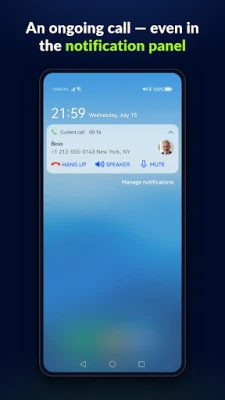
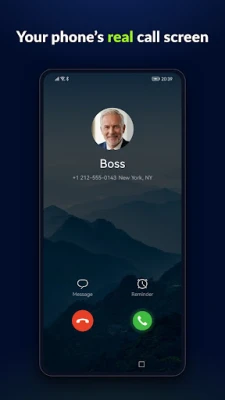
• Calls are simulated on your phone's real call screen
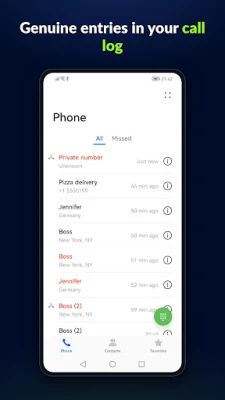
• Each call leaves an entry in your phone's call log
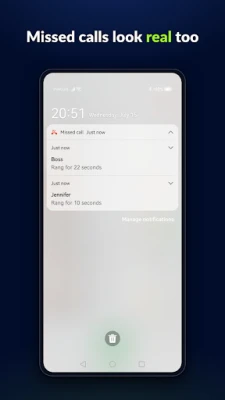
• Calls you don't answer show up as regular missed-call notifications
• Calls ring with your device's ringtone — or the one assigned to that contact
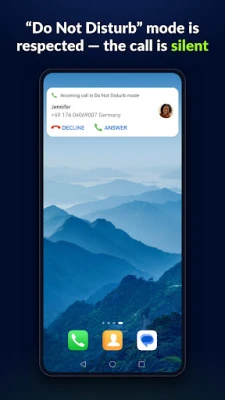
• With Do Not Disturb active, the call arrives silently as a standard notification
🎯 USEFUL FOR
• A fake call to escape a meeting that won't end or an awkward date
• A prank call on friends — your phone rings, they believe it
• An escape call from any situation, scheduled to the minute
• Testing your ringtone volume or demoing Android's call screen
⏰ SCHEDULE IT YOUR WAY
• Ring now — one tap for an instant call
• Quick intervals — 30 seconds, 1 minute, 5 minutes… (fully customizable)
• Exact date & time — plan your exit in advance
• Line up several calls at once — each one fires at its own time
• Calls fire reliably even when the app is closed
📳 PREPARED CALL — TRIGGER IT WITHOUT OPENING THE APP
• Prepare a call in advance — caller, ring settings, audio message and a delay of your choice
• Arm it from a Quick Settings tile, then press the power button 3 times quickly to trigger it
• The call rings after your chosen delay — by then the phone can be back in your pocket
• Works even with the app closed; disarm anytime from the tile or its notification
• See it in action: https://youtube.com/shorts/OEE0DxO-kkU
👤 ANY NAME, ANY NUMBER — OR A REAL CONTACT
• Create caller profiles with any name and number
• Or leave the number empty for a "Private number" call — your phone shows its own withheld-number label, on the call screen and in the log
• Or pick straight from your device contacts — Android even shows their real contact photo on the call screen
• Mark favorites for one-tap access when scheduling
🎙️ HEAR A VOICE WHEN YOU ANSWER
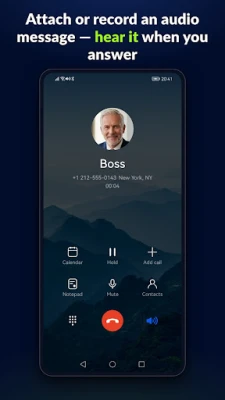
• Attach an audio message — record one or pick an audio file — and hear a "voice" through the earpiece when you answer, like a real caller
• The screen turns off at your ear during an answered call — exactly like a real one
• Per-call ring mode: sound, vibrate only, or silent — even if your ringer is on it never gets louder than your own settings
• Set how long each call rings before it ends as a missed call
🔒 NO SIM INTERACTION, NO ACCOUNT, NO ADS, NO TRACKING
• Never places or receives real calls — no interaction with your SIM, carrier, or billing.
• No server, no account, no sign-up
• No ads, no analytics, no trackers, no data collection of any kind
• Everything stays on your device; uninstalling removes it all
💎 LIMITED FREE VERSION — PAY ONCE FOR EVERYTHING, NO SUBSCRIPTION
• Free version: instant calls, quick scheduling, custom callers and recorded audio messages cost nothing
• A single one-time purchase unlocks the full app: exact date & time, several queued calls, audio files, unlimited callers, contact picker and full ring control
💡 GOOD TO KNOW
• One-time setup: enable Self Call as a calling account (the app guides you). Don't select it under "Make calls with" — it can't make real calls.
• Each permission unlocks one visible feature and is explained in the app — contacts, microphone and audio access are all optional
• Light and dark theme, launcher shortcuts for instant scheduling
• Calls are simulated on your phone's real call screen
• Each call leaves an entry in your phone's call log
• Calls you don't answer show up as regular missed-call notifications
• Calls ring with your device's ringtone — or the one assigned to that contact
• With Do Not Disturb active, the call arrives silently as a standard notification
🎯 USEFUL FOR
• A fake call to escape a meeting that won't end or an awkward date
• A prank call on friends — your phone rings, they believe it
• An escape call from any situation, scheduled to the minute
• Testing your ringtone volume or demoing Android's call screen
⏰ SCHEDULE IT YOUR WAY
• Ring now — one tap for an instant call
• Quick intervals — 30 seconds, 1 minute, 5 minutes… (fully customizable)
• Exact date & time — plan your exit in advance
• Line up several calls at once — each one fires at its own time
• Calls fire reliably even when the app is closed
📳 PREPARED CALL — TRIGGER IT WITHOUT OPENING THE APP
• Prepare a call in advance — caller, ring settings, audio message and a delay of your choice
• Arm it from a Quick Settings tile, then press the power button 3 times quickly to trigger it
• The call rings after your chosen delay — by then the phone can be back in your pocket
• Works even with the app closed; disarm anytime from the tile or its notification
• See it in action: https://youtube.com/shorts/OEE0DxO-kkU
👤 ANY NAME, ANY NUMBER — OR A REAL CONTACT
• Create caller profiles with any name and number
• Or leave the number empty for a "Private number" call — your phone shows its own withheld-number label, on the call screen and in the log
• Or pick straight from your device contacts — Android even shows their real contact photo on the call screen
• Mark favorites for one-tap access when scheduling
🎙️ HEAR A VOICE WHEN YOU ANSWER
• Attach an audio message — record one or pick an audio file — and hear a "voice" through the earpiece when you answer, like a real caller
• The screen turns off at your ear during an answered call — exactly like a real one
• Per-call ring mode: sound, vibrate only, or silent — even if your ringer is on it never gets louder than your own settings
• Set how long each call rings before it ends as a missed call
🔒 NO SIM INTERACTION, NO ACCOUNT, NO ADS, NO TRACKING
• Never places or receives real calls — no interaction with your SIM, carrier, or billing.
• No server, no account, no sign-up
• No ads, no analytics, no trackers, no data collection of any kind
• Everything stays on your device; uninstalling removes it all
💎 LIMITED FREE VERSION — PAY ONCE FOR EVERYTHING, NO SUBSCRIPTION
• Free version: instant calls, quick scheduling, custom callers and recorded audio messages cost nothing
• A single one-time purchase unlocks the full app: exact date & time, several queued calls, audio files, unlimited callers, contact picker and full ring control
💡 GOOD TO KNOW
• One-time setup: enable Self Call as a calling account (the app guides you). Don't select it under "Make calls with" — it can't make real calls.
• Each permission unlocks one visible feature and is explained in the app — contacts, microphone and audio access are all optional
• Light and dark theme, launcher shortcuts for instant scheduling
Rate the App
Add Comment & Review
User Reviews
Based on 0 reviews
No reviews added yet.
Comments will not be approved to be posted if they are SPAM, abusive, off-topic, use profanity, contain a personal attack, or promote hate of any kind.













More »

Popular Apps

phpFoxPHPFOX LLC

Moon Chai StoryOlha Dobel

World War Heroes — WW2 PvP FPSAzur Interactive Games Limited

Govee LiteGovee

AvSeaAvionics Electronics Geeks!

Viking Clan: RagnarokKano Games

Vikings: War of ClansPlarium LLC

Build World AdventureExplore city in cube world

Asphalt 9: LegendsGameloft SE

Dawn of Zombies: Survival GameRoyal Ark
More »
Editor's Choice

Grim Soul: Dark Survival RPGBrickworks Games Ltd

Craft of Survival - Gladiators101XP LIMITED

Last Shelter: SurvivalLong Tech Network Limited
Dawn of Zombies: Survival GameRoyal Ark

Merge Survival : WastelandStickyHands Inc.

AoD Vikings: Valhalla GameRoboBot Studio
Viking Clan: RagnarokKano Games
Vikings: War of ClansPlarium LLC
Asphalt 9: LegendsGameloft SE

Modern Tanks: War Tank GamesXDEVS LTD