
Latest Version
Update
August 29, 2026
August 29, 2026
Developer
kP Studio
kP Studio
Categories
Productivity
Productivity
Platforms
Android
Android
Downloads
1
1
License
Free
Free
Package Name
com.kpstudio.whiteboard.sketch.teach
com.kpstudio.whiteboard.sketch.teach
Report
Report a Problem
Report a Problem
More About Whiteboard : Write & Teach
Transform your device into a powerful digital canvas with the ultimate Smart Whiteboard & Sketch App! Whether you are a teacher delivering online classes, a student taking notes, a professional giving a presentation, or an artist sketching ideas, this app has everything you need.
Packed with cutting-edge features like a Smart Pen that auto-corrects shapes, a Laser Pointer for presentations, and seamless PDF Export, teaching and drawing have never been this intuitive!
🌟 KEY FEATURES:
🪄 Smart Pen Technology
Draw rough circles, squares, or lines, and our magic Smart Pen will automatically convert them into perfect geometric shapes.
🖌️ Advanced Brushes & Pens
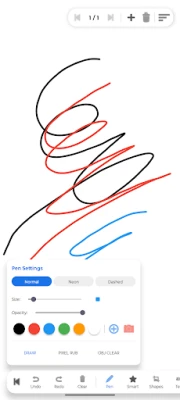
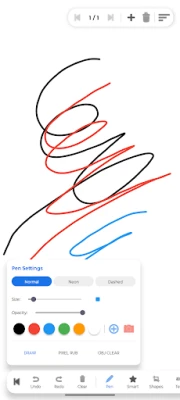
Choose from Normal, Neon (Glow effect), and Dashed pen styles. Fully customize your brush size and opacity. Pick any color using the Advanced Color Wheel or the built-in Eyedropper tool.
🎓 Perfect for Teachers & Tutors
• Laser Pointer: Highlight important topics on the board in real-time without leaving a mark.
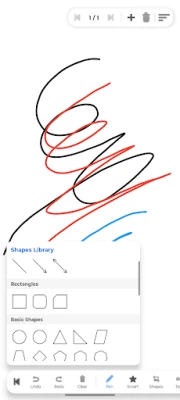
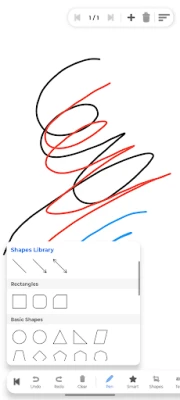
• 50+ Pre-built Shapes: Insert Lines, Arrows, Math Equations, Flowchart elements, 3D shapes (Cube, Cylinder), and basic geometric shapes instantly.
• Multi-Page Notebook: Add, delete, and navigate between multiple pages to create complete lesson plans.
🖼️ Rich Media Support
• Add formatted Text (Bold, Italic, Underline, Background color) directly to the canvas.
• Insert images from your gallery, resize them, and drag them anywhere.
• Lock objects to prevent accidental movement.
🧽 Smart Eraser & Canvas Controls
• Choose between Object Eraser (delete a full stroke instantly) or Pixel Eraser (rub out specific parts).
• Two-finger pan and pinch-to-zoom for infinite canvas exploration.
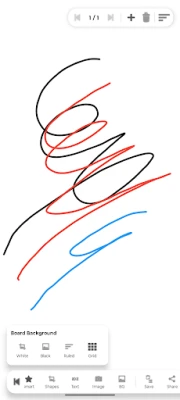
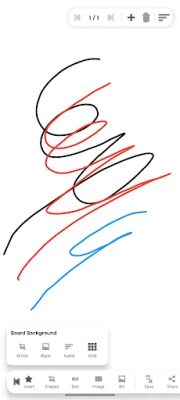
• Multiple Backgrounds: Blank White, Dark Mode (Black), Ruled (Notebook lines), and Grid (Math/Graph paper).
💾 Export & Share
• Save as PDF: Export all your whiteboard pages into a single, high-quality PDF document with one click.
• Share as Image: Take a quick snapshot of your board and share it via WhatsApp, Email, or other apps in PNG format.
Who is this app for?
👨🏫 Teachers & Tutors: For online teaching, live classes, video tutorials, and creating study materials.
👨🎓 Students: For solving math problems, taking visual notes, and drawing diagrams.
🎨 Artists & Kids: For casual sketching, doodling, and practicing drawing.
💼 Professionals: For brainstorming, mind-mapping, and office presentations.
Download now and experience the smoothest, most feature-rich digital whiteboard on mobile and tablet!
🌟 KEY FEATURES:
🪄 Smart Pen Technology
Draw rough circles, squares, or lines, and our magic Smart Pen will automatically convert them into perfect geometric shapes.
🖌️ Advanced Brushes & Pens
Choose from Normal, Neon (Glow effect), and Dashed pen styles. Fully customize your brush size and opacity. Pick any color using the Advanced Color Wheel or the built-in Eyedropper tool.
🎓 Perfect for Teachers & Tutors
• Laser Pointer: Highlight important topics on the board in real-time without leaving a mark.
• 50+ Pre-built Shapes: Insert Lines, Arrows, Math Equations, Flowchart elements, 3D shapes (Cube, Cylinder), and basic geometric shapes instantly.
• Multi-Page Notebook: Add, delete, and navigate between multiple pages to create complete lesson plans.
🖼️ Rich Media Support
• Add formatted Text (Bold, Italic, Underline, Background color) directly to the canvas.
• Insert images from your gallery, resize them, and drag them anywhere.
• Lock objects to prevent accidental movement.
🧽 Smart Eraser & Canvas Controls
• Choose between Object Eraser (delete a full stroke instantly) or Pixel Eraser (rub out specific parts).
• Two-finger pan and pinch-to-zoom for infinite canvas exploration.
• Multiple Backgrounds: Blank White, Dark Mode (Black), Ruled (Notebook lines), and Grid (Math/Graph paper).
💾 Export & Share
• Save as PDF: Export all your whiteboard pages into a single, high-quality PDF document with one click.
• Share as Image: Take a quick snapshot of your board and share it via WhatsApp, Email, or other apps in PNG format.
Who is this app for?
👨🏫 Teachers & Tutors: For online teaching, live classes, video tutorials, and creating study materials.
👨🎓 Students: For solving math problems, taking visual notes, and drawing diagrams.
🎨 Artists & Kids: For casual sketching, doodling, and practicing drawing.
💼 Professionals: For brainstorming, mind-mapping, and office presentations.
Download now and experience the smoothest, most feature-rich digital whiteboard on mobile and tablet!
Rate the App
Add Comment & Review
User Reviews
Based on 0 reviews
No reviews added yet.
Comments will not be approved to be posted if they are SPAM, abusive, off-topic, use profanity, contain a personal attack, or promote hate of any kind.













More »

Popular Apps

phpFoxPHPFOX LLC

Moon Chai StoryOlha Dobel

World War Heroes — WW2 PvP FPSAzur Interactive Games Limited

Govee LiteGovee

AvSeaAvionics Electronics Geeks!

Viking Clan: RagnarokKano Games

Vikings: War of ClansPlarium LLC

Build World AdventureExplore city in cube world

Asphalt 9: LegendsGameloft SE

Dawn of Zombies: Survival GameRoyal Ark
More »
Editor's Choice

Grim Soul: Dark Survival RPGBrickworks Games Ltd

Craft of Survival - Gladiators101XP LIMITED

Last Shelter: SurvivalLong Tech Network Limited
Dawn of Zombies: Survival GameRoyal Ark

Merge Survival : WastelandStickyHands Inc.

AoD Vikings: Valhalla GameRoboBot Studio
Viking Clan: RagnarokKano Games
Vikings: War of ClansPlarium LLC
Asphalt 9: LegendsGameloft SE

Modern Tanks: War Tank GamesXDEVS LTD