

Latest Version
Version
3.2.0
3.2.0
Update
July 20, 2026
July 20, 2026
Developer
CloudEx Inc.
CloudEx Inc.
Categories
Tools
Tools
Platforms
Android
Android
Downloads
0
0
License
$2.99
$2.99
Package Name
jp.snowlife01.android.videoenhancerpro
jp.snowlife01.android.videoenhancerpro
Report
Report a Problem
Report a Problem
More About Video Enhancer Pro: Brightness
Ever felt that videos and photos look too dark and dull on your screen?
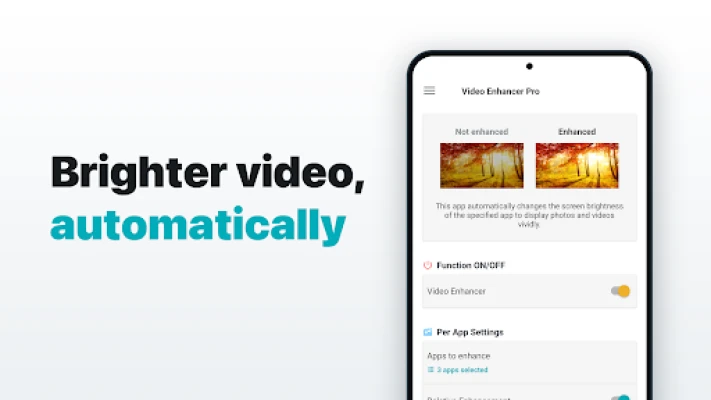
Video Enhancer Pro automatically boosts your screen brightness only when you open the apps you choose — YouTube, Netflix, your gallery, photo albums and more. When you leave the app it restores your previous brightness automatically. No manual tapping needed.
Photos and videos look richer and more vivid when the screen is brighter. But changing brightness app by app is a hassle, so most people just put up with a dim screen. With this app the brightness is set automatically only for the apps you want — so your everyday videos and photos instantly look better.
【Perfect for】
• Enjoying YouTube, Netflix and Prime Video more vividly
• Viewing photos beautifully in your gallery or albums
• Keeping the screen dim normally, but bright for video
• Anyone tired of adjusting brightness by hand
【Main features】
►Video Enhancer (automatic brightness boost)
Detects when your chosen apps open and close, then changes and restores screen brightness automatically.
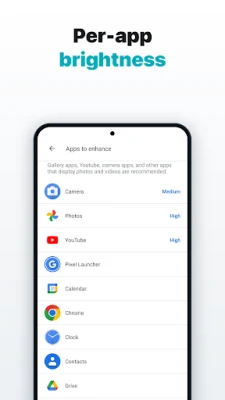
►Per-app brightness
Set the boost strength individually for each app.
►Keep screen on
Keeps the screen always on while a chosen app is in use, so it never dims out during playback.
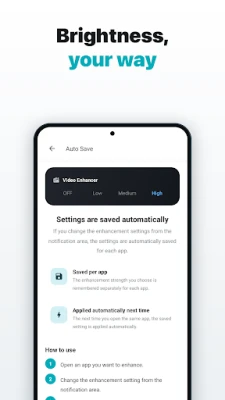
►Auto-save
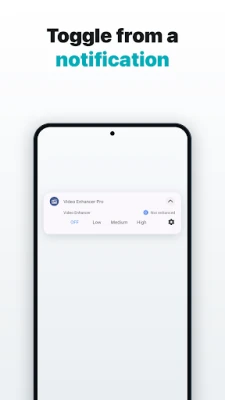
Change the enhance setting from the notification and it is saved automatically, per app.
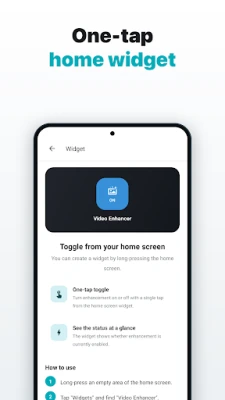
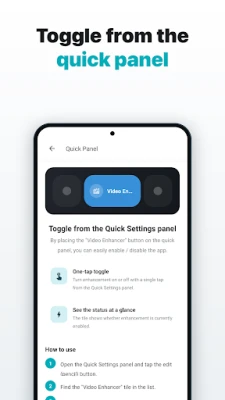
►Shortcut / Widget / Quick panel
Turn the app on or off with one tap from the home-screen widget or the quick panel.
►Relative / absolute mode
Choose a boost relative to your current brightness, or a fixed brightness level.
【How it works — it's easy】
1. Pick the apps you want brighter
2. That's it — open the app and the screen brightens automatically
【About permissions】
"Usage access" is required to detect the app in the foreground, and "Modify system settings" to change the brightness. The information is used only on your device and is never sent anywhere.
【For OPPO device users】
This app needs to run a background service to detect which app is in the foreground.
Due to OPPO's custom behavior, a special setting is required to keep app services running in the background. (Without it, the background service is killed and the app will not work correctly.)
In the recent-apps list, drag this app down slightly to lock it.
If you are not sure how, search for "OPPO task lock".
Photos and videos look richer and more vivid when the screen is brighter. But changing brightness app by app is a hassle, so most people just put up with a dim screen. With this app the brightness is set automatically only for the apps you want — so your everyday videos and photos instantly look better.
【Perfect for】
• Enjoying YouTube, Netflix and Prime Video more vividly
• Viewing photos beautifully in your gallery or albums
• Keeping the screen dim normally, but bright for video
• Anyone tired of adjusting brightness by hand
【Main features】
►Video Enhancer (automatic brightness boost)
Detects when your chosen apps open and close, then changes and restores screen brightness automatically.
►Per-app brightness
Set the boost strength individually for each app.
►Keep screen on
Keeps the screen always on while a chosen app is in use, so it never dims out during playback.
►Auto-save
Change the enhance setting from the notification and it is saved automatically, per app.
►Shortcut / Widget / Quick panel
Turn the app on or off with one tap from the home-screen widget or the quick panel.
►Relative / absolute mode
Choose a boost relative to your current brightness, or a fixed brightness level.
【How it works — it's easy】
1. Pick the apps you want brighter
2. That's it — open the app and the screen brightens automatically
【About permissions】
"Usage access" is required to detect the app in the foreground, and "Modify system settings" to change the brightness. The information is used only on your device and is never sent anywhere.
【For OPPO device users】
This app needs to run a background service to detect which app is in the foreground.
Due to OPPO's custom behavior, a special setting is required to keep app services running in the background. (Without it, the background service is killed and the app will not work correctly.)
In the recent-apps list, drag this app down slightly to lock it.
If you are not sure how, search for "OPPO task lock".
Rate the App
Add Comment & Review
User Reviews
Based on 0 reviews
No reviews added yet.
Comments will not be approved to be posted if they are SPAM, abusive, off-topic, use profanity, contain a personal attack, or promote hate of any kind.














More »

Popular Apps

phpFoxPHPFOX LLC

Moon Chai StoryOlha Dobel

World War Heroes — WW2 PvP FPSAzur Interactive Games Limited

Govee LiteGovee

Build World AdventureExplore city in cube world

Viking Clan: RagnarokKano Games

Vikings: War of ClansPlarium LLC

Asphalt 9: LegendsGameloft SE

Submarine Car Diving SimulatorSwim with dolphins & penguins

Dawn of Zombies: Survival GameRoyal Ark
More »
Editor's Choice

Grim Soul: Dark Survival RPGBrickworks Games Ltd

Craft of Survival - Gladiators101XP LIMITED

Last Shelter: SurvivalLong Tech Network Limited
Dawn of Zombies: Survival GameRoyal Ark

Merge Survival : WastelandStickyHands Inc.

AoD Vikings: Valhalla GameRoboBot Studio
Viking Clan: RagnarokKano Games
Vikings: War of ClansPlarium LLC
Asphalt 9: LegendsGameloft SE

Modern Tanks: War Tank GamesXDEVS LTD