
Latest Version
Update
September 20, 2026
September 20, 2026
Developer
CC Publisher
CC Publisher
Categories
Productivity
Productivity
Platforms
Android
Android
Downloads
0
0
License
Free
Free
Package Name
com.cc.ai.transcribe.speech.to.text
com.cc.ai.transcribe.speech.to.text
Report
Report a Problem
Report a Problem
More About Transcribe Audio To Text
Convert speech and audio to editable text with AI Transcribe. Record audio, import any audio file, transcribe audio to text, create AI summary, translate transcripts and export or share the work done within one simple transcription app .
AI speech to text app combines speech transcription, audio transcription, voice transcription, AI summaries, transcript translation, and editing in a single app. If you need to transcribe speech to text, make a voice memo, review the results of a meeting, understand a lecture, or transcribe an interview, you can do it in a few clicks without making the whole text yourself.
This audio to text converter app is designed for students, specialists, journalists, researchers, teachers, business teams and content creators. It will help you to transcribe audio to text and organize meetings, lectures, interviews, discussions, voice memos and other recordings.
AI Transcribe Features
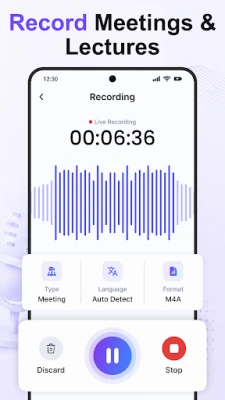
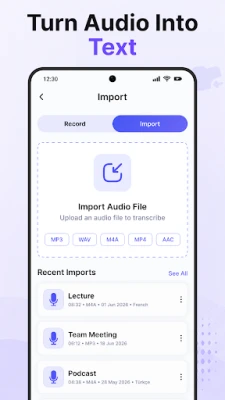
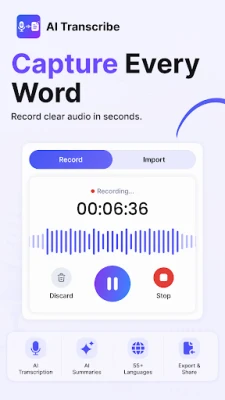
• Record or Import Audio — Record your voice or import any supported audio format (MP3, WAV, M4A, AAC,) etc. to transcribe voice to text.
• Offline Recording — Record audio offline and transcribe it after being connected to the Internet.
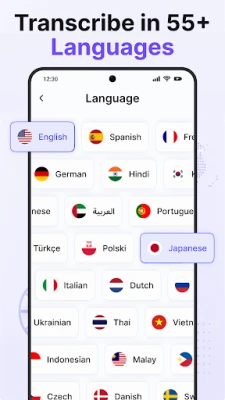
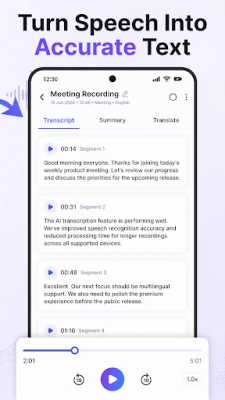
• Transcribe Speech to Text — Select Auto Detect or choose your preferable language before making a transcription.
• Multiple Modes of Transcription — Choose General, Meeting, Lecture, Interview or Study mode according to the type of your recording.
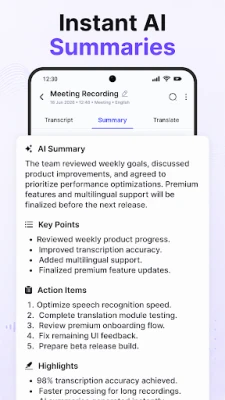
• Summaries & Smart Notes — Save your time by generating short summaries and smart notes from long transcripts.
• Transcript Translation — Translate your generated transcripts to multiple supported languages.
• Audio Playback with Transcript — Listen to the audio file and read the generated transcript.
• Edit & Manage Transcripts — Edit, copy, share and manage your transcripts with transcript history.
• Export & Share — Export transcripts as PDF, DOCX or TXT files. Also you can share transcripts, summaries, translations and available audio files.
AI Transcription Audio to Text app is useful for
• Meetings — Transcribe recordings of meetings and create useful notes, AI summary and key information from them.
• Students & Lectures — Convert lectures into text and study notes.
• Interviews — Transcribe interviews for research, journalism, hiring and content creation.
• Voice notes — Convert voice memos and ideas into text.
• Business discussions — Preserve conversations, decisions and next steps.
• Teachers — Capture lessons and create class notes.
• Researchers — Convert research recordings into text.
• Content creators — Transcribe podcasts and brainstorming sessions.
• Personal reminders — Capture ideas and reminders as text.
Why this app?
AI Transcribe Audio to Text app does not only let you transcribe speech to text but also includes audio transcription, voice transcription, AI summary, smart notes, transcript translation, editing, export, share and transcript history in one single application.
Multiple transcription modes will help you to work with different types of recordings, such as meetings, lectures, interviews, study sessions, voice memos and others while having the full process in one place.
With the AI Transcribe Speech to Text app you can transcribe voice to text in just a couple of clicks without using several applications to do that.
Use AI Transcribe to transcribe audio to text, transcribe speech and voice to text, create summaries from long transcripts, translate texts and organize your recordings.
This audio to text converter app is designed for students, specialists, journalists, researchers, teachers, business teams and content creators. It will help you to transcribe audio to text and organize meetings, lectures, interviews, discussions, voice memos and other recordings.
AI Transcribe Features
• Record or Import Audio — Record your voice or import any supported audio format (MP3, WAV, M4A, AAC,) etc. to transcribe voice to text.
• Offline Recording — Record audio offline and transcribe it after being connected to the Internet.
• Transcribe Speech to Text — Select Auto Detect or choose your preferable language before making a transcription.
• Multiple Modes of Transcription — Choose General, Meeting, Lecture, Interview or Study mode according to the type of your recording.
• Summaries & Smart Notes — Save your time by generating short summaries and smart notes from long transcripts.
• Transcript Translation — Translate your generated transcripts to multiple supported languages.
• Audio Playback with Transcript — Listen to the audio file and read the generated transcript.
• Edit & Manage Transcripts — Edit, copy, share and manage your transcripts with transcript history.
• Export & Share — Export transcripts as PDF, DOCX or TXT files. Also you can share transcripts, summaries, translations and available audio files.
AI Transcription Audio to Text app is useful for
• Meetings — Transcribe recordings of meetings and create useful notes, AI summary and key information from them.
• Students & Lectures — Convert lectures into text and study notes.
• Interviews — Transcribe interviews for research, journalism, hiring and content creation.
• Voice notes — Convert voice memos and ideas into text.
• Business discussions — Preserve conversations, decisions and next steps.
• Teachers — Capture lessons and create class notes.
• Researchers — Convert research recordings into text.
• Content creators — Transcribe podcasts and brainstorming sessions.
• Personal reminders — Capture ideas and reminders as text.
Why this app?
AI Transcribe Audio to Text app does not only let you transcribe speech to text but also includes audio transcription, voice transcription, AI summary, smart notes, transcript translation, editing, export, share and transcript history in one single application.
Multiple transcription modes will help you to work with different types of recordings, such as meetings, lectures, interviews, study sessions, voice memos and others while having the full process in one place.
With the AI Transcribe Speech to Text app you can transcribe voice to text in just a couple of clicks without using several applications to do that.
Use AI Transcribe to transcribe audio to text, transcribe speech and voice to text, create summaries from long transcripts, translate texts and organize your recordings.
Rate the App
Add Comment & Review
User Reviews
Based on 0 reviews
No reviews added yet.
Comments will not be approved to be posted if they are SPAM, abusive, off-topic, use profanity, contain a personal attack, or promote hate of any kind.













More »

Popular Apps

phpFoxPHPFOX LLC

Moon Chai StoryOlha Dobel

World War Heroes — WW2 PvP FPSAzur Interactive Games Limited

Govee LiteGovee

AvSeaAvionics Electronics Geeks!

Viking Clan: RagnarokKano Games

Vikings: War of ClansPlarium LLC

Build World AdventureExplore city in cube world

Asphalt 9: LegendsGameloft SE

Dawn of Zombies: Survival GameRoyal Ark
More »
Editor's Choice

Grim Soul: Dark Survival RPGBrickworks Games Ltd

Craft of Survival - Gladiators101XP LIMITED

Last Shelter: SurvivalLong Tech Network Limited
Dawn of Zombies: Survival GameRoyal Ark

Merge Survival : WastelandStickyHands Inc.

AoD Vikings: Valhalla GameRoboBot Studio
Viking Clan: RagnarokKano Games
Vikings: War of ClansPlarium LLC
Asphalt 9: LegendsGameloft SE

Modern Tanks: War Tank GamesXDEVS LTD