

Latest Version
Update
November 02, 2026
November 02, 2026
Developer
gradomski.dev
gradomski.dev
Categories
Personalization
Personalization
Platforms
Android
Android
Downloads
0
0
License
Free
Free
Package Name
dev.gradomski.sqtilelauncher
dev.gradomski.sqtilelauncher
Report
Report a Problem
Report a Problem
More About sqTile - Live Tiles Launcher
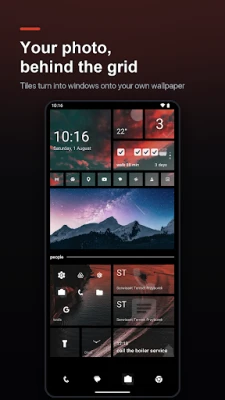
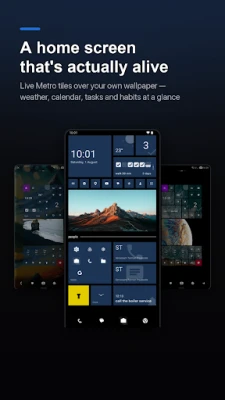
sqTile is a live tiles launcher: a square tile home screen in the spirit of Windows Phone and its Metro design, rebuilt from scratch for modern Android. No sea of round icons. Just a bold grid of tiles you arrange the way you think.
▍ Tiles that show you something
• Clock tile, digital or analog, 12 or 24 hour, with or without the date
• Calendar tile with two faces: the next event, or the whole month as a grid with a dot under every busy day. Tap a day and your calendar opens there
• Weather tile with a live forecast, fetched anonymously from your device, in Celsius or Fahrenheit
• Music tile: album art, track and artist, skip and pause without opening the player
• To-dos and reminders with exact time alarms that survive a reboot
• Habit tracker with day strips, streaks and a daily target
• Quick contact tiles: call or message a person straight from the home screen, with their photo on the tile
• Photo tiles with a slow pan and zoom, folders that hold up to nine apps, and a flashlight tile that asks for no extra permission
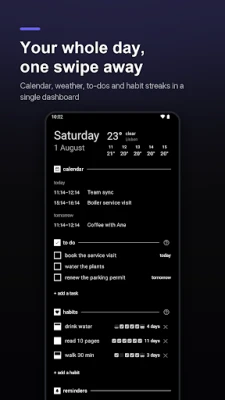
• A dashboard page pulling it all together, with the sections you choose
▍ A home screen that reacts
• Tiles move the moment a notification arrives: a light sweep, a drop, or a flip that turns the tile over and shows the app and how many are waiting
• Notification badges count what you pick: every notification, messages only, or the app's own number
• The signature turnstile launch: tap a tile and the ones around it flip in sequence before your app opens, adjustable, or off if you like it calm
▍ Yours to shape
• Icon packs: use any pack installed from Play across the launcher, or pin a single icon from a pack to one tile
• Four icon styles, from monochrome glyphs themed to your accent to the app's own full color icon
• Your wallpaper behind the grid, with a transparency slider that turns tiles into glass
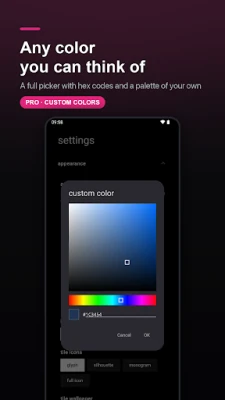
• Any accent color you can think of, with hex codes and a saved palette, on a black or white background
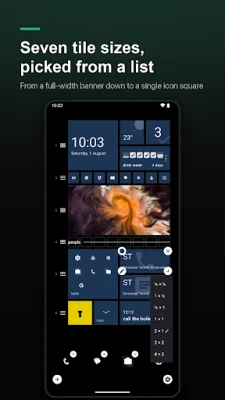
• Tile sizes from a full width banner down to a single icon square, and free hand trimming for the widths in between
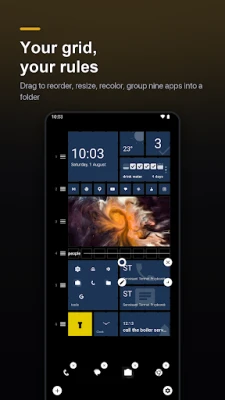
• Drag and drop edit mode: leave gaps, add section labels, recolor any tile
• App names on tiles, globally or one tile at a time
• Configurable dock (glyphs, shelf or solid tiles), tile spacing, corner radius, animation speed
• App drawer as a clean alphabetical list or a tile grid, with instant search, a letter jump and apps you can hide
• Full landscape support with a side dock rail
• Back up and restore everything to a single file
▍ Fast, and measured
Built in 100% Kotlin and Jetpack Compose. Cold start around 150 ms and frames that stay smooth at 120 Hz. Your launcher should never be the thing that makes you wait.
▍ Private by design
No ads. No analytics SDK. No tracking. No account. Weather is fetched anonymously on your device, and permissions are asked only when a feature needs them, never all at once up front. Quick contacts work without the contacts permission: you pick the person, the launcher keeps just that one name.
▍ Pay once
sqTile is free to use. The free tier holds 3 open to-dos, 2 habits, 5 reminders and a 4 slot dock, and keeps the default look. sqTile Pro is a single one time purchase, never a subscription: it unlocks the habit, folder and stack tiles, 7 dock slots, custom colors and the whole appearance section.
▍ Good to know
sqTile draws its own tiles and does not host Android widgets. Everything on the grid is built in. The interface speaks English, Polish, German, Italian and Ukrainian.
If you loved Windows Phone, or you are simply tired of the same grid of round icons, this is your home screen again.
• Clock tile, digital or analog, 12 or 24 hour, with or without the date
• Calendar tile with two faces: the next event, or the whole month as a grid with a dot under every busy day. Tap a day and your calendar opens there
• Weather tile with a live forecast, fetched anonymously from your device, in Celsius or Fahrenheit
• Music tile: album art, track and artist, skip and pause without opening the player
• To-dos and reminders with exact time alarms that survive a reboot
• Habit tracker with day strips, streaks and a daily target
• Quick contact tiles: call or message a person straight from the home screen, with their photo on the tile
• Photo tiles with a slow pan and zoom, folders that hold up to nine apps, and a flashlight tile that asks for no extra permission
• A dashboard page pulling it all together, with the sections you choose
▍ A home screen that reacts
• Tiles move the moment a notification arrives: a light sweep, a drop, or a flip that turns the tile over and shows the app and how many are waiting
• Notification badges count what you pick: every notification, messages only, or the app's own number
• The signature turnstile launch: tap a tile and the ones around it flip in sequence before your app opens, adjustable, or off if you like it calm
▍ Yours to shape
• Icon packs: use any pack installed from Play across the launcher, or pin a single icon from a pack to one tile
• Four icon styles, from monochrome glyphs themed to your accent to the app's own full color icon
• Your wallpaper behind the grid, with a transparency slider that turns tiles into glass
• Any accent color you can think of, with hex codes and a saved palette, on a black or white background
• Tile sizes from a full width banner down to a single icon square, and free hand trimming for the widths in between
• Drag and drop edit mode: leave gaps, add section labels, recolor any tile
• App names on tiles, globally or one tile at a time
• Configurable dock (glyphs, shelf or solid tiles), tile spacing, corner radius, animation speed
• App drawer as a clean alphabetical list or a tile grid, with instant search, a letter jump and apps you can hide
• Full landscape support with a side dock rail
• Back up and restore everything to a single file
▍ Fast, and measured
Built in 100% Kotlin and Jetpack Compose. Cold start around 150 ms and frames that stay smooth at 120 Hz. Your launcher should never be the thing that makes you wait.
▍ Private by design
No ads. No analytics SDK. No tracking. No account. Weather is fetched anonymously on your device, and permissions are asked only when a feature needs them, never all at once up front. Quick contacts work without the contacts permission: you pick the person, the launcher keeps just that one name.
▍ Pay once
sqTile is free to use. The free tier holds 3 open to-dos, 2 habits, 5 reminders and a 4 slot dock, and keeps the default look. sqTile Pro is a single one time purchase, never a subscription: it unlocks the habit, folder and stack tiles, 7 dock slots, custom colors and the whole appearance section.
▍ Good to know
sqTile draws its own tiles and does not host Android widgets. Everything on the grid is built in. The interface speaks English, Polish, German, Italian and Ukrainian.
If you loved Windows Phone, or you are simply tired of the same grid of round icons, this is your home screen again.
Rate the App
Add Comment & Review
User Reviews
Based on 0 reviews
No reviews added yet.
Comments will not be approved to be posted if they are SPAM, abusive, off-topic, use profanity, contain a personal attack, or promote hate of any kind.










More »

Popular Apps

phpFoxPHPFOX LLC

Moon Chai StoryOlha Dobel

World War Heroes — WW2 PvP FPSAzur Interactive Games Limited

Govee LiteGovee

AvSeaAvionics Electronics Geeks!

Viking Clan: RagnarokKano Games

Vikings: War of ClansPlarium LLC

Build World AdventureExplore city in cube world

Asphalt 9: LegendsGameloft SE

Dawn of Zombies: Survival GameRoyal Ark
More »
Editor's Choice

Grim Soul: Dark Survival RPGBrickworks Games Ltd

Craft of Survival - Gladiators101XP LIMITED

Last Shelter: SurvivalLong Tech Network Limited
Dawn of Zombies: Survival GameRoyal Ark

Merge Survival : WastelandStickyHands Inc.

AoD Vikings: Valhalla GameRoboBot Studio
Viking Clan: RagnarokKano Games
Vikings: War of ClansPlarium LLC
Asphalt 9: LegendsGameloft SE

Modern Tanks: War Tank GamesXDEVS LTD