

Latest Version
Update
October 15, 2026
October 15, 2026
Developer
CorePlay Studio
CorePlay Studio
Categories
Tools
Tools
Platforms
Android
Android
Downloads
0
0
License
Free
Free
Package Name
com.core.screenrecorder.videorecorder
com.core.screenrecorder.videorecorder
Report
Report a Problem
Report a Problem
More About Screen Recorder Video Recorder
🚀 Smooth & Clear Screen Recorder
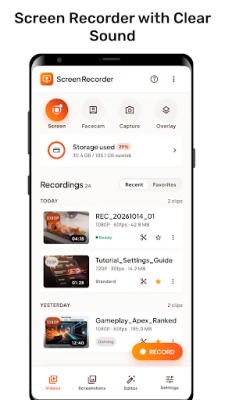
Screen Recorder Video Recorder helps you record your screen in HD, capture gameplay, take screenshots and draw on the screen, all from one floating button.
NO watermark, NO root needed, NO recording time limit! Tap the floating ball to record video tutorials, online classes, game highlights and anything else on your screen. Pause and resume anytime, then trim the video or turn it into MP3 in a few taps.
🎬 HD SCREEN RECORDING
• HD video recorder: choose 480p, 720p, 1080p or 1440p (2K) and 24, 30 or 60 FPS (up to what your device supports).
• Video quality: choose Auto, Low, Medium or High to balance file size and sharpness.
• Orientation: Auto, Portrait or Landscape, perfect for gameplay recording.
• Countdown: 3, 5 or 10 seconds before the recording starts, or skip it with "Start Now".
• Pause & Resume: pause the recording and continue in the same video.
• Screenshot while recording: capture a frame without stopping the screen recording.
🎙 RECORD AUDIO
• Internal audio: record game and media sound clearly (Android 10 or above; some apps do not allow their sound to be recorded).
• Microphone: add your voice for tutorials and commentary.
• Internal audio + Microphone together, or record without sound.
😃 FACECAM
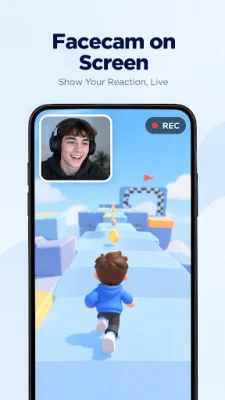
• Show your face in a small window while you record gameplay or reactions.
• Drag it anywhere and resize it as you like.
• Front or back camera, circle or square frame, color effects (Bright, Warm, Dark) and adjustable opacity.
🖌 SCREEN DRAWING (BRUSH)
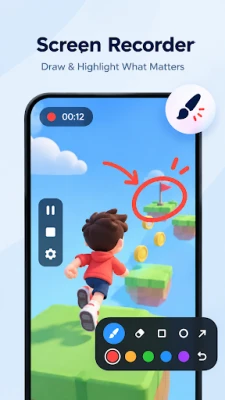
• Draw on the screen while recording: pen, highlighter, arrow, rectangle and ellipse.
• Mask tool to hide private information on the screen.
• Choose colors and sizes, undo, eraser, and auto-fade marks after 3 seconds.
• Take a screenshot that includes your drawing, right from the brush toolbar.
🎈 FLOATING BALL & QUICK CONTROLS
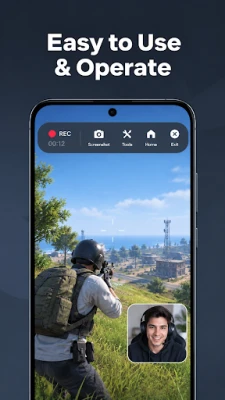
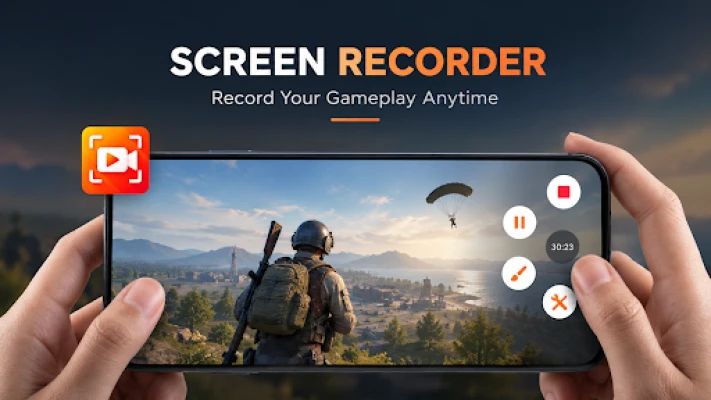
• Start, pause, resume and stop recording from a floating ball over any app.
• Quick tools: screenshot, brush, and audio, resolution and orientation settings.
• Hide the floating ball during recording for a clean video.
• Separate floating buttons for Screenshot and Brush.
• Pause, resume or stop the recording from the notification bar.
📸 SCREENSHOT & PHOTO EDITOR
• Take screenshots with the floating Screenshot button, then share, edit or delete them right away.
• Crop with ratios for social posts (1:1, 4:5, 9:16, 16:9 and more).
• Rotate and flip photos.
• Draw, highlight, add shapes and mosaic to hide details.
• Add text with many fonts, colors, borders and shadows.
• Undo / redo; the original photo is never changed.
✂️ VIDEO CUTTER
• Trim the start and end of a recording, or remove a part in the middle.
• Boost video volume up to 300%.
• Fast mode for quick saving, Stable mode for better compatibility.
• Save in a smaller resolution to reduce the file size.
🎵 VIDEO TO MP3 CONVERTER
• Extract audio from videos to MP3, AAC (M4A), WAV, FLAC, OGG, WMA or AC3.
• Convert one video or many videos at once.
• Cut the audio, adjust volume, fade in / fade out, bitrate and sample rate.
• Edit song info (title, artist, album) and add cover art to MP3.
📂 MANAGE YOUR FILES
• All recordings, screenshots and audio files in one place.
• Rename, share, open with another app or delete in a few taps.
🌍 20 LANGUAGES
English, Español, Français, Português, Русский, Tiếng Việt, हिन्दी, العربية, Bahasa Indonesia, ไทย, Türkçe and more.
🔜 COMING SOON
• Live streaming
• Record a selected area of the screen
• Recording timer
• Voice changer
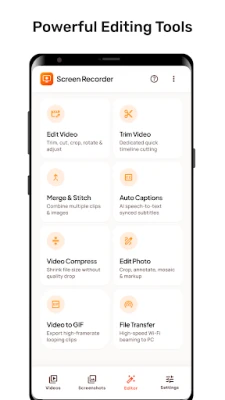
• Video editor, Merge videos, Auto captions
• Video compressor, Video to GIF, File transfer
Download Screen Recorder Video Recorder now to record your screen, capture gameplay and save every moment!
If you want to get support, share your ideas, or have any feedback, please email us at: [email protected]
NO watermark, NO root needed, NO recording time limit! Tap the floating ball to record video tutorials, online classes, game highlights and anything else on your screen. Pause and resume anytime, then trim the video or turn it into MP3 in a few taps.
🎬 HD SCREEN RECORDING
• HD video recorder: choose 480p, 720p, 1080p or 1440p (2K) and 24, 30 or 60 FPS (up to what your device supports).
• Video quality: choose Auto, Low, Medium or High to balance file size and sharpness.
• Orientation: Auto, Portrait or Landscape, perfect for gameplay recording.
• Countdown: 3, 5 or 10 seconds before the recording starts, or skip it with "Start Now".
• Pause & Resume: pause the recording and continue in the same video.
• Screenshot while recording: capture a frame without stopping the screen recording.
🎙 RECORD AUDIO
• Internal audio: record game and media sound clearly (Android 10 or above; some apps do not allow their sound to be recorded).
• Microphone: add your voice for tutorials and commentary.
• Internal audio + Microphone together, or record without sound.
😃 FACECAM
• Show your face in a small window while you record gameplay or reactions.
• Drag it anywhere and resize it as you like.
• Front or back camera, circle or square frame, color effects (Bright, Warm, Dark) and adjustable opacity.
🖌 SCREEN DRAWING (BRUSH)
• Draw on the screen while recording: pen, highlighter, arrow, rectangle and ellipse.
• Mask tool to hide private information on the screen.
• Choose colors and sizes, undo, eraser, and auto-fade marks after 3 seconds.
• Take a screenshot that includes your drawing, right from the brush toolbar.
🎈 FLOATING BALL & QUICK CONTROLS
• Start, pause, resume and stop recording from a floating ball over any app.
• Quick tools: screenshot, brush, and audio, resolution and orientation settings.
• Hide the floating ball during recording for a clean video.
• Separate floating buttons for Screenshot and Brush.
• Pause, resume or stop the recording from the notification bar.
📸 SCREENSHOT & PHOTO EDITOR
• Take screenshots with the floating Screenshot button, then share, edit or delete them right away.
• Crop with ratios for social posts (1:1, 4:5, 9:16, 16:9 and more).
• Rotate and flip photos.
• Draw, highlight, add shapes and mosaic to hide details.
• Add text with many fonts, colors, borders and shadows.
• Undo / redo; the original photo is never changed.
✂️ VIDEO CUTTER
• Trim the start and end of a recording, or remove a part in the middle.
• Boost video volume up to 300%.
• Fast mode for quick saving, Stable mode for better compatibility.
• Save in a smaller resolution to reduce the file size.
🎵 VIDEO TO MP3 CONVERTER
• Extract audio from videos to MP3, AAC (M4A), WAV, FLAC, OGG, WMA or AC3.
• Convert one video or many videos at once.
• Cut the audio, adjust volume, fade in / fade out, bitrate and sample rate.
• Edit song info (title, artist, album) and add cover art to MP3.
📂 MANAGE YOUR FILES
• All recordings, screenshots and audio files in one place.
• Rename, share, open with another app or delete in a few taps.
🌍 20 LANGUAGES
English, Español, Français, Português, Русский, Tiếng Việt, हिन्दी, العربية, Bahasa Indonesia, ไทย, Türkçe and more.
🔜 COMING SOON
• Live streaming
• Record a selected area of the screen
• Recording timer
• Voice changer
• Video editor, Merge videos, Auto captions
• Video compressor, Video to GIF, File transfer
Download Screen Recorder Video Recorder now to record your screen, capture gameplay and save every moment!
If you want to get support, share your ideas, or have any feedback, please email us at: [email protected]
Rate the App
Add Comment & Review
User Reviews
Based on 0 reviews
No reviews added yet.
Comments will not be approved to be posted if they are SPAM, abusive, off-topic, use profanity, contain a personal attack, or promote hate of any kind.












More »

Popular Apps

phpFoxPHPFOX LLC

Moon Chai StoryOlha Dobel

World War Heroes — WW2 PvP FPSAzur Interactive Games Limited

Govee LiteGovee

AvSeaAvionics Electronics Geeks!

Viking Clan: RagnarokKano Games

Build World AdventureExplore city in cube world

Vikings: War of ClansPlarium LLC

Asphalt 9: LegendsGameloft SE

Dawn of Zombies: Survival GameRoyal Ark
More »
Editor's Choice

Grim Soul: Dark Survival RPGBrickworks Games Ltd

Craft of Survival - Gladiators101XP LIMITED

Last Shelter: SurvivalLong Tech Network Limited
Dawn of Zombies: Survival GameRoyal Ark

Merge Survival : WastelandStickyHands Inc.

AoD Vikings: Valhalla GameRoboBot Studio
Viking Clan: RagnarokKano Games
Vikings: War of ClansPlarium LLC
Asphalt 9: LegendsGameloft SE

Modern Tanks: War Tank GamesXDEVS LTD