
Latest Version
Update
October 15, 2026
October 15, 2026
Developer
Yuzvix
Yuzvix
Categories
Tools
Tools
Platforms
Android
Android
Downloads
0
0
License
Free
Free
Package Name
com.yuzvix.watch.rokuremote
com.yuzvix.watch.rokuremote
Report
Report a Problem
Report a Problem
More About Remote for Roku
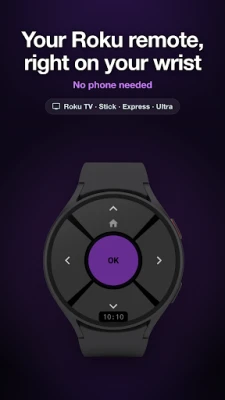
Remote for Roku turns your Wear OS smartwatch into a Roku remote control. Navigate your Roku TV, Streaming Stick, Express or Ultra, pause a show, turn up the volume, open Netflix or YouTube and switch the TV on or off, right from your wrist. No phone needed, and no more hunting for the lost remote.
★ KEY FEATURES
• D-pad remote: Up, Down, Left, Right, OK and Home, with fast response and adjustable vibration
• Power button: turn your Roku TV on or off in one tap
• Automatic discovery: finds your Roku in seconds and reconnects even if its IP address changes
• Quick Actions Tile (Pro): control the TV without opening the app
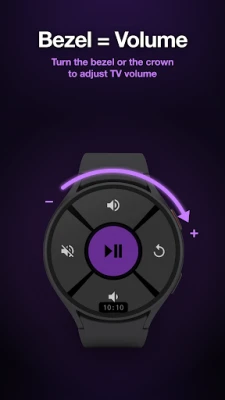
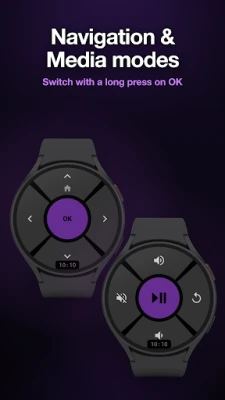
• Media Mode (Pro): Play/Pause, Volume Up/Down, Mute and Back on a second screen, one long press on OK away
• Bezel and crown volume (Pro): turn the bezel on a Samsung Galaxy Watch or the crown on a Pixel Watch or OnePlus Watch to change TV volume
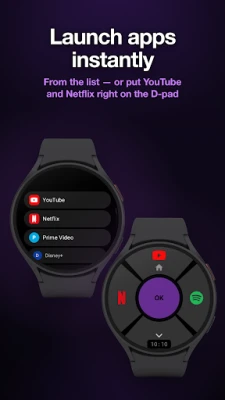
• One-tap apps (Pro): put YouTube, Netflix, Prime Video, Disney+, Max, Hulu, Apple TV, Spotify, Plex or any installed channel on a button or the Tile
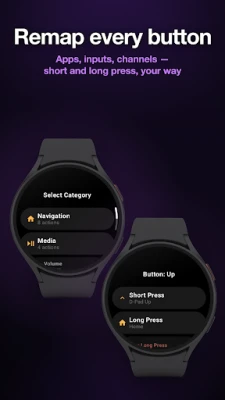
• Button remapping (Pro): assign any Roku key to a short or long press, including HDMI inputs, Channel Up/Down, Rewind, Fast Forward, Instant Replay, Search and Find Remote, which makes a lost Roku remote play a sound
• Multiple Rokus (Pro): save every Roku in your home and switch in one tap or with a Fast Switch button
• Keep Screen On (Pro): the remote stays on screen, dimmed, through the whole movie
★ QUICK ACTIONS TILE (PRO)
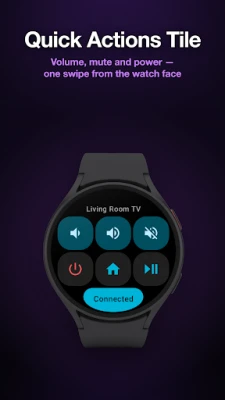
Add the Remote for Roku Tile to your watch and your TV remote is one swipe from the watch face. It has six buttons (Volume Down, Volume Up, Mute, Power, Home and Play/Pause by default), and each can be remapped to any Roku key, app or device switch. The Tile shows your connection status at a glance, connects as soon as you swipe to it, and a tap goes through even when the app is closed.
★ WORKS WITH ALL ROKU DEVICES
Roku Streaming Stick, Stick 4K and Stick Plus, Roku Express, Express 4K and 4K+, Roku Ultra, Premiere and Streambar, plus every Roku TV: Roku Pro Series and Select Series, TCL, Hisense, Onn, Sharp, Philips, Westinghouse, Element, JVC, RCA, Insignia and more.
On streaming sticks and boxes, volume and power reach your TV or soundbar via HDMI-CEC. HDMI inputs and channel keys are shown only on Roku TVs; Find Remote needs a supported model such as Roku Ultra.
★ WORKS WITH WEAR OS WATCHES
Any smartwatch with Wear OS 3 or newer: Samsung Galaxy Watch 4 and newer (including Classic, FE and Ultra), Google Pixel Watch (all models), OnePlus Watch 2, 2R and 3, Mobvoi TicWatch, Xiaomi Watch 2 and more.
★ SET UP IN A MINUTE
1. Connect your watch and your Roku to the same Wi-Fi network.
2. On your Roku, open Settings → Advanced system settings → Control by mobile apps and set Network access to Enabled (on older Roku OS: Settings → System → Advanced system settings).
3. Open the app on your watch, tap Start and pick your Roku from the list.
★ FREE VS PRO
Free: D-pad navigation with OK and Home, the power button and automatic discovery, with no time limits. Pro is a single one-time purchase, not a subscription, and unlocks everything marked (Pro) above.
★ NO PHONE NEEDED
Remote for Roku is a true standalone Wear OS app, not a phone app with a watch add-on. It talks to your Roku directly over your home Wi-Fi, so it keeps working even when your phone is in another room or switched off. No ads, no account.
Available in 28 languages; change the language right in the app. Something not working? Tap About → Support in the app and we'll help.
Remote for Roku is an independent app, not affiliated with, endorsed or sponsored by Roku, Inc. Roku, Roku TV and related marks are trademarks of Roku, Inc.; other names belong to their respective owners.
• D-pad remote: Up, Down, Left, Right, OK and Home, with fast response and adjustable vibration
• Power button: turn your Roku TV on or off in one tap
• Automatic discovery: finds your Roku in seconds and reconnects even if its IP address changes
• Quick Actions Tile (Pro): control the TV without opening the app
• Media Mode (Pro): Play/Pause, Volume Up/Down, Mute and Back on a second screen, one long press on OK away
• Bezel and crown volume (Pro): turn the bezel on a Samsung Galaxy Watch or the crown on a Pixel Watch or OnePlus Watch to change TV volume
• One-tap apps (Pro): put YouTube, Netflix, Prime Video, Disney+, Max, Hulu, Apple TV, Spotify, Plex or any installed channel on a button or the Tile
• Button remapping (Pro): assign any Roku key to a short or long press, including HDMI inputs, Channel Up/Down, Rewind, Fast Forward, Instant Replay, Search and Find Remote, which makes a lost Roku remote play a sound
• Multiple Rokus (Pro): save every Roku in your home and switch in one tap or with a Fast Switch button
• Keep Screen On (Pro): the remote stays on screen, dimmed, through the whole movie
★ QUICK ACTIONS TILE (PRO)
Add the Remote for Roku Tile to your watch and your TV remote is one swipe from the watch face. It has six buttons (Volume Down, Volume Up, Mute, Power, Home and Play/Pause by default), and each can be remapped to any Roku key, app or device switch. The Tile shows your connection status at a glance, connects as soon as you swipe to it, and a tap goes through even when the app is closed.
★ WORKS WITH ALL ROKU DEVICES
Roku Streaming Stick, Stick 4K and Stick Plus, Roku Express, Express 4K and 4K+, Roku Ultra, Premiere and Streambar, plus every Roku TV: Roku Pro Series and Select Series, TCL, Hisense, Onn, Sharp, Philips, Westinghouse, Element, JVC, RCA, Insignia and more.
On streaming sticks and boxes, volume and power reach your TV or soundbar via HDMI-CEC. HDMI inputs and channel keys are shown only on Roku TVs; Find Remote needs a supported model such as Roku Ultra.
★ WORKS WITH WEAR OS WATCHES
Any smartwatch with Wear OS 3 or newer: Samsung Galaxy Watch 4 and newer (including Classic, FE and Ultra), Google Pixel Watch (all models), OnePlus Watch 2, 2R and 3, Mobvoi TicWatch, Xiaomi Watch 2 and more.
★ SET UP IN A MINUTE
1. Connect your watch and your Roku to the same Wi-Fi network.
2. On your Roku, open Settings → Advanced system settings → Control by mobile apps and set Network access to Enabled (on older Roku OS: Settings → System → Advanced system settings).
3. Open the app on your watch, tap Start and pick your Roku from the list.
★ FREE VS PRO
Free: D-pad navigation with OK and Home, the power button and automatic discovery, with no time limits. Pro is a single one-time purchase, not a subscription, and unlocks everything marked (Pro) above.
★ NO PHONE NEEDED
Remote for Roku is a true standalone Wear OS app, not a phone app with a watch add-on. It talks to your Roku directly over your home Wi-Fi, so it keeps working even when your phone is in another room or switched off. No ads, no account.
Available in 28 languages; change the language right in the app. Something not working? Tap About → Support in the app and we'll help.
Remote for Roku is an independent app, not affiliated with, endorsed or sponsored by Roku, Inc. Roku, Roku TV and related marks are trademarks of Roku, Inc.; other names belong to their respective owners.
Rate the App
Add Comment & Review
User Reviews
Based on 0 reviews
No reviews added yet.
Comments will not be approved to be posted if they are SPAM, abusive, off-topic, use profanity, contain a personal attack, or promote hate of any kind.





More »

Popular Apps

phpFoxPHPFOX LLC

Moon Chai StoryOlha Dobel

World War Heroes — WW2 PvP FPSAzur Interactive Games Limited

Govee LiteGovee

AvSeaAvionics Electronics Geeks!

Viking Clan: RagnarokKano Games

Build World AdventureExplore city in cube world

Vikings: War of ClansPlarium LLC

Asphalt 9: LegendsGameloft SE

Dawn of Zombies: Survival GameRoyal Ark
More »
Editor's Choice

Grim Soul: Dark Survival RPGBrickworks Games Ltd

Craft of Survival - Gladiators101XP LIMITED

Last Shelter: SurvivalLong Tech Network Limited
Dawn of Zombies: Survival GameRoyal Ark

Merge Survival : WastelandStickyHands Inc.

AoD Vikings: Valhalla GameRoboBot Studio
Viking Clan: RagnarokKano Games
Vikings: War of ClansPlarium LLC
Asphalt 9: LegendsGameloft SE

Modern Tanks: War Tank GamesXDEVS LTD