Latest Version
Update
November 01, 2026
November 01, 2026
Developer
Said Labs
Said Labs
Categories
Tools
Tools
Platforms
Android
Android
Downloads
0
0
License
Free
Free
Package Name
com.abdelilahsaid.saidremote
com.abdelilahsaid.saidremote
Report
Report a Problem
Report a Problem
More About Remote Control for Android TV
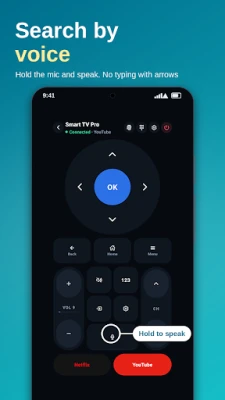
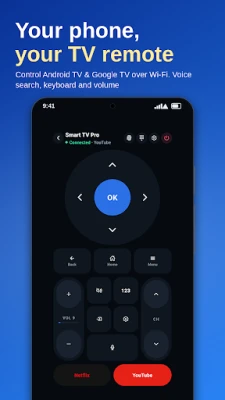
Turn your phone into a TV remote control for Android TV and Google TV. Move around with a D-pad or touchpad, type with your phone keyboard and search by voice. Lost the remote, or tired of typing letter by letter with arrows? Connect over Wi-Fi: no account and no extra hardware.
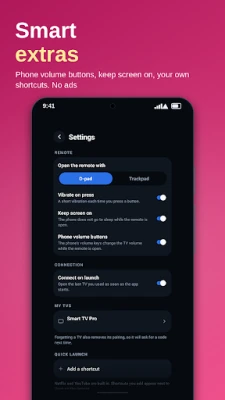
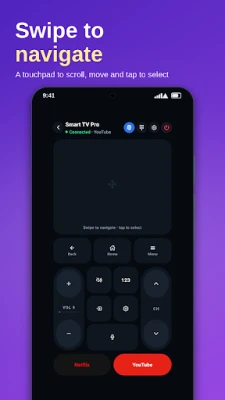
FEATURES • Direction pad or touchpad to move around the TV • Volume, mute, channels, Back, Home and Menu • Keyboard: type searches from your phone • Voice search: hold the microphone button and speak • Number pad for channel numbers • Shortcut buttons for your favorite streaming apps, and add your own • Use your phone's volume buttons to change the TV volume • Reconnects to your last TV when you open the app • No ads
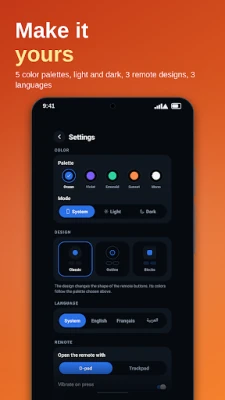
MAKE IT YOURS • Five color palettes, each with light and dark mode • Three remote designs: Classic, Outline and Blocks • English, French and Arabic
HOW TO CONNECT
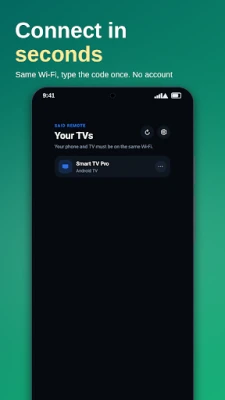
Connect your phone and your TV to the same Wi-Fi network.
Open the app and choose your TV in the list.
The first time, type the code shown on the TV. That's all.
COMPATIBILITY Works with TVs and boxes running Android TV or Google TV. Tested on a TCL TV. It does not support Samsung Tizen, LG webOS, Roku or Amazon Fire TV.
QUESTIONS Do I need an account? No. Do I need the same Wi-Fi as my TV? Yes, both must be on the same network. Does it use the internet? No. The app talks only to your TV on your local network.
PRIVACY No account, no ads, no tracking. The microphone is used only for voice search, while you hold the button.
Android TV and Google TV are trademarks of Google LLC. This is an independent app and is not affiliated with or endorsed by Google.
MAKE IT YOURS • Five color palettes, each with light and dark mode • Three remote designs: Classic, Outline and Blocks • English, French and Arabic
HOW TO CONNECT
Connect your phone and your TV to the same Wi-Fi network.
Open the app and choose your TV in the list.
The first time, type the code shown on the TV. That's all.
COMPATIBILITY Works with TVs and boxes running Android TV or Google TV. Tested on a TCL TV. It does not support Samsung Tizen, LG webOS, Roku or Amazon Fire TV.
QUESTIONS Do I need an account? No. Do I need the same Wi-Fi as my TV? Yes, both must be on the same network. Does it use the internet? No. The app talks only to your TV on your local network.
PRIVACY No account, no ads, no tracking. The microphone is used only for voice search, while you hold the button.
Android TV and Google TV are trademarks of Google LLC. This is an independent app and is not affiliated with or endorsed by Google.
Rate the App
Add Comment & Review
User Reviews
Based on 0 reviews
No reviews added yet.
Comments will not be approved to be posted if they are SPAM, abusive, off-topic, use profanity, contain a personal attack, or promote hate of any kind.





More »

Popular Apps

phpFoxPHPFOX LLC

Moon Chai StoryOlha Dobel

World War Heroes — WW2 PvP FPSAzur Interactive Games Limited

Govee LiteGovee

AvSeaAvionics Electronics Geeks!

Viking Clan: RagnarokKano Games

Vikings: War of ClansPlarium LLC

Build World AdventureExplore city in cube world

Asphalt 9: LegendsGameloft SE

Dawn of Zombies: Survival GameRoyal Ark
More »
Editor's Choice

Grim Soul: Dark Survival RPGBrickworks Games Ltd

Craft of Survival - Gladiators101XP LIMITED

Last Shelter: SurvivalLong Tech Network Limited
Dawn of Zombies: Survival GameRoyal Ark

Merge Survival : WastelandStickyHands Inc.

AoD Vikings: Valhalla GameRoboBot Studio
Viking Clan: RagnarokKano Games
Vikings: War of ClansPlarium LLC
Asphalt 9: LegendsGameloft SE

Modern Tanks: War Tank GamesXDEVS LTD