
Latest Version
Update
September 05, 2026
September 05, 2026
Developer
DividedBits
DividedBits
Categories
Productivity
Productivity
Platforms
Android
Android
Downloads
1
1
License
Free
Free
Package Name
com.dividedbits.app.reachbeam
com.dividedbits.app.reachbeam
Report
Report a Problem
Report a Problem
More About Reachbeam: RDP VNC SSH Remote
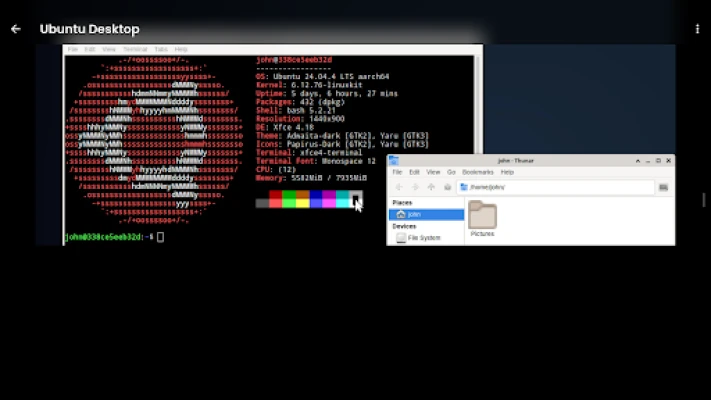
Reachbeam is a touch-first remote desktop client — RDP, VNC, SSH, RFB, and Mac screen sharing — for controlling your Windows, Mac, Linux, and Raspberry Pi computers from an Android phone or tablet. No accounts, no tracking.
Most remote-desktop apps just shrink a mouse-and-keyboard screen onto glass. Reachbeam is built for touch from the ground up — a purpose-built gesture engine turns natural taps, drags, and pinches into precise remote control.
REACH ANY MACHINE
• RDP — control a Windows PC's full desktop, with Network Level Authentication (NLA)
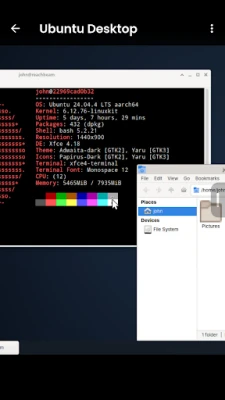
• VNC / RFB — connect to TigerVNC, x11vnc, RealVNC, UltraVNC, and more
• macOS Screen Sharing — connect to any Mac out of the box (Apple Remote Desktop auth)
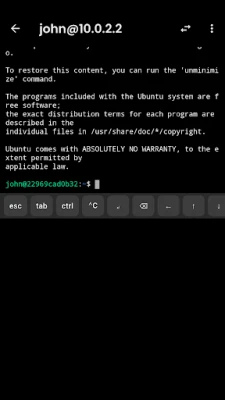
• SSH terminal — a real shell with your keyboard, password or private-key login, host-key verification, and local port-forwarding
• VNC-over-SSH — route a VNC session through an SSH host in one tap
BIG SCREEN, PHONE AS TRACKPAD (REACHBEAM PRO)
• Plug into an external monitor, USB-C dongle, or display glasses and the remote desktop moves to the big screen — your phone becomes the trackpad and keyboard
• Works with any display the system sees as a monitor: HDMI, USB-C, DeX, wireless
• Blank the phone panel to save battery while you work on the large display
EVERY MONITOR ON THE REMOTE MACHINE
• Remote machine has three displays? Jump between them in one tap, full quality
• No more panning around one giant stitched-together desktop
• Fit, fill, or 1:1 viewport modes per monitor
TOUCH THAT FEELS RIGHT
• Three input modes: Trackpad (relative cursor), Touchscreen (tap where you touch), Stylus
• Pinch-to-zoom anchored to your fingers, two-finger pan, edge auto-pan
• Scroll anywhere with flick momentum
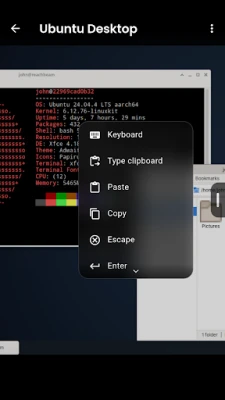
• Quick-actions menu from the screen edge: Copy, Paste, Esc, Tab, Ctrl+Alt+Del, and more
• Tap = click, long-press = right-click — no fumbling
A KEYBOARD THAT ACTUALLY WORKS
• Your native keyboard, plus a special-keys bar: Esc, Tab, Ctrl/Alt/Meta/AltGr, arrows, F1–F12, Home/End/PgUp/PgDn, one-tap Ctrl+Alt+Del and Alt+Tab
• Real X11 keysyms — the modifiers and function keys other clients get wrong
BUILT FOR REAL USE
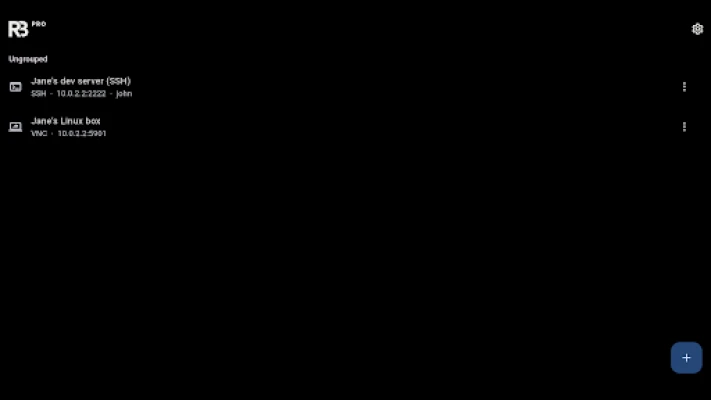
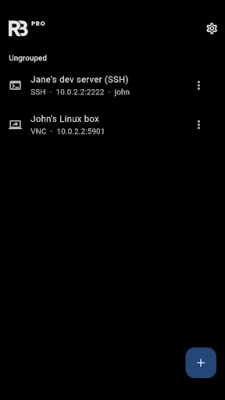
• Saved connections with folders, per-connection quality and input settings
• Credentials stored in the device Keystore, optional biometric unlock
• Auto-reconnect, clipboard sync, adaptive quality
• The screen stays awake while you are connected — no blanking mid-session
• LAN device discovery — scans your network and fills the connection form in one tap
• Desktop windowing support — runs as a resizable window on Samsung DeX and Android desktop mode instead of a phone-shaped box
REACHBEAM PRO
• Open several remote machines at once and switch between live tabs — sessions stay connected in the background
• Send the session to an external monitor and use your phone as the trackpad
• Jump between individual monitors on the remote machine in one tap
• Custom keyboard shortcuts and macros — define your own key combos and text snippets, fired from the quick-actions menu
Auto-renewing subscription — cancel any time.
No accounts. No tracking. Your credentials stay on your device.
REACH ANY MACHINE
• RDP — control a Windows PC's full desktop, with Network Level Authentication (NLA)
• VNC / RFB — connect to TigerVNC, x11vnc, RealVNC, UltraVNC, and more
• macOS Screen Sharing — connect to any Mac out of the box (Apple Remote Desktop auth)
• SSH terminal — a real shell with your keyboard, password or private-key login, host-key verification, and local port-forwarding
• VNC-over-SSH — route a VNC session through an SSH host in one tap
BIG SCREEN, PHONE AS TRACKPAD (REACHBEAM PRO)
• Plug into an external monitor, USB-C dongle, or display glasses and the remote desktop moves to the big screen — your phone becomes the trackpad and keyboard
• Works with any display the system sees as a monitor: HDMI, USB-C, DeX, wireless
• Blank the phone panel to save battery while you work on the large display
EVERY MONITOR ON THE REMOTE MACHINE
• Remote machine has three displays? Jump between them in one tap, full quality
• No more panning around one giant stitched-together desktop
• Fit, fill, or 1:1 viewport modes per monitor
TOUCH THAT FEELS RIGHT
• Three input modes: Trackpad (relative cursor), Touchscreen (tap where you touch), Stylus
• Pinch-to-zoom anchored to your fingers, two-finger pan, edge auto-pan
• Scroll anywhere with flick momentum
• Quick-actions menu from the screen edge: Copy, Paste, Esc, Tab, Ctrl+Alt+Del, and more
• Tap = click, long-press = right-click — no fumbling
A KEYBOARD THAT ACTUALLY WORKS
• Your native keyboard, plus a special-keys bar: Esc, Tab, Ctrl/Alt/Meta/AltGr, arrows, F1–F12, Home/End/PgUp/PgDn, one-tap Ctrl+Alt+Del and Alt+Tab
• Real X11 keysyms — the modifiers and function keys other clients get wrong
BUILT FOR REAL USE
• Saved connections with folders, per-connection quality and input settings
• Credentials stored in the device Keystore, optional biometric unlock
• Auto-reconnect, clipboard sync, adaptive quality
• The screen stays awake while you are connected — no blanking mid-session
• LAN device discovery — scans your network and fills the connection form in one tap
• Desktop windowing support — runs as a resizable window on Samsung DeX and Android desktop mode instead of a phone-shaped box
REACHBEAM PRO
• Open several remote machines at once and switch between live tabs — sessions stay connected in the background
• Send the session to an external monitor and use your phone as the trackpad
• Jump between individual monitors on the remote machine in one tap
• Custom keyboard shortcuts and macros — define your own key combos and text snippets, fired from the quick-actions menu
Auto-renewing subscription — cancel any time.
No accounts. No tracking. Your credentials stay on your device.
Rate the App
Add Comment & Review
User Reviews
Based on 0 reviews
No reviews added yet.
Comments will not be approved to be posted if they are SPAM, abusive, off-topic, use profanity, contain a personal attack, or promote hate of any kind.














More »

Popular Apps

phpFoxPHPFOX LLC

Moon Chai StoryOlha Dobel

World War Heroes — WW2 PvP FPSAzur Interactive Games Limited

Govee LiteGovee

AvSeaAvionics Electronics Geeks!

Viking Clan: RagnarokKano Games

Vikings: War of ClansPlarium LLC

Build World AdventureExplore city in cube world

Asphalt 9: LegendsGameloft SE

Dawn of Zombies: Survival GameRoyal Ark
More »
Editor's Choice

Grim Soul: Dark Survival RPGBrickworks Games Ltd

Craft of Survival - Gladiators101XP LIMITED

Last Shelter: SurvivalLong Tech Network Limited
Dawn of Zombies: Survival GameRoyal Ark

Merge Survival : WastelandStickyHands Inc.

AoD Vikings: Valhalla GameRoboBot Studio
Viking Clan: RagnarokKano Games
Vikings: War of ClansPlarium LLC
Asphalt 9: LegendsGameloft SE

Modern Tanks: War Tank GamesXDEVS LTD