

Latest Version
Update
October 14, 2026
October 14, 2026
Developer
ParentalEdge
ParentalEdge
Categories
Parenting
Parenting
Platforms
Android
Android
Downloads
0
0
License
Free
Free
Package Name
com.parentaledge.child
com.parentaledge.child
Report
Report a Problem
Report a Problem
More About ParentalEdge: Parental Control
Worried about what your child can access online? ParentalEdge blocks adult content, harmful websites, and risky apps, then helps you set screen time. One app, one parent dashboard. Setup in about 2 minutes.
One family plan, billed yearly. 7-day free trial, no card required.
WEB FILTER
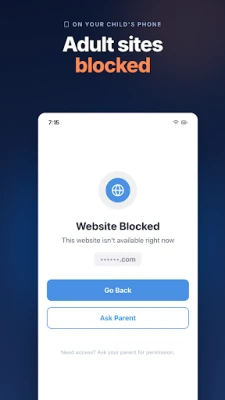
• Adult content, violence, gambling, dating, and other harmful categories blocked by default
• Safe search on Google, Bing, DuckDuckGo, Yahoo, and Yandex, including incognito
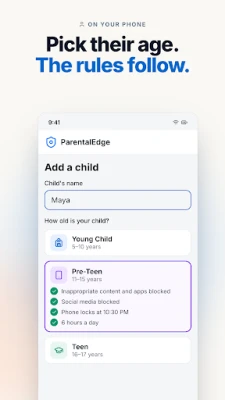
• Filter follows your child's age
APP BLOCKER
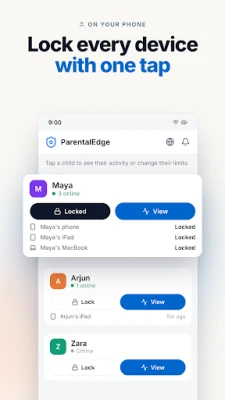
• Block any app from the parent dashboard
• Category blocks: gambling, vault apps, VPN bypass tools
• Auto-lock apps when the daily limit is hit
SCREEN TIME AND BEDTIME
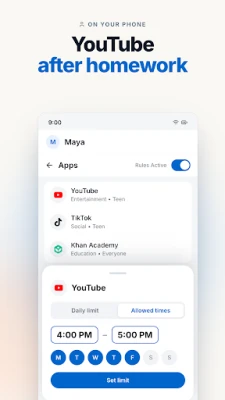
• Daily limits per app or category
• Time windows (YouTube 6–7 PM, social on weekends)
• Bedtime lock
• Child can ask for more time; you approve or deny
YOUTUBE
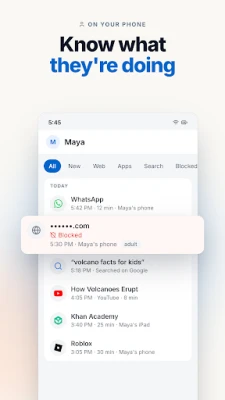
• Titles and channels for videos and Shorts
• Time limits; block during homework or bedtime
SOCIAL APPS
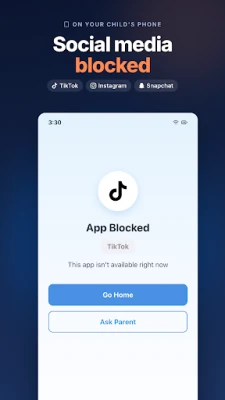
• Instagram, TikTok, Snapchat, and X auto-blocked under 16
• Dating apps blocked. VPN and proxy blocking built in.
STUDY MODE
Sharing your phone for homework? Allow only the apps and sites you choose. YouTube, games, and social stay off until you turn Study Mode off.
ACTIVITY REPORTS
• Apps, websites, and searches on the parent dashboard
• Daily and weekly email reports
• Built for family conversations, not spying. We never read private messages.
ANDROID
Android 8.1 or later. Not a stealth app: your child can see it is installed. Device Admin helps stop uninstall without a parent PIN (Android).
Why parents switch from Family Link: web filter that works beyond Chrome, app blocking, YouTube titles, Study Mode on a shared phone.
Support: [email protected] | parentaledge.com
ACCESSIBILITYSERVICE API DATA DISCLOSURE
ParentalEdge collects website URLs, app names, search queries, YouTube video titles, and app usage time using the AccessibilityService API to enable parental controls, even when running in background.
• Website URLs → block inappropriate websites
• App names → enforce app blocking and screen time limits
• Search queries → alert parents to concerning searches
• YouTube video titles → show parents what videos are watched
• App usage time → enforce daily screen time limits
Data shared via HTTPS with linked parent account only. Never sold. 30-day retention.
DEVICE ADMINISTRATOR
Uses Device Administrator to prevent uninstallation without parent permission. Disable anytime in Settings > Security > Device Admin Apps.
WEB FILTER
• Adult content, violence, gambling, dating, and other harmful categories blocked by default
• Safe search on Google, Bing, DuckDuckGo, Yahoo, and Yandex, including incognito
• Filter follows your child's age
APP BLOCKER
• Block any app from the parent dashboard
• Category blocks: gambling, vault apps, VPN bypass tools
• Auto-lock apps when the daily limit is hit
SCREEN TIME AND BEDTIME
• Daily limits per app or category
• Time windows (YouTube 6–7 PM, social on weekends)
• Bedtime lock
• Child can ask for more time; you approve or deny
YOUTUBE
• Titles and channels for videos and Shorts
• Time limits; block during homework or bedtime
SOCIAL APPS
• Instagram, TikTok, Snapchat, and X auto-blocked under 16
• Dating apps blocked. VPN and proxy blocking built in.
STUDY MODE
Sharing your phone for homework? Allow only the apps and sites you choose. YouTube, games, and social stay off until you turn Study Mode off.
ACTIVITY REPORTS
• Apps, websites, and searches on the parent dashboard
• Daily and weekly email reports
• Built for family conversations, not spying. We never read private messages.
ANDROID
Android 8.1 or later. Not a stealth app: your child can see it is installed. Device Admin helps stop uninstall without a parent PIN (Android).
Why parents switch from Family Link: web filter that works beyond Chrome, app blocking, YouTube titles, Study Mode on a shared phone.
Support: [email protected] | parentaledge.com
ACCESSIBILITYSERVICE API DATA DISCLOSURE
ParentalEdge collects website URLs, app names, search queries, YouTube video titles, and app usage time using the AccessibilityService API to enable parental controls, even when running in background.
• Website URLs → block inappropriate websites
• App names → enforce app blocking and screen time limits
• Search queries → alert parents to concerning searches
• YouTube video titles → show parents what videos are watched
• App usage time → enforce daily screen time limits
Data shared via HTTPS with linked parent account only. Never sold. 30-day retention.
DEVICE ADMINISTRATOR
Uses Device Administrator to prevent uninstallation without parent permission. Disable anytime in Settings > Security > Device Admin Apps.
Rate the App
Add Comment & Review
User Reviews
Based on 0 reviews
No reviews added yet.
Comments will not be approved to be posted if they are SPAM, abusive, off-topic, use profanity, contain a personal attack, or promote hate of any kind.















More »

Popular Apps

phpFoxPHPFOX LLC

Moon Chai StoryOlha Dobel

World War Heroes — WW2 PvP FPSAzur Interactive Games Limited

Govee LiteGovee

AvSeaAvionics Electronics Geeks!

Viking Clan: RagnarokKano Games

Vikings: War of ClansPlarium LLC

Build World AdventureExplore city in cube world

Asphalt 9: LegendsGameloft SE

Dawn of Zombies: Survival GameRoyal Ark
More »
Editor's Choice

Grim Soul: Dark Survival RPGBrickworks Games Ltd

Craft of Survival - Gladiators101XP LIMITED

Last Shelter: SurvivalLong Tech Network Limited
Dawn of Zombies: Survival GameRoyal Ark

Merge Survival : WastelandStickyHands Inc.

AoD Vikings: Valhalla GameRoboBot Studio
Viking Clan: RagnarokKano Games
Vikings: War of ClansPlarium LLC
Asphalt 9: LegendsGameloft SE

Modern Tanks: War Tank GamesXDEVS LTD