

Latest Version
Update
November 03, 2026
November 03, 2026
Developer
Avosmart
Avosmart
Categories
Parenting
Parenting
Platforms
Android
Android
Downloads
0
0
License
Free
Free
Package Name
com.avosmart.mobile
com.avosmart.mobile
Report
Report a Problem
Report a Problem
More About Parental Control Avosmart
Avosmart - Parental Control App
Manage the app remotely through the Parent Dashboard at https://app.avosmart.com
The Avosmart app helps parents keep their children safe online and develop healthy smartphone and tablet habits. It allows you to manage the amount of time children spend on their smartphones and tablets. You can filter websites, monitor activity on popular video platforms, and check your child’s location.
Device Time Management
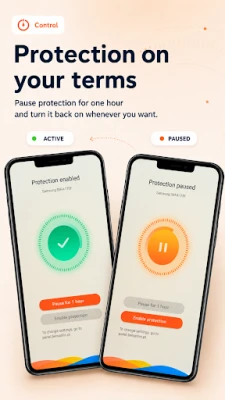
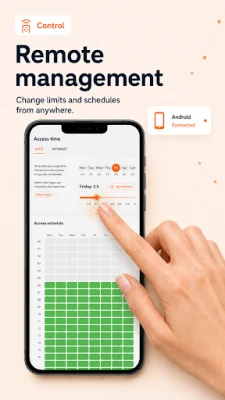
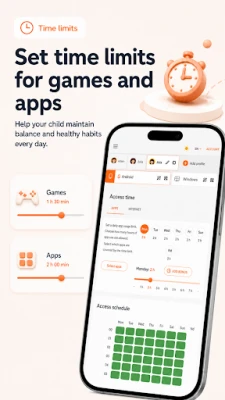
From anywhere, you can limit the amount of time your child spends online and using apps each day, block selected apps, and set schedules for device usage. You can also reward your child with additional screen time for good behavior or good results at school.
Website Filtering
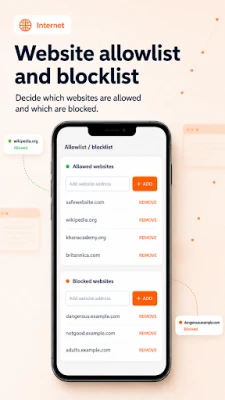
Protect your child from inappropriate content with website filtering. Blocking also works in incognito mode. Avosmart also provides safe internet search.
Child Location
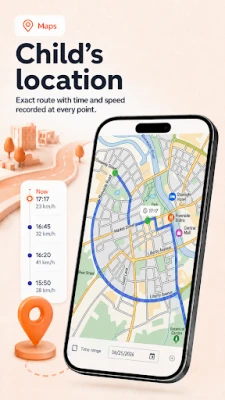
Check where your child is. The location feature allows you to view location history from the past 30 days, making it easier to help keep your child safe.
Video Monitoring
In the Parent Dashboard, you can check which videos your child has watched, assess their content, and, if necessary, block a specific video or channel.
Reports and Statistics
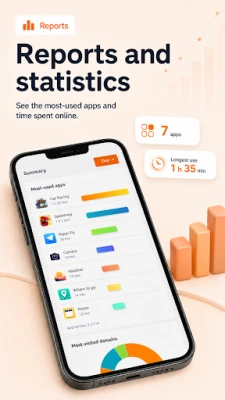
Remotely view activity reports, monitor internet and app usage, change settings, and check your child’s current and previous locations.
What Does Avosmart Offer?
- Protect your child’s devices and monitor their activity.
- Set screen-time limits for each device.
- Monitor internet activity and search results.
- Block content that is inappropriate for children.
- Monitor activity on popular video platforms.
- Control games and apps.
- Manage the device remotely from anywhere.
- Check your child’s location and location history.
How to Get Started
1. Install the Avosmart app on your child’s phone.
2. Log in to the Avosmart app using the account you previously created at app.avosmart.com. Select “Child Profile” and follow the setup instructions.
3. That’s all you need to do on your child’s phone. You can now log in to the Parent Dashboard at app.avosmart.com from your own device to monitor your child’s activity and set phone usage rules.
Why Avosmart?
For more than 15 years, we have been developing software designed to help protect children online. We support parents of younger children and teenagers in building safe and responsible habits when using the internet and apps.
Important Information
The Avosmart app uses Device Administrator permissions, which prevent the app from being uninstalled by the child without the parent’s knowledge and consent.
The app also uses Accessibility Services to provide effective child protection. These services enable activity monitoring, control of internet and app usage time, website filtering, and monitoring of activity on social media.
The Avosmart app helps parents keep their children safe online and develop healthy smartphone and tablet habits. It allows you to manage the amount of time children spend on their smartphones and tablets. You can filter websites, monitor activity on popular video platforms, and check your child’s location.
Device Time Management
From anywhere, you can limit the amount of time your child spends online and using apps each day, block selected apps, and set schedules for device usage. You can also reward your child with additional screen time for good behavior or good results at school.
Website Filtering
Protect your child from inappropriate content with website filtering. Blocking also works in incognito mode. Avosmart also provides safe internet search.
Child Location
Check where your child is. The location feature allows you to view location history from the past 30 days, making it easier to help keep your child safe.
Video Monitoring
In the Parent Dashboard, you can check which videos your child has watched, assess their content, and, if necessary, block a specific video or channel.
Reports and Statistics
Remotely view activity reports, monitor internet and app usage, change settings, and check your child’s current and previous locations.
What Does Avosmart Offer?
- Protect your child’s devices and monitor their activity.
- Set screen-time limits for each device.
- Monitor internet activity and search results.
- Block content that is inappropriate for children.
- Monitor activity on popular video platforms.
- Control games and apps.
- Manage the device remotely from anywhere.
- Check your child’s location and location history.
How to Get Started
1. Install the Avosmart app on your child’s phone.
2. Log in to the Avosmart app using the account you previously created at app.avosmart.com. Select “Child Profile” and follow the setup instructions.
3. That’s all you need to do on your child’s phone. You can now log in to the Parent Dashboard at app.avosmart.com from your own device to monitor your child’s activity and set phone usage rules.
Why Avosmart?
For more than 15 years, we have been developing software designed to help protect children online. We support parents of younger children and teenagers in building safe and responsible habits when using the internet and apps.
Important Information
The Avosmart app uses Device Administrator permissions, which prevent the app from being uninstalled by the child without the parent’s knowledge and consent.
The app also uses Accessibility Services to provide effective child protection. These services enable activity monitoring, control of internet and app usage time, website filtering, and monitoring of activity on social media.
Rate the App
Add Comment & Review
User Reviews
Based on 0 reviews
No reviews added yet.
Comments will not be approved to be posted if they are SPAM, abusive, off-topic, use profanity, contain a personal attack, or promote hate of any kind.















More »

Popular Apps

phpFoxPHPFOX LLC

Moon Chai StoryOlha Dobel

World War Heroes — WW2 PvP FPSAzur Interactive Games Limited

Govee LiteGovee

AvSeaAvionics Electronics Geeks!

Viking Clan: RagnarokKano Games

Vikings: War of ClansPlarium LLC

Build World AdventureExplore city in cube world

Asphalt 9: LegendsGameloft SE

Dawn of Zombies: Survival GameRoyal Ark
More »
Editor's Choice

Grim Soul: Dark Survival RPGBrickworks Games Ltd

Craft of Survival - Gladiators101XP LIMITED

Last Shelter: SurvivalLong Tech Network Limited
Dawn of Zombies: Survival GameRoyal Ark

Merge Survival : WastelandStickyHands Inc.

AoD Vikings: Valhalla GameRoboBot Studio
Viking Clan: RagnarokKano Games
Vikings: War of ClansPlarium LLC
Asphalt 9: LegendsGameloft SE

Modern Tanks: War Tank GamesXDEVS LTD