

Latest Version
Update
June 26, 2026
June 26, 2026
Developer
Jan Augustyniak
Jan Augustyniak
Categories
Tools
Tools
Platforms
Android
Android
Downloads
0
0
License
Free
Free
Package Name
com.janaug.mega
com.janaug.mega
Report
Report a Problem
Report a Problem
More About Microphone & Voice Amplifier
Microphone: Megi - Wireless Mic for Bluetooth Speakers
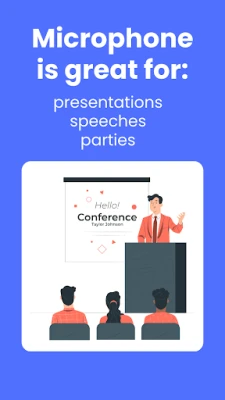
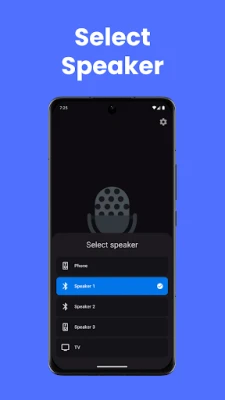
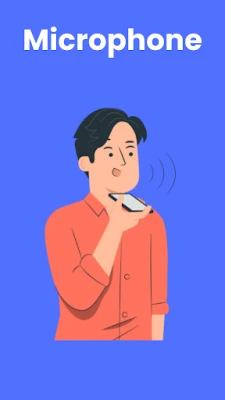
Turn your device into a powerful voice amplification system. Speak into your phone's microphone and instantly project your voice through any connected speaker. With built-in echo cancellation and fun voice effects, you get clear sound plus the option to transform how you sound. Perfect microphone for presentations, events, tour guides, teachers, or anyone who needs their voice to reach further.
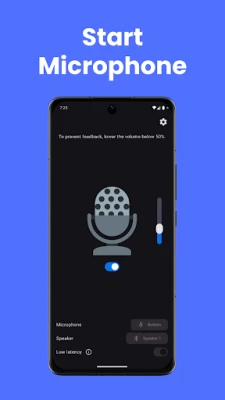
Simply connect to your preferred speaker, tap to talk to your device microphone, and make yourself heard. No special equipment needed—just your device and a speaker.
Use Megi as a:
Live microphone & PA system
Portable voice amplifier for teachers and classrooms
Tour guide megaphone
Presentation speaker tool
Event announcer
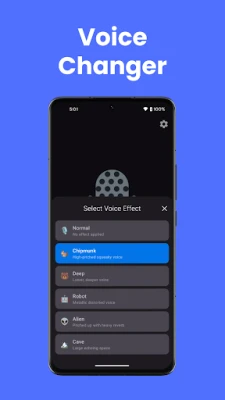
Voice changer with robot, chipmunk, deep voice and more effects
Frequently Asked Questions:
Can I use my phone as a megaphone?
Yes, but you need an external speaker. Microphone - Megi turns your phone into a real-time voice amplifier. Just connect a Bluetooth speaker or wired speaker and start talking.
Can I use my phone as a microphone for a speaker?
Yes. Microphone - Megi lets you use your phone's built-in microphone to send your voice to any connected speaker instantly.
Does the app remove echo and feedback?
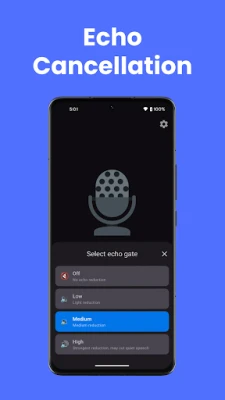
Yes. Microphone - Megi includes adjustable echo cancellation with multiple intensity levels (low, medium, high) so you can eliminate feedback and howling based on your setup.
Can I change my voice?
Yes. The built-in voice changer offers multiple effects including deep voice, chipmunk, robot, and more — great for fun, parties, or creative presentations.
Do I need special equipment?
No. All you need is your phone and a speaker — Bluetooth or wired (then you would also need a cable to connect it to the phone).
How do I amplify my voice with my phone?
Download Microphone - Megi, connect to your speaker, tap the button, and start speaking. Your voice is projected through the speaker in real time.
Is this app good for teachers and presentations?
Absolutely. Microphone - Megi is ideal for classrooms, meetings, presentations, guided tours, and small events where you need your voice to carry further.
Simply connect to your preferred speaker, tap to talk to your device microphone, and make yourself heard. No special equipment needed—just your device and a speaker.
Use Megi as a:
Live microphone & PA system
Portable voice amplifier for teachers and classrooms
Tour guide megaphone
Presentation speaker tool
Event announcer
Voice changer with robot, chipmunk, deep voice and more effects
Frequently Asked Questions:
Can I use my phone as a megaphone?
Yes, but you need an external speaker. Microphone - Megi turns your phone into a real-time voice amplifier. Just connect a Bluetooth speaker or wired speaker and start talking.
Can I use my phone as a microphone for a speaker?
Yes. Microphone - Megi lets you use your phone's built-in microphone to send your voice to any connected speaker instantly.
Does the app remove echo and feedback?
Yes. Microphone - Megi includes adjustable echo cancellation with multiple intensity levels (low, medium, high) so you can eliminate feedback and howling based on your setup.
Can I change my voice?
Yes. The built-in voice changer offers multiple effects including deep voice, chipmunk, robot, and more — great for fun, parties, or creative presentations.
Do I need special equipment?
No. All you need is your phone and a speaker — Bluetooth or wired (then you would also need a cable to connect it to the phone).
How do I amplify my voice with my phone?
Download Microphone - Megi, connect to your speaker, tap the button, and start speaking. Your voice is projected through the speaker in real time.
Is this app good for teachers and presentations?
Absolutely. Microphone - Megi is ideal for classrooms, meetings, presentations, guided tours, and small events where you need your voice to carry further.
Rate the App
Add Comment & Review
User Reviews
Based on 0 reviews
No reviews added yet.
Comments will not be approved to be posted if they are SPAM, abusive, off-topic, use profanity, contain a personal attack, or promote hate of any kind.













More »

Popular Apps

phpFoxPHPFOX LLC

Moon Chai StoryOlha Dobel

World War Heroes — WW2 PvP FPSAzur Interactive Games Limited

Govee LiteGovee

Build World AdventureExplore city in cube world

Viking Clan: RagnarokKano Games

Vikings: War of ClansPlarium LLC

Asphalt 9: LegendsGameloft SE

Submarine Car Diving SimulatorSwim with dolphins & penguins

Dawn of Zombies: Survival GameRoyal Ark
More »
Editor's Choice

Grim Soul: Dark Survival RPGBrickworks Games Ltd

Craft of Survival - Gladiators101XP LIMITED

Last Shelter: SurvivalLong Tech Network Limited
Dawn of Zombies: Survival GameRoyal Ark

Merge Survival : WastelandStickyHands Inc.

AoD Vikings: Valhalla GameRoboBot Studio
Viking Clan: RagnarokKano Games
Vikings: War of ClansPlarium LLC
Asphalt 9: LegendsGameloft SE

Modern Tanks: War Tank GamesXDEVS LTD