

Latest Version
Update
June 26, 2026
June 26, 2026
Developer
iStack
iStack
Categories
Tools
Tools
Platforms
Android
Android
Downloads
0
0
License
Free
Free
Package Name
com.istack.tv_remote
com.istack.tv_remote
Report
Report a Problem
Report a Problem
More About Remote for Xiaomi TV – Mi Box
A complete Wi-Fi remote control for Xiaomi Mi TV, Mi Box, Mi TV Stick 4K, and Redmi TV — over your local network. No account, no subscription, no login.
📺 REMOTE CONTROL FOR MI TV & XIAOMI DEVICES
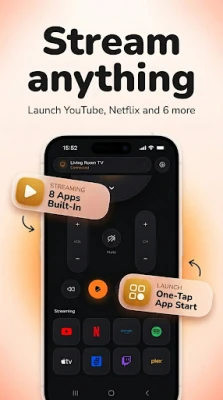
Turn your Android into a full remote control for your entire Xiaomi home setup. Connect via Wi-Fi or LAN to Mi TV, Mi Box S, Mi TV Stick 4K, and Redmi TV — all from the same app. No cable needed.
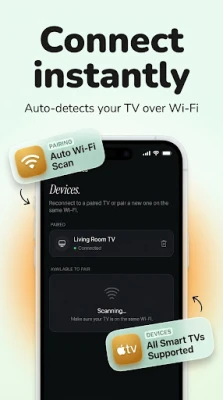
Unlike the official app, there is no forced account sign-in, no login, and no subscription wall. Open the app, pair your device automatically over Wi-Fi, and start controlling instantly — channels, volume, navigation, and HDMI source switching.
📶 WI-FI REMOTE — FAST, RESPONSIVE, NO PAIRING CODE
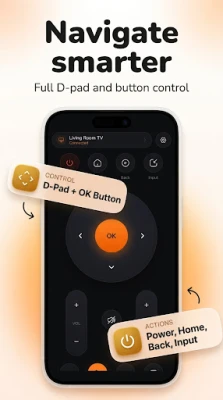
Connect to your Xiaomi television or Mi Box over the same Wi-Fi network. Full D-pad navigation, voice search shortcut, volume and channel control, media playback, and HDMI input switching — everything a standard Xiaomi tv remote delivers, from any room in the house.
Works as a xiaomi remote control even when your original remote is lost, broken, or out of reach. No Bluetooth pairing required. No USB cable. Just Wi-Fi.
🏠 HOME SCREEN WIDGETS & QUICK TILES
No more opening the app every time. Place a widget on your home screen for one-tap power, volume, and input switching. Add quick-settings tiles for instant access without unlocking your phone. A Wear OS companion app puts basic controls on your wrist.
⚡ MACROS & ACTIVITY SEQUENCES
Set up one-tap activity sequences — power on the television, switch to the right HDMI input, and set the volume. Program movie modes, gaming setups, and goodnight routines. HDMI-CEC aware, with Wake-on-LAN support for Xiaomi television and Mi Box devices.
🎮 FULL REMOTE LAYOUT
Every button from the original Xiaomi controller is available:
• Power, volume up/down, mute
• D-pad navigation and OK/select
• Back, home, menu
• Channel up/down
• Media controls: play, pause, rewind, fast forward
• HDMI source switching
• Voice search shortcut
📡 COMPLETE XIAOMI DEVICE SUPPORT
✓ Mi TV — all series: Mi TV 4, P1, Q series, Mi TV Lite, Mi TV 5X
✓ Mi TV Stick 4K / Mi TV Stick 4K Max
✓ Mi Box S / Mi Box 4K / mi box remote via Wi-Fi
✓ Redmi TV / Redmi Smart TV X series
✓ Xiaomi Smart TV — all Android TV models
✓ Set-top box control via Wi-Fi where supported
🔒 NO ACCOUNT. NO SUBSCRIPTION. NO FORCED LOGIN.
Wi-Fi control works entirely without an internet connection or a login. Your remote layouts stay on your device. Cloud backup is available as an optional feature — never mandatory.
A one-time remove-ads purchase unlocks home screen widget, themes, macro sequences, and cloud backup. No subscription. No weekly charge. Pay once, own it forever.
📲 HOW TO SET UP
1. Connect your phone and Xiaomi television or Mi Box to the same Wi-Fi network
2. Open the app — no sign-in required
3. Your device is detected automatically
4. Start controlling instantly — full remote layout, volume, channels, source input
Compatible with all Android phones. Both devices must be on the same Wi-Fi network. Android 7.0 and above.
Turn your Android into a full remote control for your entire Xiaomi home setup. Connect via Wi-Fi or LAN to Mi TV, Mi Box S, Mi TV Stick 4K, and Redmi TV — all from the same app. No cable needed.
Unlike the official app, there is no forced account sign-in, no login, and no subscription wall. Open the app, pair your device automatically over Wi-Fi, and start controlling instantly — channels, volume, navigation, and HDMI source switching.
📶 WI-FI REMOTE — FAST, RESPONSIVE, NO PAIRING CODE
Connect to your Xiaomi television or Mi Box over the same Wi-Fi network. Full D-pad navigation, voice search shortcut, volume and channel control, media playback, and HDMI input switching — everything a standard Xiaomi tv remote delivers, from any room in the house.
Works as a xiaomi remote control even when your original remote is lost, broken, or out of reach. No Bluetooth pairing required. No USB cable. Just Wi-Fi.
🏠 HOME SCREEN WIDGETS & QUICK TILES
No more opening the app every time. Place a widget on your home screen for one-tap power, volume, and input switching. Add quick-settings tiles for instant access without unlocking your phone. A Wear OS companion app puts basic controls on your wrist.
⚡ MACROS & ACTIVITY SEQUENCES
Set up one-tap activity sequences — power on the television, switch to the right HDMI input, and set the volume. Program movie modes, gaming setups, and goodnight routines. HDMI-CEC aware, with Wake-on-LAN support for Xiaomi television and Mi Box devices.
🎮 FULL REMOTE LAYOUT
Every button from the original Xiaomi controller is available:
• Power, volume up/down, mute
• D-pad navigation and OK/select
• Back, home, menu
• Channel up/down
• Media controls: play, pause, rewind, fast forward
• HDMI source switching
• Voice search shortcut
📡 COMPLETE XIAOMI DEVICE SUPPORT
✓ Mi TV — all series: Mi TV 4, P1, Q series, Mi TV Lite, Mi TV 5X
✓ Mi TV Stick 4K / Mi TV Stick 4K Max
✓ Mi Box S / Mi Box 4K / mi box remote via Wi-Fi
✓ Redmi TV / Redmi Smart TV X series
✓ Xiaomi Smart TV — all Android TV models
✓ Set-top box control via Wi-Fi where supported
🔒 NO ACCOUNT. NO SUBSCRIPTION. NO FORCED LOGIN.
Wi-Fi control works entirely without an internet connection or a login. Your remote layouts stay on your device. Cloud backup is available as an optional feature — never mandatory.
A one-time remove-ads purchase unlocks home screen widget, themes, macro sequences, and cloud backup. No subscription. No weekly charge. Pay once, own it forever.
📲 HOW TO SET UP
1. Connect your phone and Xiaomi television or Mi Box to the same Wi-Fi network
2. Open the app — no sign-in required
3. Your device is detected automatically
4. Start controlling instantly — full remote layout, volume, channels, source input
Compatible with all Android phones. Both devices must be on the same Wi-Fi network. Android 7.0 and above.
Rate the App
Add Comment & Review
User Reviews
Based on 0 reviews
No reviews added yet.
Comments will not be approved to be posted if they are SPAM, abusive, off-topic, use profanity, contain a personal attack, or promote hate of any kind.













More »

Popular Apps

phpFoxPHPFOX LLC

Moon Chai StoryOlha Dobel

World War Heroes — WW2 PvP FPSAzur Interactive Games Limited

Govee LiteGovee

Build World AdventureExplore city in cube world

Viking Clan: RagnarokKano Games

Vikings: War of ClansPlarium LLC

Asphalt 9: LegendsGameloft SE

Submarine Car Diving SimulatorSwim with dolphins & penguins

Dawn of Zombies: Survival GameRoyal Ark
More »
Editor's Choice

Grim Soul: Dark Survival RPGBrickworks Games Ltd

Craft of Survival - Gladiators101XP LIMITED

Last Shelter: SurvivalLong Tech Network Limited
Dawn of Zombies: Survival GameRoyal Ark

Merge Survival : WastelandStickyHands Inc.

AoD Vikings: Valhalla GameRoboBot Studio
Viking Clan: RagnarokKano Games
Vikings: War of ClansPlarium LLC
Asphalt 9: LegendsGameloft SE

Modern Tanks: War Tank GamesXDEVS LTD