

Latest Version
Update
October 28, 2026
October 28, 2026
Developer
Quiet Hours Studio
Quiet Hours Studio
Categories
Health & Fitness
Health & Fitness
Platforms
Android
Android
Downloads
0
0
License
Free
Free
Package Name
com.lullsleep.calculator
com.lullsleep.calculator
Report
Report a Problem
Report a Problem
More About Lull: Sleep Cycle Calculator
Slept seven or eight hours and still woke up groggy? How long you slept is one part of it. When the alarm goes off can be another. Wake in the middle of deep sleep and getting up can feel like a struggle. Wake at the end of a sleep cycle and, for many people, it tends to feel easier. And if your room isn't quiet, a steady sound can cover sudden noises like traffic or a neighbor.
Lull handles both. Its sleep cycle calculator works out bedtimes that line up with full cycles, and a steady sound plays while you wind down. Each cycle is about 90 minutes in adults.
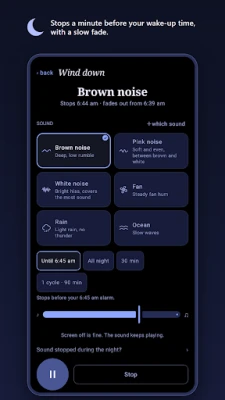
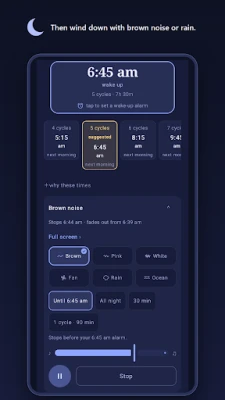
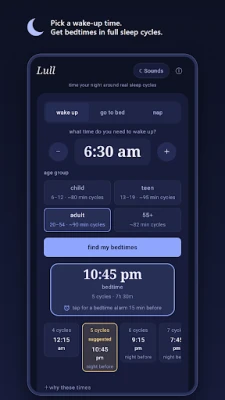
Say you need to be up at 6:30 am. The adult setting suggests getting into bed at 10:45 pm, for five full cycles (7h 30m). Going to bed at 11:00 pm instead? Lull shows 6:45 am. Tap it to send the alarm to your clock app, press play, and the brown noise fades out and stops at 6:44.
Three ways to use the bedtime calculator
- Wake up: enter the time you need to be up and get bedtimes counted back in full cycles.
- Go to bed: enter your bedtime and get wake-up times counted forward.
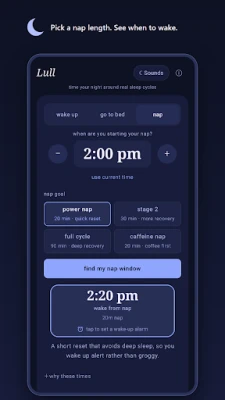
- Nap calculator: pick a start time and a goal (20-minute power nap, 30-minute nap, a full 90-minute cycle or a coffee nap) and see when to wake.
Each result shows the time, cycles and total sleep. Bedtimes and wake-up times allow about 15 minutes to fall asleep. Tap a wake-up time to send it to your clock app as an alarm. Tap a bedtime instead for a bedtime reminder alarm 15 minutes earlier.
Sleep sounds to wind down
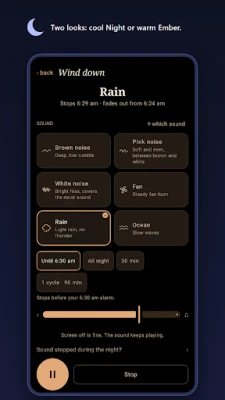
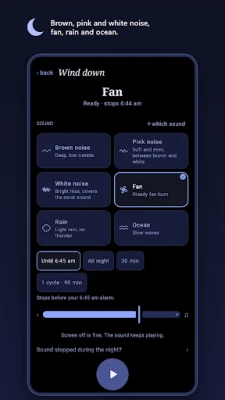
- Six sounds: brown noise, pink noise, white noise, fan, rain and ocean, with a volume slider. Brown noise is the deepest, white noise the brightest. One plays at a time.
- Start one from the Sounds button or from "Wind down with a sound" under a result.
- Sleep timer: all night, 30 minutes, one sleep cycle, or until the time from your result. Timed sounds fade out over the last 5 minutes; the "until" timer stops a minute before that time.
- Keeps playing with the screen off. Pause and stop sit in the notification.
- Pauses for phone calls. If your headphones disconnect, it pauses instead of switching to the speaker.
- A black Wind-down screen that dims itself while a sound plays.
- No ads while a sound is playing: the banner is hidden on every screen until you stop.
- The sounds are built into the app, so they work offline. No Wi-Fi needed. Lull never uses your microphone.
Simple by design
- Age presets (6-12, 13-19, 20-54 and 55+) adjust the cycle length
- A short "why these times" explainer, plus our sleep guides at instacalc.co
- A dark, low-glare design for use in bed, in Night blue or warm Ember
- No account or sign-up. Calculations stay on your device and are never sent anywhere
What Lull is not
Lull is a sleep calculator with sounds. It doesn't ring. Tap a result and it sends a normal alarm, set for a fixed time, to your phone's clock app. It also doesn't track your sleep or know which sleep stage you're in. The sounds are steady background noise, not a sleep treatment. Some phones close background apps to save battery. If a sound stops in the night, the app's "Sound stopped during the night?" page shows what to change. Cycle length varies from person to person, so treat the times as a starting point. This is an educational estimate, not medical advice. If you have ongoing trouble sleeping, please talk to a doctor.
Free, with one small banner ad
Lull is free to use, sounds included, and shows one banner ad at the bottom of the screen, hidden while a sound is playing. There are no full-screen ads. A one-time "Remove Ads" purchase in the About screen switches the banner off (price shown in Google Play), with "Restore purchases" in the same place. Where the law requires it, the app asks for ad consent first, and you can change it any time under "Ad privacy options". The Data safety section lists what the ad and crash-reporting services collect.
Built by Quiet Hours Studio.
© 2026 Quiet Hours Studio. All rights reserved.
A Quiet Hours Studio project · Serbia
Say you need to be up at 6:30 am. The adult setting suggests getting into bed at 10:45 pm, for five full cycles (7h 30m). Going to bed at 11:00 pm instead? Lull shows 6:45 am. Tap it to send the alarm to your clock app, press play, and the brown noise fades out and stops at 6:44.
Three ways to use the bedtime calculator
- Wake up: enter the time you need to be up and get bedtimes counted back in full cycles.
- Go to bed: enter your bedtime and get wake-up times counted forward.
- Nap calculator: pick a start time and a goal (20-minute power nap, 30-minute nap, a full 90-minute cycle or a coffee nap) and see when to wake.
Each result shows the time, cycles and total sleep. Bedtimes and wake-up times allow about 15 minutes to fall asleep. Tap a wake-up time to send it to your clock app as an alarm. Tap a bedtime instead for a bedtime reminder alarm 15 minutes earlier.
Sleep sounds to wind down
- Six sounds: brown noise, pink noise, white noise, fan, rain and ocean, with a volume slider. Brown noise is the deepest, white noise the brightest. One plays at a time.
- Start one from the Sounds button or from "Wind down with a sound" under a result.
- Sleep timer: all night, 30 minutes, one sleep cycle, or until the time from your result. Timed sounds fade out over the last 5 minutes; the "until" timer stops a minute before that time.
- Keeps playing with the screen off. Pause and stop sit in the notification.
- Pauses for phone calls. If your headphones disconnect, it pauses instead of switching to the speaker.
- A black Wind-down screen that dims itself while a sound plays.
- No ads while a sound is playing: the banner is hidden on every screen until you stop.
- The sounds are built into the app, so they work offline. No Wi-Fi needed. Lull never uses your microphone.
Simple by design
- Age presets (6-12, 13-19, 20-54 and 55+) adjust the cycle length
- A short "why these times" explainer, plus our sleep guides at instacalc.co
- A dark, low-glare design for use in bed, in Night blue or warm Ember
- No account or sign-up. Calculations stay on your device and are never sent anywhere
What Lull is not
Lull is a sleep calculator with sounds. It doesn't ring. Tap a result and it sends a normal alarm, set for a fixed time, to your phone's clock app. It also doesn't track your sleep or know which sleep stage you're in. The sounds are steady background noise, not a sleep treatment. Some phones close background apps to save battery. If a sound stops in the night, the app's "Sound stopped during the night?" page shows what to change. Cycle length varies from person to person, so treat the times as a starting point. This is an educational estimate, not medical advice. If you have ongoing trouble sleeping, please talk to a doctor.
Free, with one small banner ad
Lull is free to use, sounds included, and shows one banner ad at the bottom of the screen, hidden while a sound is playing. There are no full-screen ads. A one-time "Remove Ads" purchase in the About screen switches the banner off (price shown in Google Play), with "Restore purchases" in the same place. Where the law requires it, the app asks for ad consent first, and you can change it any time under "Ad privacy options". The Data safety section lists what the ad and crash-reporting services collect.
Built by Quiet Hours Studio.
© 2026 Quiet Hours Studio. All rights reserved.
A Quiet Hours Studio project · Serbia
Rate the App
Add Comment & Review
User Reviews
Based on 0 reviews
No reviews added yet.
Comments will not be approved to be posted if they are SPAM, abusive, off-topic, use profanity, contain a personal attack, or promote hate of any kind.















More »

Popular Apps

phpFoxPHPFOX LLC

Moon Chai StoryOlha Dobel

World War Heroes — WW2 PvP FPSAzur Interactive Games Limited

Govee LiteGovee

AvSeaAvionics Electronics Geeks!

Viking Clan: RagnarokKano Games

Build World AdventureExplore city in cube world

Vikings: War of ClansPlarium LLC

Asphalt 9: LegendsGameloft SE

Dawn of Zombies: Survival GameRoyal Ark
More »
Editor's Choice

Grim Soul: Dark Survival RPGBrickworks Games Ltd

Craft of Survival - Gladiators101XP LIMITED

Last Shelter: SurvivalLong Tech Network Limited
Dawn of Zombies: Survival GameRoyal Ark

Merge Survival : WastelandStickyHands Inc.

AoD Vikings: Valhalla GameRoboBot Studio
Viking Clan: RagnarokKano Games
Vikings: War of ClansPlarium LLC
Asphalt 9: LegendsGameloft SE

Modern Tanks: War Tank GamesXDEVS LTD