
Latest Version
Update
November 29, 2026
Developer
Tech Mobile Innovations
Categories
Personalization
Platforms
Android
Downloads
0
License
Free
Package Name
com.theme.emojikeyboard.fonts
Report
Report a Problem
More About Keyboard Themes: Emoji, Fonts
This is a cute and simple keyboard that lets you type in your own style. Pick a pretty theme, write with fancy fonts, send your favorite emoji and make every chat feel a little more like you. It works in all your apps, from messages to social media.
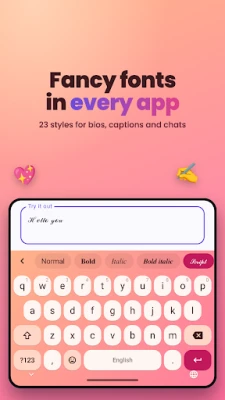
Fancy fonts in every app
Change how your text looks in one tap. This fonts keyboard has 23 font styles, including script, bold, italic, gothic, bubble, small caps and strikethrough. They are great for bios, captions, usernames and fun messages to friends. You can also type any text in the app, see it in every style and copy the one you like.
Keyboard themes you will love
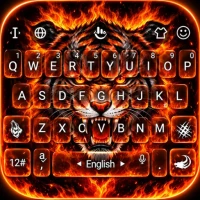
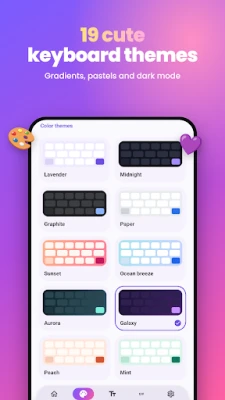
Choose from 19 keyboard themes. There are soft pastels like lavender, sakura and peach, colorful gradients like sunset, galaxy and aurora, and dark themes like midnight and pure black. You can also use one of your own photos as the keyboard background. Make the keys rounder or more see through, and pick the keyboard height that feels right for your hands.
An emoji keyboard that is easy to use
Find emoji quickly with clear categories and your recently used emoji always one tap away. You can also save your own GIFs and stickers and send them from the keyboard in apps that support images.
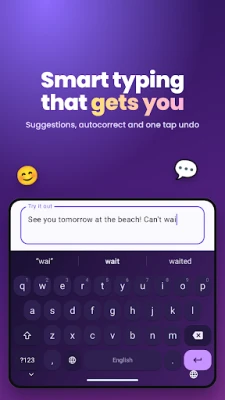
Smart typing that keeps up with you
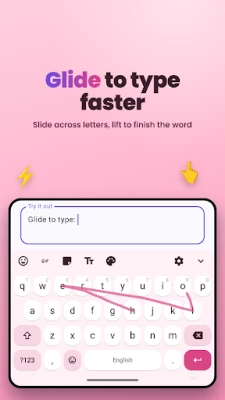
The keyboard suggests words as you type and fixes common typos for you. If it changes a word you meant to keep, just tap backspace to undo it. You can glide your finger across the letters to type a word, and capital letters and periods are added for you at the start and end of sentences. Long press a key for accents and numbers, and slide on the space bar to move the cursor.
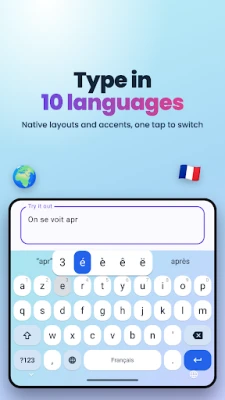
Type in 10 languages
There are keyboards for English, Spanish, French, German, Italian, Portuguese, Turkish, Indonesian, Russian and Arabic. Each one has its own layout, accents and word suggestions, and you can switch between them with the globe key. The app itself is available in 20 languages.
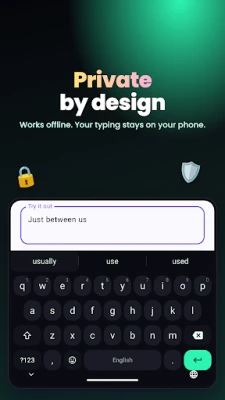
Private by design
Your typing is processed on your phone. The keyboard does not store or send what you type, and suggestions and autocorrect work without an internet connection. Password fields never get suggestions. Words you choose to keep and your recent emoji are saved only on your phone, and you can clear them at any time in settings.
How to get started
Open the app and tap Open keyboard list to turn the keyboard on. Then tap Choose keyboard and select it. Pick a theme and a font, and start typing.
When you turn on any keyboard, Android shows a standard message saying the keyboard may be able to collect the text you type. This message appears for every keyboard app. This keyboard does not collect, store or send your typing.
Rate the App
Add Comment & Review
User Reviews
Based on 0 reviews
No reviews added yet.
Comments will not be approved to be posted if they are SPAM, abusive, off-topic, use profanity, contain a personal attack, or promote hate of any kind.












More »

Popular Apps

phpFoxPHPFOX LLC

Moon Chai StoryOlha Dobel

World War Heroes — WW2 PvP FPSAzur Interactive Games Limited

Govee LiteGovee

AvSeaAvionics Electronics Geeks!

Viking Clan: RagnarokKano Games

Vikings: War of ClansPlarium LLC

Build World AdventureExplore city in cube world

Asphalt 9: LegendsGameloft SE

Dawn of Zombies: Survival GameRoyal Ark
More »
Editor's Choice

Grim Soul: Dark Survival RPGBrickworks Games Ltd

Craft of Survival - Gladiators101XP LIMITED

Last Shelter: SurvivalLong Tech Network Limited
Dawn of Zombies: Survival GameRoyal Ark

Merge Survival : WastelandStickyHands Inc.

AoD Vikings: Valhalla GameRoboBot Studio
Viking Clan: RagnarokKano Games
Vikings: War of ClansPlarium LLC
Asphalt 9: LegendsGameloft SE

Modern Tanks: War Tank GamesXDEVS LTD