
Latest Version
Update
November 29, 2026
Developer
Pallav Chaudhari
Categories
Personalization
Platforms
Android
Downloads
0
License
Free
Package Name
com.recordapp.ioslauncher
Report
Report a Problem
More About Flat Launcher: Clean Home
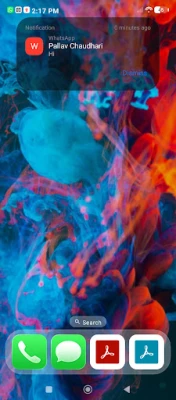
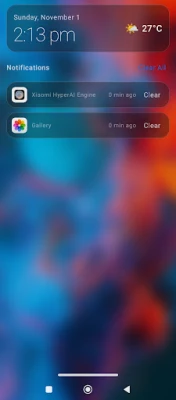
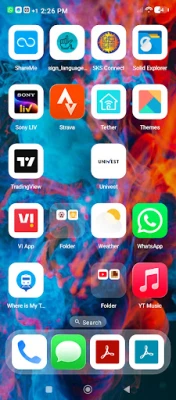
Flat Launcher gives your Android phone a clean, frosted-glass home screen with a polished look, smooth animations and plenty of control. Set it as your default launcher to get a multi-page home screen, a four-app dock, rounded icons, folders and a dedicated widgets page.
HOME SCREEN
Multi-page grid with drag-and-drop organization
Four-app dock you can rearrange
Folders: drop one app onto another to create one
Long-press to edit, move, hide, lock or remove apps
Full-screen wallpaper that stays still while you swipe
APP CATEGORIES AND QUICK SEARCH
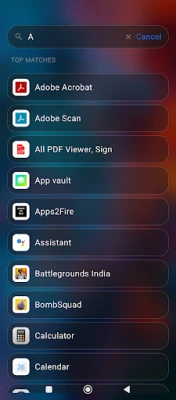
Browse apps in automatic category tiles or an A–Z list
Search installed apps instantly, with recent suggestions and shortcuts to settings, phone and messages
Hide apps in a protected vault that needs fingerprint or device credentials
QUICK PANEL
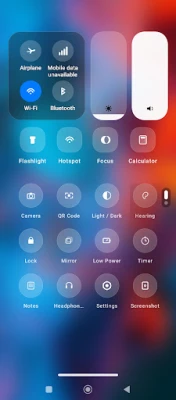
Pull down on the right side of the home screen to open a glass control panel. Toggle airplane mode, mobile data, Wi-Fi and Bluetooth, adjust brightness and volume, and use the flashlight, hotspot, Do Not Disturb, calculator, camera, QR code, dark mode, orientation lock, screen mirroring, battery saver, timer, notes and screenshot. A Now Playing view gives you media controls and a seek bar.
NOTIFICATION PANEL
Pull down on the left side for a panel with clock, weather, calendar and your notifications. Conversations are grouped, and you can clear single items or everything at once. Notification history is kept on your device.
FLOATING STATUS PILL
A compact pill near the top of your screen shows calls, notifications, music and charging, and expands for quick actions. It can appear over other apps when you allow Display Over Other Apps.
WIDGETS PAGE
Screen Time card with an hourly chart, top categories and top apps
Battery card and analog clock
Support for standard Android widgets, including optional Google Photos and Digital Wellbeing widgets
Resize, move and rearrange widgets in edit mode
LOCK COVER AND APP LOCK
Launcher lock cover with your own wallpaper, clock and notifications
Unlock with swipe, pattern, PIN or biometrics
Optional emergency contact on the cover
App Lock asks for authentication before opening the apps you choose, with a timeout you set
CUSTOMIZATION
Rounded or circular icons in small, medium or large sizes
Show or hide labels
Recolor icons with a full color picker
Apply compatible icon packs
Set separate home and lock wallpapers
Custom status strip with time, notification icons, signal, Wi-Fi, Bluetooth and battery
12-hour or 24-hour clock
PHONE AND MESSAGES
Shortcuts open the companion apps Flat Dialer and Flat Messages when installed, with a clear install prompt when they are not.
PERMISSIONS
All permissions are optional, and denying one only turns off the features that need it:
Notification Access: notification panel, status pill and media controls
Display Over Other Apps: panels and status pill over other apps
Usage Access: Screen Time card
Accessibility: edge gestures and screenshot action
Calendar: upcoming events in the notification panel
Modify System Settings: persistent brightness and rotation controls
Flat Launcher does not read or share the content of your screen. Foreground app detection uses package names only.
Requires Android 8.0 or above. All features are available with no paid unlock.
Flat Launcher is an independent Android launcher and is not affiliated with or endorsed by any phone manufacturer or operating system vendor.
Rate the App
Add Comment & Review
User Reviews
Based on 0 reviews
No reviews added yet.
Comments will not be approved to be posted if they are SPAM, abusive, off-topic, use profanity, contain a personal attack, or promote hate of any kind.






More »

Popular Apps

phpFoxPHPFOX LLC

Moon Chai StoryOlha Dobel

World War Heroes — WW2 PvP FPSAzur Interactive Games Limited
Govee LiteGovee

AvSeaAvionics Electronics Geeks!
Viking Clan: RagnarokKano Games
Vikings: War of ClansPlarium LLC

Build World AdventureExplore city in cube world

Asphalt 9: LegendsGameloft SE
Dawn of Zombies: Survival GameRoyal Ark
More »
Editor's Choice

Grim Soul: Dark Survival RPGBrickworks Games Ltd

Craft of Survival - Gladiators101XP LIMITED
Last Shelter: SurvivalLong Tech Network Limited
Dawn of Zombies: Survival GameRoyal Ark

Merge Survival : WastelandStickyHands Inc.

AoD Vikings: Valhalla GameRoboBot Studio
Viking Clan: RagnarokKano Games
Vikings: War of ClansPlarium LLC
Asphalt 9: LegendsGameloft SE
Modern Tanks: War Tank GamesXDEVS LTD