


Latest Version
Update
February 05, 2026
February 05, 2026
Developer
Power App Zone
Power App Zone
Categories
Entertainment
Entertainment
Platforms
Android
Android
Downloads
1
1
License
Free
Free
Package Name
com.iptv.smartplayer.livr.streaming.watch.onlinetv
com.iptv.smartplayer.livr.streaming.watch.onlinetv
Report
Report a Problem
Report a Problem
More About IPTV Player – Smart Live TV
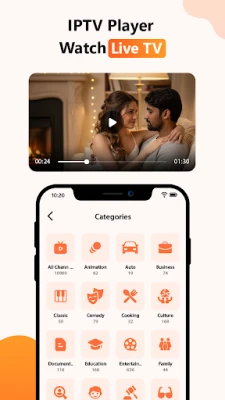
📺 IPTV Player – Smart Live TV is a powerful media player that allows users to seamlessly stream M3U and M3U8 files. Enjoy your favorite online TV channels anytime, anywhere with IPTV Player – Smart Live TV. Experience smooth IPTV streaming with our user-friendly interface.
DISCLAIMER:
* IPTV Player – Smart Live TV does not contain any preloaded playlists or channels.
Users must import their own content.
IPTV Player – Smart Live TV is not affiliated with any third-party providers.
We do not support or promote streaming copyrighted material without proper permission from the copyright holders.
IPTV Player – Smart Live TV only displays and plays the content that users add. *
KEY FEATURES:
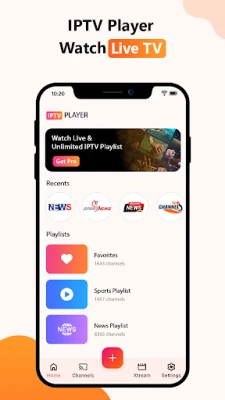
🔥 Easily import and manage playlists using Playlist URL
🔥 Play single streams using M3U and M3U8 files
🔥 Add favorite channels and personalize your playlist
🔥 Unlimited playlists and channels can be added
🔥 Advanced tools such as timer, brightness, volume control, lock screen, and more
🔥 Built-in powerful IPTV player for fast, reliable, and stable streaming
🔥 Support for playing media from your device, including videos, files, and URLs
🔥 Smart IPTV supports playlist formats like M3U and M3U8
🔥 Fast channel search and compatibility with all Android devices and TV Boxes
🔥 Picture-in-picture mode for multitasking
🔥 Recently Viewed feature to quickly resume watching
🔥 Automatic playlist updates for your convenience
COMING SOON:
⏳ Xtream Code API support
⏳ Chromecast - Mirror-cast from your phone to the big screen
HOW TO ADD M3U/M3U8 FILES:
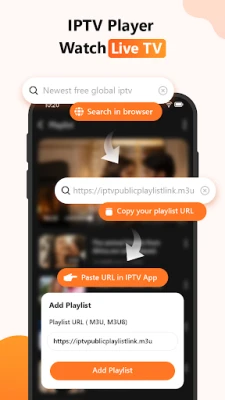
1. On the Home page, click the "Add" button.
2. Select "Add your playlist" and paste your M3U link into the input box.
3. Wait for the loading process to finish, and enjoy live TV streaming.
HOW TO FIND VALID IPTV M3U/M3U8 FILES ONLINE:
Method 1:
- Search GitHub for IPTV sources, then copy the URL to obtain the playlist.
Method 2:
- Use a search engine to search for "public IPTV playlist", open a link from the results, copy the M3U/M3U8 link, and import it into our IPTV Player app by clicking the "Add" button.
WHY CHOOSE IPTV PLAYER – SMART LIVE TV?
▶️ IPTV Player is designed to be user-friendly and simple to use. It provides a helpful guide to import your playlist and offers tutorials for online search, supporting M3U and M3U8 files.
▶️ With IPTV Player, you have unlimited access to a wide range of content and live channels from around the world.
▶️ Smart online TV allows you to enjoy your favorite content from a distance and supports a wide range of formats, ensuring you can watch your entertainment with ease.
▶️ Watch Live in style with high compatibility for video quality, including SD, HD, and 4K, as well as high resolutions like 720p and 1080p.
▶️ Compatible with phones, tablets and Android TV devices.
▶️ Adjust playback ratio, volume and brightness per your preferences.
▶️ Screen lock feature to avoid rotation when moving the phone.
▶️ Organize and save your favorite channels for quick access
IMPORTANT NOTE:
This IPTV player app doesn't supply or include any media content. We have no affiliation with any content providers and can't be responsible for the content provided by third parties.
We don't support the streaming of copyright-protected material without permission of the copyright holder.
We can't ensure every M3U/M3U8 playlists have EPG information, as it is provided by the network service provider.
The IPTV xtream player doesn't provide any audiovisual content to the users.
For more information, please check our Terms of Use:- https://modgic.xyz/terms-and-conditions.html
To understand how we handle your privacy, please read our Privacy Policy:- https://modgic.xyz/privacy-policy.html
If you have any feedback or suggestions, please contact us at Our Support Email. We value your input and are dedicated to improving IPTV Player – Smart Live TV.
* IPTV Player – Smart Live TV does not contain any preloaded playlists or channels.
Users must import their own content.
IPTV Player – Smart Live TV is not affiliated with any third-party providers.
We do not support or promote streaming copyrighted material without proper permission from the copyright holders.
IPTV Player – Smart Live TV only displays and plays the content that users add. *
KEY FEATURES:
🔥 Easily import and manage playlists using Playlist URL
🔥 Play single streams using M3U and M3U8 files
🔥 Add favorite channels and personalize your playlist
🔥 Unlimited playlists and channels can be added
🔥 Advanced tools such as timer, brightness, volume control, lock screen, and more
🔥 Built-in powerful IPTV player for fast, reliable, and stable streaming
🔥 Support for playing media from your device, including videos, files, and URLs
🔥 Smart IPTV supports playlist formats like M3U and M3U8
🔥 Fast channel search and compatibility with all Android devices and TV Boxes
🔥 Picture-in-picture mode for multitasking
🔥 Recently Viewed feature to quickly resume watching
🔥 Automatic playlist updates for your convenience
COMING SOON:
⏳ Xtream Code API support
⏳ Chromecast - Mirror-cast from your phone to the big screen
HOW TO ADD M3U/M3U8 FILES:
1. On the Home page, click the "Add" button.
2. Select "Add your playlist" and paste your M3U link into the input box.
3. Wait for the loading process to finish, and enjoy live TV streaming.
HOW TO FIND VALID IPTV M3U/M3U8 FILES ONLINE:
Method 1:
- Search GitHub for IPTV sources, then copy the URL to obtain the playlist.
Method 2:
- Use a search engine to search for "public IPTV playlist", open a link from the results, copy the M3U/M3U8 link, and import it into our IPTV Player app by clicking the "Add" button.
WHY CHOOSE IPTV PLAYER – SMART LIVE TV?
▶️ IPTV Player is designed to be user-friendly and simple to use. It provides a helpful guide to import your playlist and offers tutorials for online search, supporting M3U and M3U8 files.
▶️ With IPTV Player, you have unlimited access to a wide range of content and live channels from around the world.
▶️ Smart online TV allows you to enjoy your favorite content from a distance and supports a wide range of formats, ensuring you can watch your entertainment with ease.
▶️ Watch Live in style with high compatibility for video quality, including SD, HD, and 4K, as well as high resolutions like 720p and 1080p.
▶️ Compatible with phones, tablets and Android TV devices.
▶️ Adjust playback ratio, volume and brightness per your preferences.
▶️ Screen lock feature to avoid rotation when moving the phone.
▶️ Organize and save your favorite channels for quick access
IMPORTANT NOTE:
This IPTV player app doesn't supply or include any media content. We have no affiliation with any content providers and can't be responsible for the content provided by third parties.
We don't support the streaming of copyright-protected material without permission of the copyright holder.
We can't ensure every M3U/M3U8 playlists have EPG information, as it is provided by the network service provider.
The IPTV xtream player doesn't provide any audiovisual content to the users.
For more information, please check our Terms of Use:- https://modgic.xyz/terms-and-conditions.html
To understand how we handle your privacy, please read our Privacy Policy:- https://modgic.xyz/privacy-policy.html
If you have any feedback or suggestions, please contact us at Our Support Email. We value your input and are dedicated to improving IPTV Player – Smart Live TV.
Rate the App
Add Comment & Review
User Reviews
Based on 0 reviews
No reviews added yet.
Comments will not be approved to be posted if they are SPAM, abusive, off-topic, use profanity, contain a personal attack, or promote hate of any kind.














More »

Popular Apps

phpFoxPHPFOX LLC

Moon Chai StoryOlha Dobel

World War Heroes — WW2 PvP FPSAzur Interactive Games Limited

Govee LiteGovee

Viking Clan: RagnarokKano Games

Build World AdventureExplore city in cube world

Vikings: War of ClansPlarium LLC

AvSeaAvionics Electronics Geeks!

Asphalt 9: LegendsGameloft SE

Dawn of Zombies: Survival GameRoyal Ark
More »
Editor's Choice

Grim Soul: Dark Survival RPGBrickworks Games Ltd

Craft of Survival - Gladiators101XP LIMITED

Last Shelter: SurvivalLong Tech Network Limited
Dawn of Zombies: Survival GameRoyal Ark

Merge Survival : WastelandStickyHands Inc.

AoD Vikings: Valhalla GameRoboBot Studio
Viking Clan: RagnarokKano Games
Vikings: War of ClansPlarium LLC
Asphalt 9: LegendsGameloft SE

Modern Tanks: War Tank GamesXDEVS LTD