

Latest Version
Update
November 04, 2026
November 04, 2026
Developer
ezBuilder
ezBuilder
Categories
Tools
Tools
Platforms
Android
Android
Downloads
0
0
License
Free
Free
Package Name
com.ezbuilder.hotspoton
com.ezbuilder.hotspoton
Report
Report a Problem
Report a Problem
More About HotspotOn: Tethering & Hotspot
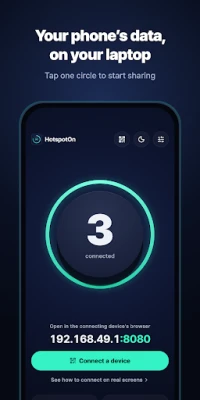
Use your phone’s data on your laptop and tablet. Tap one circle and sharing starts.
HotspotOn runs a small proxy on your phone so your own laptop and tablet on the same hotspot or Wi-Fi can use the phone’s internet connection. No extra hardware, nothing to install on your laptop.
■ One tap to start
Tap the circle to share and see connected devices and data at a glance.
■ Join by QR, set up once
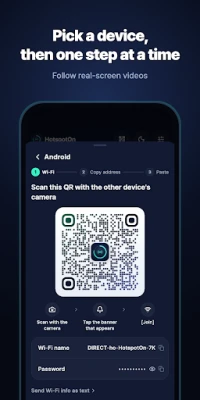
Scan the QR to join the Wi-Fi; the setup page shows the rest. One profile on iPhone, iPad and Mac, one file on Windows, and on Android you paste an address into the Wi-Fi settings once. After that, just join the Wi-Fi.
■ See who’s connected
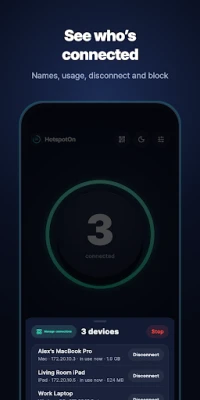
Devices show up by name and type. Disconnect unknown ones, then allow or block them for good.
■ Dim screen, no interruptions
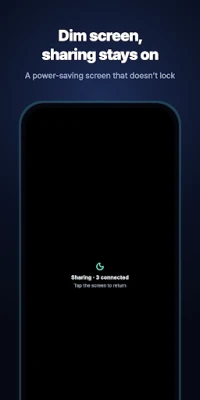
A dim screen that never locks your phone, so sharing never stops. Brightness comes back when you leave.
■ Background sharing
Keep sharing with the screen off while the notification shows. On Android 10+ the app opens its own Wi-Fi, so no hotspot settings are needed.
■ HotspotOn Pro
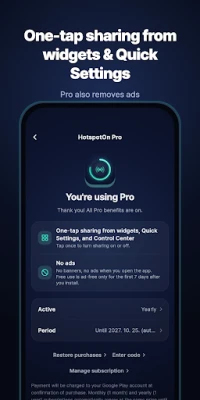
· One-tap sharing from home-screen widgets and Quick Settings
· No ads
Sharing from the app is always free. The free version shows small ads after 7 days.
■ Subscriptions
· Monthly, yearly (7-day free trial for first-time subscribers) and lifetime options.
· Payment is charged to your Google Play account.
· Subscriptions renew automatically at the same price until cancelled.
· Cancel during the free trial and you won’t be charged; after cancelling, Pro stays on until the period ends.
· Manage or cancel in Play Store › Payments & subscriptions.
· Any unused part of a free trial is forfeited when you subscribe.
■ Good to know
· Not a VPN. Traffic isn’t sent to other servers or logged.
· Data use, speed and terms follow your mobile plan.
· Works with browsers and apps that follow the system proxy setting.
Terms: https://hotspoton.ezbuilder.app/en/terms/
Privacy: https://hotspoton.ezbuilder.app/en/privacy/
Contact: [email protected]
■ One tap to start
Tap the circle to share and see connected devices and data at a glance.
■ Join by QR, set up once
Scan the QR to join the Wi-Fi; the setup page shows the rest. One profile on iPhone, iPad and Mac, one file on Windows, and on Android you paste an address into the Wi-Fi settings once. After that, just join the Wi-Fi.
■ See who’s connected
Devices show up by name and type. Disconnect unknown ones, then allow or block them for good.
■ Dim screen, no interruptions
A dim screen that never locks your phone, so sharing never stops. Brightness comes back when you leave.
■ Background sharing
Keep sharing with the screen off while the notification shows. On Android 10+ the app opens its own Wi-Fi, so no hotspot settings are needed.
■ HotspotOn Pro
· One-tap sharing from home-screen widgets and Quick Settings
· No ads
Sharing from the app is always free. The free version shows small ads after 7 days.
■ Subscriptions
· Monthly, yearly (7-day free trial for first-time subscribers) and lifetime options.
· Payment is charged to your Google Play account.
· Subscriptions renew automatically at the same price until cancelled.
· Cancel during the free trial and you won’t be charged; after cancelling, Pro stays on until the period ends.
· Manage or cancel in Play Store › Payments & subscriptions.
· Any unused part of a free trial is forfeited when you subscribe.
■ Good to know
· Not a VPN. Traffic isn’t sent to other servers or logged.
· Data use, speed and terms follow your mobile plan.
· Works with browsers and apps that follow the system proxy setting.
Terms: https://hotspoton.ezbuilder.app/en/terms/
Privacy: https://hotspoton.ezbuilder.app/en/privacy/
Contact: [email protected]
Rate the App
Add Comment & Review
User Reviews
Based on 0 reviews
No reviews added yet.
Comments will not be approved to be posted if they are SPAM, abusive, off-topic, use profanity, contain a personal attack, or promote hate of any kind.










More »

Popular Apps

phpFoxPHPFOX LLC

Moon Chai StoryOlha Dobel

World War Heroes — WW2 PvP FPSAzur Interactive Games Limited

Govee LiteGovee

AvSeaAvionics Electronics Geeks!

Viking Clan: RagnarokKano Games

Vikings: War of ClansPlarium LLC

Build World AdventureExplore city in cube world

Asphalt 9: LegendsGameloft SE

Dawn of Zombies: Survival GameRoyal Ark
More »
Editor's Choice

Grim Soul: Dark Survival RPGBrickworks Games Ltd

Craft of Survival - Gladiators101XP LIMITED

Last Shelter: SurvivalLong Tech Network Limited
Dawn of Zombies: Survival GameRoyal Ark

Merge Survival : WastelandStickyHands Inc.

AoD Vikings: Valhalla GameRoboBot Studio
Viking Clan: RagnarokKano Games
Vikings: War of ClansPlarium LLC
Asphalt 9: LegendsGameloft SE

Modern Tanks: War Tank GamesXDEVS LTD