

Latest Version
Update
October 14, 2026
October 14, 2026
Developer
Town Fab
Town Fab
Categories
Photography
Photography
Platforms
Android
Android
Downloads
0
0
License
Free
Free
Package Name
com.gridphotomaker.photosplit
com.gridphotomaker.photosplit
Report
Report a Problem
Report a Problem
More About Grid Photo Splitter-Grid Maker
Create beautiful photo grids and split one photo into multiple perfectly aligned images with Grid Photo Splitter - Grid Maker. Choose a photo, select a grid layout, adjust the image, preview your result, and export your individual grid photos in the correct order.
Whether you are a content creator, photographer, designer, or simply want to create creative photo layouts, this photo grid maker and photo splitter provides a simple and convenient way to turn one image into multiple grid photos.
📸 Photo Grid Maker
Turn a single photo into a professional-looking grid with multiple layout options. Choose the grid size that works best for your image and create perfectly organized photo tiles.
Supported grid layouts include:
• 2×2 Grid
• 2×3 Grid
• 2×4 Grid
• 2×5 Grid
• 3×3 Grid
• 3×4 Grid
• 3×5 Grid
• 3×6 Grid
✂️ Photo Splitter
Split one large image into multiple accurately aligned photo pieces. Grid Photo Splitter divides your selected image according to the chosen grid layout while maintaining the original image composition.
Create photo tiles for:
• Creative photo grids
• Profile grid layouts
• Photography projects
• Portfolio designs
• Portrait photos
• Landscape photos
• Travel photos
• Event photos
• Creative content
• Promotional images
🎨 Easy Photo Grid Editor
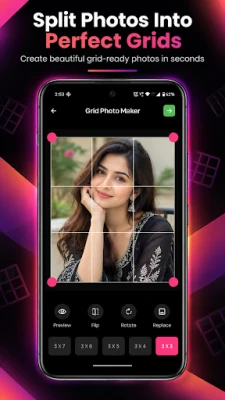
Adjust your image before splitting it. The simple grid editor gives you useful controls to create the composition you want.
You can:
• Position your photo
• Adjust the crop area
• Rotate the image
• Flip the image
• Replace the selected photo
• Select different grid layouts
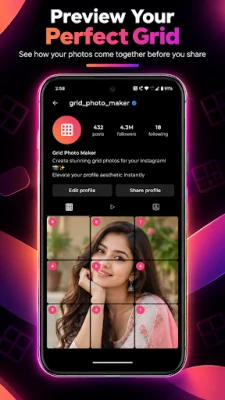
• Preview your complete grid
The clean interface makes photo splitting simple, even if you have never used a grid photo maker before.
👀 Preview Your Grid
Check your complete photo grid before exporting. The preview feature helps you see how your image will look after it is divided into individual tiles.
Adjust the photo until the subject, face, background, and important details are positioned exactly where you want them.
🔢 Correct Grid Order
Grid Photo Splitter automatically creates numbered photo pieces so you can easily identify the correct sequence.
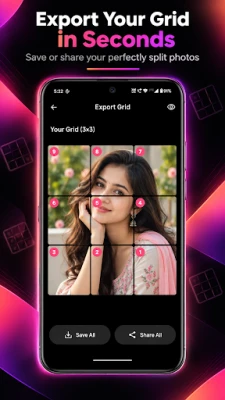
For example, selecting a 3×3 grid creates 9 individual images. Each tile is generated from the corresponding section of your original photo, helping you keep your complete grid organized.
💾 Save All Photos
Once your grid is ready, use Save All to save the generated photo tiles to your device. Export multiple grid images conveniently instead of saving each piece one by one.
📤 Share Your Grid
Use Share All to share your generated grid photos through the sharing options available on your device.
Create your grid, export your photo pieces, and share them whenever you are ready.
⭐ Key Features
✓ Photo grid maker
✓ Photo splitter
✓ Split one photo into multiple images
✓ Multiple grid sizes
✓ 2×2, 2×3, 2×4 and 2×5 grids
✓ 3×3, 3×4, 3×5 and 3×6 grids
✓ Easy image positioning
✓ Crop and adjust photos
✓ Rotate photos
✓ Flip photos
✓ Replace photos
✓ Grid preview
✓ Correctly numbered photo tiles
✓ Save all grid images
✓ Share all generated images
✓ Clean and simple interface
✓ Fast and convenient photo editing
🎯 Perfect for Creative Photo Layouts
Create organized photo grids from portraits, landscapes, travel photography, events, artwork, portfolios, promotional photos, and other favorite images.
Whether you need a photo splitter, grid maker, image splitter, photo tile maker, or photo grid creator, Grid Photo Splitter provides an easy workflow from selecting your photo to exporting the finished grid.
🚀 How It Works
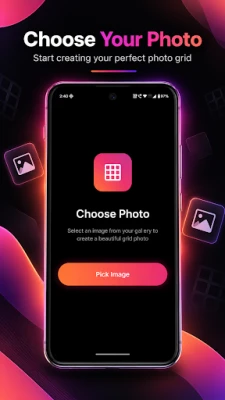
1. Pick Image
Select a photo from your device.
2. Choose Grid
Select your preferred grid size.
3. Adjust Photo
Position, crop, rotate, flip, or replace your image.
4. Preview
Check the complete grid before exporting.
5. Export
Generate individual photo tiles in the correct order.
6. Save or Share
Save all generated images or share them using your device's sharing options.
📸 Photo Grid Maker
Turn a single photo into a professional-looking grid with multiple layout options. Choose the grid size that works best for your image and create perfectly organized photo tiles.
Supported grid layouts include:
• 2×2 Grid
• 2×3 Grid
• 2×4 Grid
• 2×5 Grid
• 3×3 Grid
• 3×4 Grid
• 3×5 Grid
• 3×6 Grid
✂️ Photo Splitter
Split one large image into multiple accurately aligned photo pieces. Grid Photo Splitter divides your selected image according to the chosen grid layout while maintaining the original image composition.
Create photo tiles for:
• Creative photo grids
• Profile grid layouts
• Photography projects
• Portfolio designs
• Portrait photos
• Landscape photos
• Travel photos
• Event photos
• Creative content
• Promotional images
🎨 Easy Photo Grid Editor
Adjust your image before splitting it. The simple grid editor gives you useful controls to create the composition you want.
You can:
• Position your photo
• Adjust the crop area
• Rotate the image
• Flip the image
• Replace the selected photo
• Select different grid layouts
• Preview your complete grid
The clean interface makes photo splitting simple, even if you have never used a grid photo maker before.
👀 Preview Your Grid
Check your complete photo grid before exporting. The preview feature helps you see how your image will look after it is divided into individual tiles.
Adjust the photo until the subject, face, background, and important details are positioned exactly where you want them.
🔢 Correct Grid Order
Grid Photo Splitter automatically creates numbered photo pieces so you can easily identify the correct sequence.
For example, selecting a 3×3 grid creates 9 individual images. Each tile is generated from the corresponding section of your original photo, helping you keep your complete grid organized.
💾 Save All Photos
Once your grid is ready, use Save All to save the generated photo tiles to your device. Export multiple grid images conveniently instead of saving each piece one by one.
📤 Share Your Grid
Use Share All to share your generated grid photos through the sharing options available on your device.
Create your grid, export your photo pieces, and share them whenever you are ready.
⭐ Key Features
✓ Photo grid maker
✓ Photo splitter
✓ Split one photo into multiple images
✓ Multiple grid sizes
✓ 2×2, 2×3, 2×4 and 2×5 grids
✓ 3×3, 3×4, 3×5 and 3×6 grids
✓ Easy image positioning
✓ Crop and adjust photos
✓ Rotate photos
✓ Flip photos
✓ Replace photos
✓ Grid preview
✓ Correctly numbered photo tiles
✓ Save all grid images
✓ Share all generated images
✓ Clean and simple interface
✓ Fast and convenient photo editing
🎯 Perfect for Creative Photo Layouts
Create organized photo grids from portraits, landscapes, travel photography, events, artwork, portfolios, promotional photos, and other favorite images.
Whether you need a photo splitter, grid maker, image splitter, photo tile maker, or photo grid creator, Grid Photo Splitter provides an easy workflow from selecting your photo to exporting the finished grid.
🚀 How It Works
1. Pick Image
Select a photo from your device.
2. Choose Grid
Select your preferred grid size.
3. Adjust Photo
Position, crop, rotate, flip, or replace your image.
4. Preview
Check the complete grid before exporting.
5. Export
Generate individual photo tiles in the correct order.
6. Save or Share
Save all generated images or share them using your device's sharing options.
Rate the App
Add Comment & Review
User Reviews
Based on 0 reviews
No reviews added yet.
Comments will not be approved to be posted if they are SPAM, abusive, off-topic, use profanity, contain a personal attack, or promote hate of any kind.














More »

Popular Apps

phpFoxPHPFOX LLC

Moon Chai StoryOlha Dobel

World War Heroes — WW2 PvP FPSAzur Interactive Games Limited

Govee LiteGovee

AvSeaAvionics Electronics Geeks!

Viking Clan: RagnarokKano Games

Build World AdventureExplore city in cube world

Vikings: War of ClansPlarium LLC

Asphalt 9: LegendsGameloft SE

Dawn of Zombies: Survival GameRoyal Ark
More »
Editor's Choice

Grim Soul: Dark Survival RPGBrickworks Games Ltd

Craft of Survival - Gladiators101XP LIMITED

Last Shelter: SurvivalLong Tech Network Limited
Dawn of Zombies: Survival GameRoyal Ark

Merge Survival : WastelandStickyHands Inc.

AoD Vikings: Valhalla GameRoboBot Studio
Viking Clan: RagnarokKano Games
Vikings: War of ClansPlarium LLC
Asphalt 9: LegendsGameloft SE

Modern Tanks: War Tank GamesXDEVS LTD