
Latest Version
Update
November 12, 2026
November 12, 2026
Developer
Sorted Systems Lab
Sorted Systems Lab
Categories
Photography
Photography
Platforms
Android
Android
Downloads
0
0
License
Free
Free
Package Name
in.sortedsystems.picframe
in.sortedsystems.picframe
Report
Report a Problem
Report a Problem
More About PicFrame: Photo Collage Maker
PicFrame – Photo Frames, Collage Maker & Photo Editor
Turn your everyday photos into beautiful photo frames, photo collages and creative edits with PicFrame. Pick a design for a birthday, wedding, Diwali or a trip, add your photos, customize them and save your creation in a few taps.
PicFrame is free to use, and you don't need to sign up or create an account.
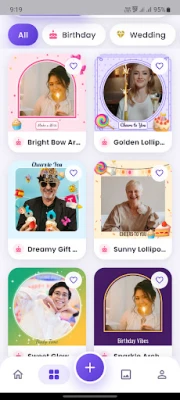
🖼️ PHOTO FRAMES
Explore beautiful photo frames designed to fit your photos naturally. Nothing gets stretched, so square posts, portraits and tall story pictures keep a neat, even border.
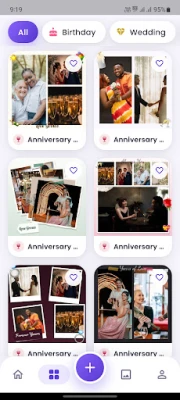
🧩 COLLAGE TEMPLATES
Create beautiful photo collages with ready-made scrapbook templates featuring polaroid-style prints, torn paper, washi tape and textured paper. Add your photos and create a design ready to share.
🎉 CATEGORIES FOR EVERY OCCASION
Find the right photo frame, collage template or photo editing design for every moment.
• 🎂 Celebrations: Birthday, Wedding, Anniversary, Party, Graduation, Baby Shower
• 🪔 Festivals: Diwali, Holi, Navratri, Raksha Bandhan, Eid, Christmas, New Year and more
• ❤️ Loved ones: Love, Couple, Friendship, Family, Baby, Kids, Mother's Day, Father's Day
• ✨ Styles: Floral, Minimal, Neon, Retro, Professional, Travel
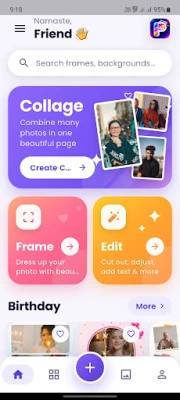
🧑🎨 MAKE A COLLAGE YOUR WAY
Create your photo collage the way you like.
• 📖 Templates: Choose a ready-made scrapbook page
• 🔲 Grid: Arrange 2 to 9 photos in a tidy layout, then change the arrangement, spacing, corners and page shape
• 🖼️ Free Style: Scatter your photos like prints on a table. Drag, pinch and turn each one, or tap Shuffle for a fresh look
🎨 COMPLETE PHOTO EDITOR
Use PicFrame as your everyday photo editor to enhance and customize your pictures.
• ✂️ Crop: Trim your photo freely or to a fixed ratio
• ☀️ Adjust: Brightness, contrast, saturation and warmth
• 🎭 Effects: One-tap looks like Vivid, Noir, Sepia, Cinema and Sunset, with a strength slider
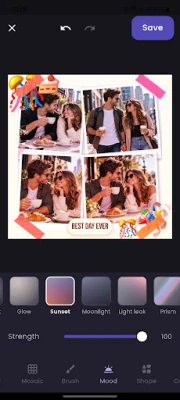
• ✨ Mood: Add light and atmosphere with vignette, glow, light leak, bokeh, sparkle, snow, haze and more
• 🌫️ Blur: Soften the whole photo or only the background
• 🖌️ Brush: Paint blur, brighten or darken onto just the part you want
• 🟫 Mosaic: Give your photo a pixel-art look
• 💠 Shape: Put your photo in a circle, heart, star, hexagon, arch or diamond
• ✨ Cutout: Remove the background from a photo of a person in one tap, then tidy the edges with Erase and Restore
• 🌈 Background: Place your cutout on a colour, gradient, ready-made background or your own photo
• 🔤 Text: Add captions in stylish fonts with colours, bold and italic. You can even type in Hindi and Gujarati
• 🎀 Stickers: Decorate your photo for every celebration
📐 SQUARE OR STORY SIZE
Create your photo design in popular formats.
• 1:1 for posts and profile pictures
• 9:16 for status updates and stories
💾 SAVE AND SHARE IN HD
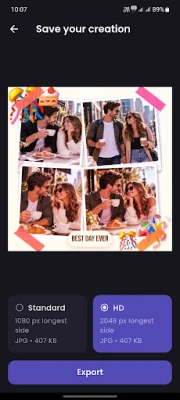
Export your photo edits, frames and collages in Standard or HD quality, as JPG or PNG.
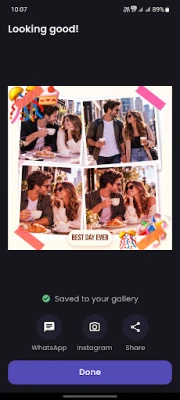
Your picture is saved to a "PicFrame" album in your gallery, ready to share with friends and family in your favourite apps.
My Creations keeps everything you've made in one place.
🔒 YOUR PHOTOS STAY ON YOUR PHONE
Your photos are edited on your phone and are never uploaded to us. No sign-up, no account, and every tool works offline, including background removal.
💝 PERFECT FOR
• 🎂 Birthday wishes and party invites
• 💍 Wedding and anniversary memories
• 🪔 Diwali, Holi, Navratri, Eid and Christmas greetings
• 👶 Baby milestones and family moments
• ✈️ Travel diaries and friendship posts
• 📱 Profile pictures, status updates and stories
Make your memories look as special as they felt. ✨
Questions or ideas? Write to us at [email protected]. We'd love to hear from you.
PicFrame is free to use, and you don't need to sign up or create an account.
🖼️ PHOTO FRAMES
Explore beautiful photo frames designed to fit your photos naturally. Nothing gets stretched, so square posts, portraits and tall story pictures keep a neat, even border.
🧩 COLLAGE TEMPLATES
Create beautiful photo collages with ready-made scrapbook templates featuring polaroid-style prints, torn paper, washi tape and textured paper. Add your photos and create a design ready to share.
🎉 CATEGORIES FOR EVERY OCCASION
Find the right photo frame, collage template or photo editing design for every moment.
• 🎂 Celebrations: Birthday, Wedding, Anniversary, Party, Graduation, Baby Shower
• 🪔 Festivals: Diwali, Holi, Navratri, Raksha Bandhan, Eid, Christmas, New Year and more
• ❤️ Loved ones: Love, Couple, Friendship, Family, Baby, Kids, Mother's Day, Father's Day
• ✨ Styles: Floral, Minimal, Neon, Retro, Professional, Travel
🧑🎨 MAKE A COLLAGE YOUR WAY
Create your photo collage the way you like.
• 📖 Templates: Choose a ready-made scrapbook page
• 🔲 Grid: Arrange 2 to 9 photos in a tidy layout, then change the arrangement, spacing, corners and page shape
• 🖼️ Free Style: Scatter your photos like prints on a table. Drag, pinch and turn each one, or tap Shuffle for a fresh look
🎨 COMPLETE PHOTO EDITOR
Use PicFrame as your everyday photo editor to enhance and customize your pictures.
• ✂️ Crop: Trim your photo freely or to a fixed ratio
• ☀️ Adjust: Brightness, contrast, saturation and warmth
• 🎭 Effects: One-tap looks like Vivid, Noir, Sepia, Cinema and Sunset, with a strength slider
• ✨ Mood: Add light and atmosphere with vignette, glow, light leak, bokeh, sparkle, snow, haze and more
• 🌫️ Blur: Soften the whole photo or only the background
• 🖌️ Brush: Paint blur, brighten or darken onto just the part you want
• 🟫 Mosaic: Give your photo a pixel-art look
• 💠 Shape: Put your photo in a circle, heart, star, hexagon, arch or diamond
• ✨ Cutout: Remove the background from a photo of a person in one tap, then tidy the edges with Erase and Restore
• 🌈 Background: Place your cutout on a colour, gradient, ready-made background or your own photo
• 🔤 Text: Add captions in stylish fonts with colours, bold and italic. You can even type in Hindi and Gujarati
• 🎀 Stickers: Decorate your photo for every celebration
📐 SQUARE OR STORY SIZE
Create your photo design in popular formats.
• 1:1 for posts and profile pictures
• 9:16 for status updates and stories
💾 SAVE AND SHARE IN HD
Export your photo edits, frames and collages in Standard or HD quality, as JPG or PNG.
Your picture is saved to a "PicFrame" album in your gallery, ready to share with friends and family in your favourite apps.
My Creations keeps everything you've made in one place.
🔒 YOUR PHOTOS STAY ON YOUR PHONE
Your photos are edited on your phone and are never uploaded to us. No sign-up, no account, and every tool works offline, including background removal.
💝 PERFECT FOR
• 🎂 Birthday wishes and party invites
• 💍 Wedding and anniversary memories
• 🪔 Diwali, Holi, Navratri, Eid and Christmas greetings
• 👶 Baby milestones and family moments
• ✈️ Travel diaries and friendship posts
• 📱 Profile pictures, status updates and stories
Make your memories look as special as they felt. ✨
Questions or ideas? Write to us at [email protected]. We'd love to hear from you.
Rate the App
Add Comment & Review
User Reviews
Based on 0 reviews
No reviews added yet.
Comments will not be approved to be posted if they are SPAM, abusive, off-topic, use profanity, contain a personal attack, or promote hate of any kind.







More »

Popular Apps

phpFoxPHPFOX LLC
Moon Chai StoryOlha Dobel

World War Heroes — WW2 PvP FPSAzur Interactive Games Limited

Govee LiteGovee

AvSeaAvionics Electronics Geeks!
Viking Clan: RagnarokKano Games
Vikings: War of ClansPlarium LLC

Build World AdventureExplore city in cube world

Asphalt 9: LegendsGameloft SE
Dawn of Zombies: Survival GameRoyal Ark
More »
Editor's Choice
Grim Soul: Dark Survival RPGBrickworks Games Ltd
Craft of Survival - Gladiators101XP LIMITED

Last Shelter: SurvivalLong Tech Network Limited
Dawn of Zombies: Survival GameRoyal Ark
Merge Survival : WastelandStickyHands Inc.
AoD Vikings: Valhalla GameRoboBot Studio
Viking Clan: RagnarokKano Games
Vikings: War of ClansPlarium LLC
Asphalt 9: LegendsGameloft SE

Modern Tanks: War Tank GamesXDEVS LTD