

Latest Version
Update
October 27, 2026
October 27, 2026
Developer
Kampvie
Kampvie
Categories
Productivity
Productivity
Platforms
Android
Android
Downloads
0
0
License
Free
Free
Package Name
com.gram.grammarcheck.grammarchecker.grammar.corrector
com.gram.grammarcheck.grammarchecker.grammar.corrector
Report
Report a Problem
Report a Problem
More About Grammar Check AI: Corrector GC
✨ Make Every Word Count with Grammar Check AI
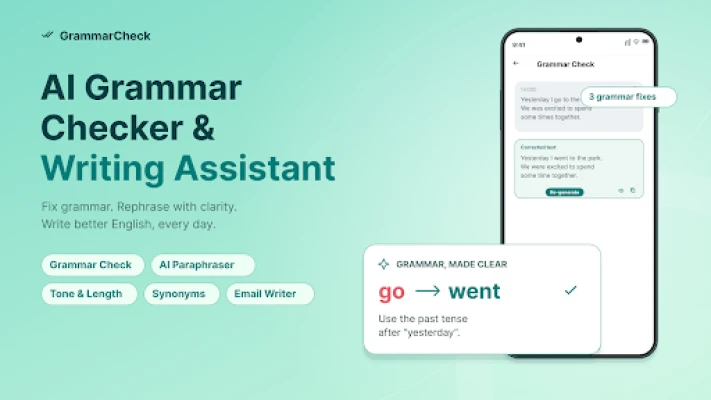
Send that email with confidence. Turn a draft into a clear message. Be a confident writer. Grammar Check AI brings an AI grammar checker, spell check app and AI writing assistant together to help you write with clarity, polish your English and find your voice.
Why choose Grammar Check AI?
• Check English grammar and understand your corrections.
• Catch spelling mistakes with an AI spell corrector.
• Rewrite and rephrase text for a clearer message.
• Explore synonym suggestions and better word choice.
• Compose professional emails from a simple brief.
✅ Smart Grammar Correction, Clearer Communication
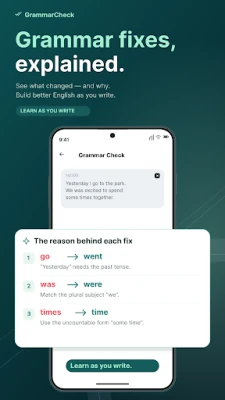
From everyday messages to academic work, your grammar checker helps you spot grammatical errors and review suggested changes. Compare the original and corrected text to understand each grammar correction.
Let the AI grammar checker be your writing corrector. A grammar check helps you catch grammar mistakes, while clear grammar explanations show what changed and why. Better English grammar starts with understanding your writing.
Spell Check and Proofreading in One Place
Misspelled words can distract from a good idea. Use the spelling checker to review typos and spelling mistakes before you share your text. The spell check app helps you check the words in your messages, notes and emails.
Looking for a spell checker for Android or an AI proofreader? Start with Grammar Check AI. The spell corrector and proofreader grammar checker show error correction in context, helping you choose the wording for the final draft.
✍️ Rewrite, Paraphrase and Express Yourself
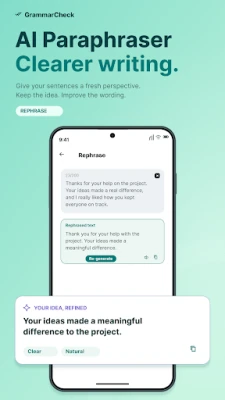
Use the paraphrasing tool to rewrite awkward sentences, rephrase ideas and explore clearer alternatives. Compare rewrites with your original text for meaning, clarity and fluency.
Use AI writing to turn a rough sentence into a thoughtful draft. The AI-powered rewrite tool supports rewriting for emails, essays and social media posts. Add a grammar check after a rewrite to review your new wording before you use it.
Grammar Check: Your Tone, Your Message
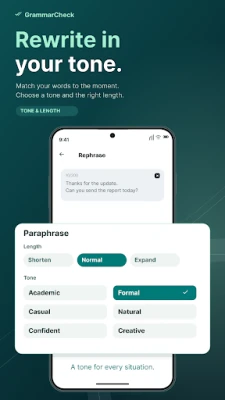
Make your words fit the moment. Choose formal, academic, casual, natural, confident or creative tones. Tone adjustment helps you explore the right formality level for professional writing or a friendly conversation. Shorten a long message, expand an idea or keep a similar length.
Find Your Words
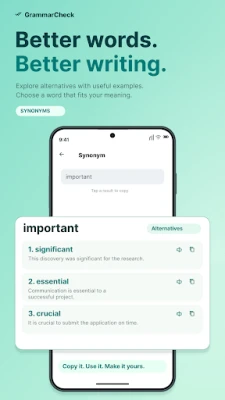
Build your vocabulary with synonyms, example sentences and pronunciation. Explore alternatives when a word feels repetitive, learn new words in context and choose expressions that match your idea. Vocabulary enhancement and thoughtful word choice help you improve your writing beyond basic text correction.
✉️ AI Writing for Emails That Get Your Point Across
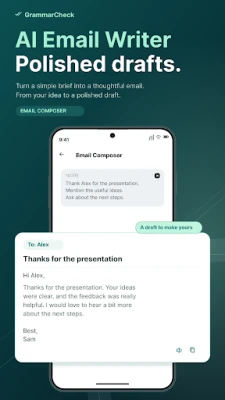
Describe your reader and what you want to say, then let the email composer create a draft with a subject, greeting, message and sign-off. Choose a tone for workplace emails or personal messages. Review your email composition, make it your own and use the grammar checker before sending.
A Writing Assistant for Your Everyday Goals
• Students: proofread an academic essay, assignments and study drafts.
• Professionals: polish professional emails, reports and work messages.
• Non-native speakers: explore AI grammar explanations and English usage.
• Content creators: refine captions, social media posts and everyday writing.
Learn as You Write with AI Grammar
Your AI grammar checker can be a starting point for stronger writing skills. Read each grammar explanation, compare sentence changes and use what you learn in your next draft. Keep the corrections that work for you.
Review, Copy and Keep Going
Find grammar checking, rephrasing, synonyms and email composition on one home screen. Copy your results or listen to your text aloud as you review.
⭐ Start Writing with Confidence
Make Grammar Check AI your companion for grammar, spell check and AI writing. Open your next draft, run a grammar check and give your words the attention they deserve.
Why choose Grammar Check AI?
• Check English grammar and understand your corrections.
• Catch spelling mistakes with an AI spell corrector.
• Rewrite and rephrase text for a clearer message.
• Explore synonym suggestions and better word choice.
• Compose professional emails from a simple brief.
✅ Smart Grammar Correction, Clearer Communication
From everyday messages to academic work, your grammar checker helps you spot grammatical errors and review suggested changes. Compare the original and corrected text to understand each grammar correction.
Let the AI grammar checker be your writing corrector. A grammar check helps you catch grammar mistakes, while clear grammar explanations show what changed and why. Better English grammar starts with understanding your writing.
Spell Check and Proofreading in One Place
Misspelled words can distract from a good idea. Use the spelling checker to review typos and spelling mistakes before you share your text. The spell check app helps you check the words in your messages, notes and emails.
Looking for a spell checker for Android or an AI proofreader? Start with Grammar Check AI. The spell corrector and proofreader grammar checker show error correction in context, helping you choose the wording for the final draft.
✍️ Rewrite, Paraphrase and Express Yourself
Use the paraphrasing tool to rewrite awkward sentences, rephrase ideas and explore clearer alternatives. Compare rewrites with your original text for meaning, clarity and fluency.
Use AI writing to turn a rough sentence into a thoughtful draft. The AI-powered rewrite tool supports rewriting for emails, essays and social media posts. Add a grammar check after a rewrite to review your new wording before you use it.
Grammar Check: Your Tone, Your Message
Make your words fit the moment. Choose formal, academic, casual, natural, confident or creative tones. Tone adjustment helps you explore the right formality level for professional writing or a friendly conversation. Shorten a long message, expand an idea or keep a similar length.
Find Your Words
Build your vocabulary with synonyms, example sentences and pronunciation. Explore alternatives when a word feels repetitive, learn new words in context and choose expressions that match your idea. Vocabulary enhancement and thoughtful word choice help you improve your writing beyond basic text correction.
✉️ AI Writing for Emails That Get Your Point Across
Describe your reader and what you want to say, then let the email composer create a draft with a subject, greeting, message and sign-off. Choose a tone for workplace emails or personal messages. Review your email composition, make it your own and use the grammar checker before sending.
A Writing Assistant for Your Everyday Goals
• Students: proofread an academic essay, assignments and study drafts.
• Professionals: polish professional emails, reports and work messages.
• Non-native speakers: explore AI grammar explanations and English usage.
• Content creators: refine captions, social media posts and everyday writing.
Learn as You Write with AI Grammar
Your AI grammar checker can be a starting point for stronger writing skills. Read each grammar explanation, compare sentence changes and use what you learn in your next draft. Keep the corrections that work for you.
Review, Copy and Keep Going
Find grammar checking, rephrasing, synonyms and email composition on one home screen. Copy your results or listen to your text aloud as you review.
⭐ Start Writing with Confidence
Make Grammar Check AI your companion for grammar, spell check and AI writing. Open your next draft, run a grammar check and give your words the attention they deserve.
Rate the App
Add Comment & Review
User Reviews
Based on 0 reviews
No reviews added yet.
Comments will not be approved to be posted if they are SPAM, abusive, off-topic, use profanity, contain a personal attack, or promote hate of any kind.











More »

Popular Apps

phpFoxPHPFOX LLC

Moon Chai StoryOlha Dobel

World War Heroes — WW2 PvP FPSAzur Interactive Games Limited

Govee LiteGovee

AvSeaAvionics Electronics Geeks!

Viking Clan: RagnarokKano Games

Build World AdventureExplore city in cube world

Vikings: War of ClansPlarium LLC

Asphalt 9: LegendsGameloft SE

Dawn of Zombies: Survival GameRoyal Ark
More »
Editor's Choice

Grim Soul: Dark Survival RPGBrickworks Games Ltd

Craft of Survival - Gladiators101XP LIMITED

Last Shelter: SurvivalLong Tech Network Limited
Dawn of Zombies: Survival GameRoyal Ark

Merge Survival : WastelandStickyHands Inc.

AoD Vikings: Valhalla GameRoboBot Studio
Viking Clan: RagnarokKano Games
Vikings: War of ClansPlarium LLC
Asphalt 9: LegendsGameloft SE

Modern Tanks: War Tank GamesXDEVS LTD