

Latest Version
Update
November 05, 2026
November 05, 2026
Developer
Nepali Indie Dev
Nepali Indie Dev
Categories
Maps & Navigation
Maps & Navigation
Platforms
Android
Android
Downloads
0
0
License
Free
Free
Package Name
io.github.thegbguy.gpssimulator
io.github.thegbguy.gpssimulator
Report
Report a Problem
Report a Problem
More About GPS Simulator: Mock Location
GPS Simulator sets your phone's location to a point or a route you choose. It uses Android's built-in mock location setting, so you stay in control: pick GPS Simulator once in Developer options, and stop the simulation whenever you like.
SET A FAKE LOCATION
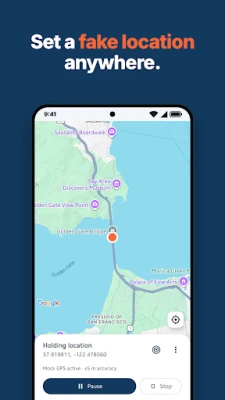
Long press anywhere on the map, or search for a place, and tap Simulate here. Your device reports that point until you stop.
FAKE GPS ROUTES
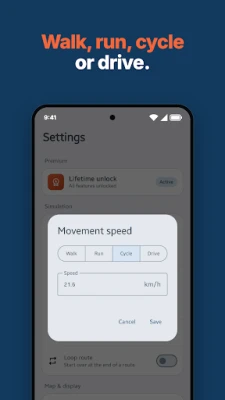
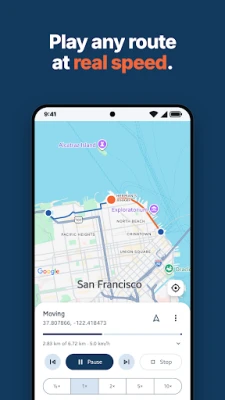
Tap places on the map to build a route, drag waypoints to adjust it, then play it back. Choose a walking, cycling or driving speed, pause, seek, or restart at any time. The camera follows the route, or you can view the whole path.
IMPORT GPX, KML, KMZ AND GEOJSON
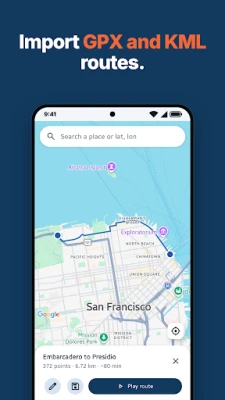
Open GPX tracks, routes and waypoints, KML and KMZ files from Google Earth and My Maps, or GeoJSON lines and points, from your files. Review the route on the map and save it to your Library to replay later.
A SIMPLE LOCATION CHANGER
• Google Maps with place search
• Point and route simulation in one screen
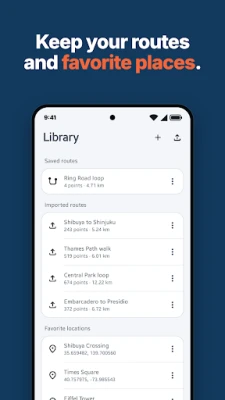
• Saved routes and favourite places
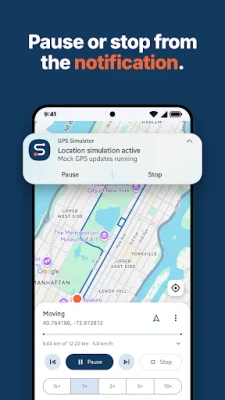
• Playback controls in the notification while a simulation runs
• No ads and no account
PRICING
Every feature is free for 1 day. After that, a one-time $4.99 purchase unlocks the app for good. There is no subscription.
HOW IT WORKS
GPS Simulator works like a GPS emulator built on Android's test-provider API. Turn on Developer options, open Select mock location app, and choose GPS Simulator. Other apps can see that the location is simulated; GPS Simulator does not hide this.
Use it for testing location-based apps, planning routes, and demos. Stop the simulation before you rely on your real location.
Privacy policy: https://nepali-indie-dev.github.io/gps-simulator/privacy-policy.html
Long press anywhere on the map, or search for a place, and tap Simulate here. Your device reports that point until you stop.
FAKE GPS ROUTES
Tap places on the map to build a route, drag waypoints to adjust it, then play it back. Choose a walking, cycling or driving speed, pause, seek, or restart at any time. The camera follows the route, or you can view the whole path.
IMPORT GPX, KML, KMZ AND GEOJSON
Open GPX tracks, routes and waypoints, KML and KMZ files from Google Earth and My Maps, or GeoJSON lines and points, from your files. Review the route on the map and save it to your Library to replay later.
A SIMPLE LOCATION CHANGER
• Google Maps with place search
• Point and route simulation in one screen
• Saved routes and favourite places
• Playback controls in the notification while a simulation runs
• No ads and no account
PRICING
Every feature is free for 1 day. After that, a one-time $4.99 purchase unlocks the app for good. There is no subscription.
HOW IT WORKS
GPS Simulator works like a GPS emulator built on Android's test-provider API. Turn on Developer options, open Select mock location app, and choose GPS Simulator. Other apps can see that the location is simulated; GPS Simulator does not hide this.
Use it for testing location-based apps, planning routes, and demos. Stop the simulation before you rely on your real location.
Privacy policy: https://nepali-indie-dev.github.io/gps-simulator/privacy-policy.html
Rate the App
Add Comment & Review
User Reviews
Based on 0 reviews
No reviews added yet.
Comments will not be approved to be posted if they are SPAM, abusive, off-topic, use profanity, contain a personal attack, or promote hate of any kind.












More »

Popular Apps

phpFoxPHPFOX LLC

Moon Chai StoryOlha Dobel

World War Heroes — WW2 PvP FPSAzur Interactive Games Limited

Govee LiteGovee

AvSeaAvionics Electronics Geeks!

Viking Clan: RagnarokKano Games

Vikings: War of ClansPlarium LLC

Build World AdventureExplore city in cube world

Asphalt 9: LegendsGameloft SE
Dawn of Zombies: Survival GameRoyal Ark
More »
Editor's Choice

Grim Soul: Dark Survival RPGBrickworks Games Ltd

Craft of Survival - Gladiators101XP LIMITED

Last Shelter: SurvivalLong Tech Network Limited
Dawn of Zombies: Survival GameRoyal Ark

Merge Survival : WastelandStickyHands Inc.

AoD Vikings: Valhalla GameRoboBot Studio
Viking Clan: RagnarokKano Games
Vikings: War of ClansPlarium LLC
Asphalt 9: LegendsGameloft SE

Modern Tanks: War Tank GamesXDEVS LTD