
Latest Version
Update
November 15, 2026
November 15, 2026
Developer
BebraSoft AI
BebraSoft AI
Categories
Tools
Tools
Platforms
Android
Android
Downloads
0
0
License
Free
Free
Package Name
com.bebrasoftai.findmyphone
com.bebrasoftai.findmyphone
Report
Report a Problem
Report a Problem
More About Find My Phone Anti Theft Alarm
Find My Phone Anti Theft Alarm
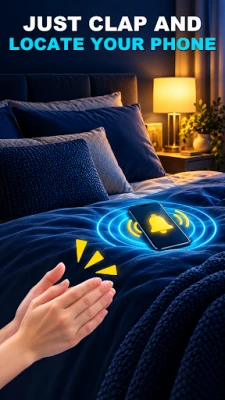
Can’t find your phone? Find My Phone helps you locate a nearby Android device by clap or whistle, and adds anti-theft alerts for extra awareness. Use the phone finder app when you have misplaced your phone under a cushion, in a bag, or somewhere in the room. When sound detection recognizes your clap or whistle, your device can ring, vibrate, or flash to help you find it.
👏 Find your phone by clap or whistle
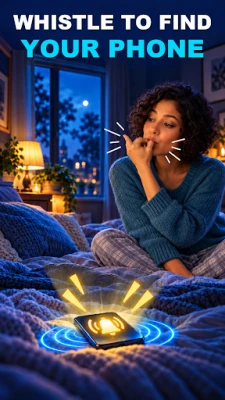
Turn on Find My Phone by Clap, Find My Phone by Whistle, or both. The Find My Phone by Clap Detector listens for a clear clap while detection is active. Prefer a whistle? Whistle to find your phone and let the selected alarm guide you to it. Use the clap finder tool when your hands are free, or the whistle finder when that cue is easier. Find Phone by Clap or Find Phone by Whistle to locate your own device nearby.
🔎 A lost phone finder for everyday moments
The lost phone finder can help when your phone is under furniture, on a desk, in a pocket, or in a dark room. Clap to find my phone, or whistle to trigger a ringtone, vibration, or flashlight alert. The Clap Find Phone with Flash feature can make a misplaced phone easier to spot in low light. This sound-based gadget finder and cell phone finder works by listening for the cue you choose; a GPS map or call from another phone is not needed for this nearby search. If you are wondering “Where is my phone?” or “How can I find my device?”, activate the feature and follow the alert.
🔔 Choose how your phone responds
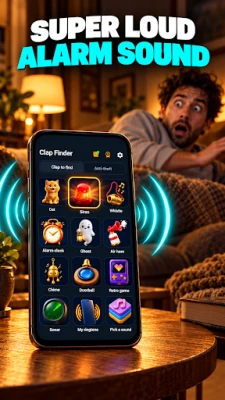
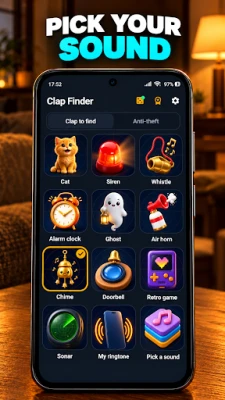
Pick a recognizable alarm, ringtone, or sound. Adjust clap sensitivity to suit your surroundings and use vibration or flash when you may not hear the ringtone. A clear clap or whistle works best; conversations, music, and other background noise may affect detection. Depending on your Android settings, the phone finder may respond while the device is set to silent or Do Not Disturb.
🛡 Anti-theft phone alarm and security alerts
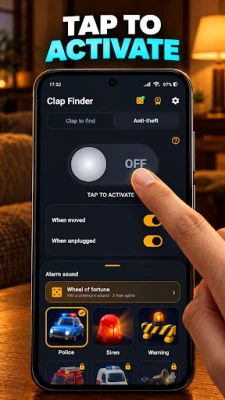
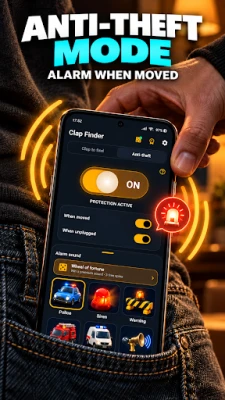
The anti-theft phone alarm combines phone finding with security alerts. Enable motion detection to sound an alert if the device is moved, and pocket detection to warn you if it is removed unexpectedly. The Don’t Touch My Phone alarm, also known as a phone touch alarm, can alert you when someone picks up or moves your phone.
Use password protection to add privacy when opening the app, and enable a wrong password alert to know when an incorrect password is entered. These anti-theft phone security alerts notify you of activity; they do not prevent theft or replace keeping your device secure.
🔋 Battery, charger, and accessory alerts
Set a battery full alarm to know when charging is complete. A charger removal alert, also called a charging removal alert, can notify you if the cable is disconnected while your phone is charging. The hands-free removal detection alarm can alert you if a connected hands-free accessory is unplugged.
⚙️ Quick setup
1. Open the app and choose clap, whistle, or the anti-theft alerts you want.
2. Select an alarm sound and adjust detection sensitivity.
3. Tap Activate for the feature you want to use.
4. Clap or whistle to find your phone, or place it down to activate a security alarm.
The app uses the microphone to listen for a clap or whistle while sound detection is active. Keep microphone permission enabled for phone-finding alerts. Background listening and alarm behavior may depend on Android device settings. If the phone does not respond, move closer, reduce noise, check that the selected feature is active, and adjust its sensitivity.
Find My Phone is a phone finder, clap finder, whistle finder, and anti-theft alarm app in one. Use it to find your phone by clap or whistle, or enable motion, pocket, password, battery, charger, and accessory alerts when needed.
👏 Find your phone by clap or whistle
Turn on Find My Phone by Clap, Find My Phone by Whistle, or both. The Find My Phone by Clap Detector listens for a clear clap while detection is active. Prefer a whistle? Whistle to find your phone and let the selected alarm guide you to it. Use the clap finder tool when your hands are free, or the whistle finder when that cue is easier. Find Phone by Clap or Find Phone by Whistle to locate your own device nearby.
🔎 A lost phone finder for everyday moments
The lost phone finder can help when your phone is under furniture, on a desk, in a pocket, or in a dark room. Clap to find my phone, or whistle to trigger a ringtone, vibration, or flashlight alert. The Clap Find Phone with Flash feature can make a misplaced phone easier to spot in low light. This sound-based gadget finder and cell phone finder works by listening for the cue you choose; a GPS map or call from another phone is not needed for this nearby search. If you are wondering “Where is my phone?” or “How can I find my device?”, activate the feature and follow the alert.
🔔 Choose how your phone responds
Pick a recognizable alarm, ringtone, or sound. Adjust clap sensitivity to suit your surroundings and use vibration or flash when you may not hear the ringtone. A clear clap or whistle works best; conversations, music, and other background noise may affect detection. Depending on your Android settings, the phone finder may respond while the device is set to silent or Do Not Disturb.
🛡 Anti-theft phone alarm and security alerts
The anti-theft phone alarm combines phone finding with security alerts. Enable motion detection to sound an alert if the device is moved, and pocket detection to warn you if it is removed unexpectedly. The Don’t Touch My Phone alarm, also known as a phone touch alarm, can alert you when someone picks up or moves your phone.
Use password protection to add privacy when opening the app, and enable a wrong password alert to know when an incorrect password is entered. These anti-theft phone security alerts notify you of activity; they do not prevent theft or replace keeping your device secure.
🔋 Battery, charger, and accessory alerts
Set a battery full alarm to know when charging is complete. A charger removal alert, also called a charging removal alert, can notify you if the cable is disconnected while your phone is charging. The hands-free removal detection alarm can alert you if a connected hands-free accessory is unplugged.
⚙️ Quick setup
1. Open the app and choose clap, whistle, or the anti-theft alerts you want.
2. Select an alarm sound and adjust detection sensitivity.
3. Tap Activate for the feature you want to use.
4. Clap or whistle to find your phone, or place it down to activate a security alarm.
The app uses the microphone to listen for a clap or whistle while sound detection is active. Keep microphone permission enabled for phone-finding alerts. Background listening and alarm behavior may depend on Android device settings. If the phone does not respond, move closer, reduce noise, check that the selected feature is active, and adjust its sensitivity.
Find My Phone is a phone finder, clap finder, whistle finder, and anti-theft alarm app in one. Use it to find your phone by clap or whistle, or enable motion, pocket, password, battery, charger, and accessory alerts when needed.
Rate the App
Add Comment & Review
User Reviews
Based on 0 reviews
No reviews added yet.
Comments will not be approved to be posted if they are SPAM, abusive, off-topic, use profanity, contain a personal attack, or promote hate of any kind.












More »

Popular Apps

phpFoxPHPFOX LLC

Moon Chai StoryOlha Dobel

World War Heroes — WW2 PvP FPSAzur Interactive Games Limited

Govee LiteGovee

AvSeaAvionics Electronics Geeks!

Viking Clan: RagnarokKano Games

Vikings: War of ClansPlarium LLC

Build World AdventureExplore city in cube world

Asphalt 9: LegendsGameloft SE

Dawn of Zombies: Survival GameRoyal Ark
More »
Editor's Choice

Grim Soul: Dark Survival RPGBrickworks Games Ltd

Craft of Survival - Gladiators101XP LIMITED

Last Shelter: SurvivalLong Tech Network Limited
Dawn of Zombies: Survival GameRoyal Ark

Merge Survival : WastelandStickyHands Inc.

AoD Vikings: Valhalla GameRoboBot Studio
Viking Clan: RagnarokKano Games
Vikings: War of ClansPlarium LLC
Asphalt 9: LegendsGameloft SE

Modern Tanks: War Tank GamesXDEVS LTD