Latest Version
Update
November 14, 2026
November 14, 2026
Developer
SkyWei
SkyWei
Categories
Tools
Tools
Platforms
Android
Android
Downloads
0
0
License
Free
Free
Package Name
com.sky.android.control
com.sky.android.control
Report
Report a Problem
Report a Problem
More About Bluetooth Remote
Bluetooth Remote is a standard remote control utility app developed based on the Bluetooth HID protocol and device infrared specifications.
1. A mobile tool app that lets you control authorized TVs, tablets, computers and other compatible devices through your phone's Bluetooth connection.
2. If your phone supports infrared, you can control standard home TVs through the phone's built-in infrared function.
Bluetooth Remote is currently divided into 9 functional modules:
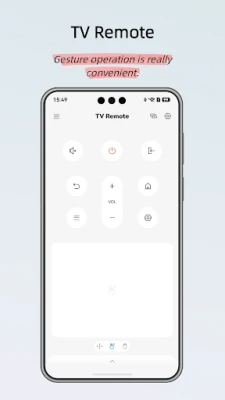
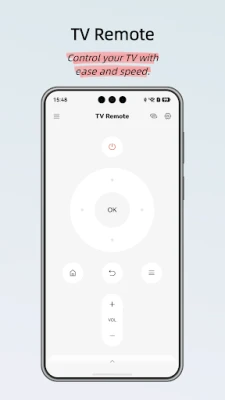
1. TV Remote - after connecting to the TV via Bluetooth, you can operate the TV from the TV remote interface, achieving the same daily control as the TV's original remote.
2. TV Remote (Infrared Version) - if your phone supports infrared, control standard household TVs through the phone's local infrared function.
3. Mouse/Touchpad - after connecting to a computer via Bluetooth, you can operate the computer from the mouse/touchpad interface, achieving the same control as a standard wired or wireless mouse.
4. Computer Keyboard - after connecting to a computer via Bluetooth, you can operate the computer from the keyboard interface, achieving the same text input control as a standard keyboard.
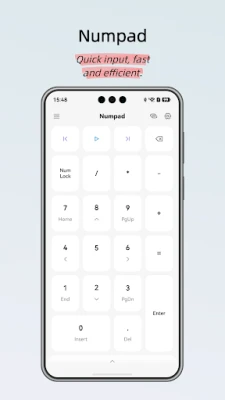
5. Numeric Keypad - after connecting to a computer via Bluetooth, you can operate the computer from the numeric keypad interface, achieving the same control as a standard wireless numeric keypad.
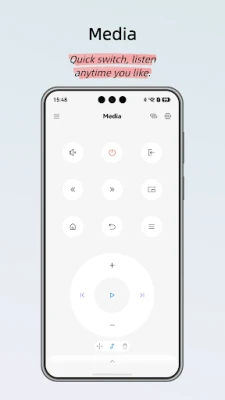
6. Multimedia - after connecting to a computer via Bluetooth, you can play/pause music and adjust the volume from the multimedia interface.
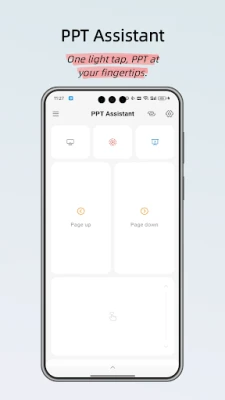
7. PPT Assistant - after connecting to a computer via Bluetooth, open the PPT software on the computer and you can wirelessly control slide playback from the PPT Assistant interface for presentations.
8. Camera Assistant - after connecting to a phone via Bluetooth, open the camera app on the phone and you can wirelessly trigger the camera shutter from the Camera Assistant interface.
9. Barcode Scan Assistant - after connecting to a computer via Bluetooth, it acts as a standard wireless scanner to input the scanned barcode text into your computer software's active input field.
2. If your phone supports infrared, you can control standard home TVs through the phone's built-in infrared function.
Bluetooth Remote is currently divided into 9 functional modules:
1. TV Remote - after connecting to the TV via Bluetooth, you can operate the TV from the TV remote interface, achieving the same daily control as the TV's original remote.
2. TV Remote (Infrared Version) - if your phone supports infrared, control standard household TVs through the phone's local infrared function.
3. Mouse/Touchpad - after connecting to a computer via Bluetooth, you can operate the computer from the mouse/touchpad interface, achieving the same control as a standard wired or wireless mouse.
4. Computer Keyboard - after connecting to a computer via Bluetooth, you can operate the computer from the keyboard interface, achieving the same text input control as a standard keyboard.
5. Numeric Keypad - after connecting to a computer via Bluetooth, you can operate the computer from the numeric keypad interface, achieving the same control as a standard wireless numeric keypad.
6. Multimedia - after connecting to a computer via Bluetooth, you can play/pause music and adjust the volume from the multimedia interface.
7. PPT Assistant - after connecting to a computer via Bluetooth, open the PPT software on the computer and you can wirelessly control slide playback from the PPT Assistant interface for presentations.
8. Camera Assistant - after connecting to a phone via Bluetooth, open the camera app on the phone and you can wirelessly trigger the camera shutter from the Camera Assistant interface.
9. Barcode Scan Assistant - after connecting to a computer via Bluetooth, it acts as a standard wireless scanner to input the scanned barcode text into your computer software's active input field.
Rate the App
Add Comment & Review
User Reviews
Based on 0 reviews
No reviews added yet.
Comments will not be approved to be posted if they are SPAM, abusive, off-topic, use profanity, contain a personal attack, or promote hate of any kind.










More »

Popular Apps

phpFoxPHPFOX LLC

Moon Chai StoryOlha Dobel

World War Heroes — WW2 PvP FPSAzur Interactive Games Limited

Govee LiteGovee

AvSeaAvionics Electronics Geeks!

Viking Clan: RagnarokKano Games

Vikings: War of ClansPlarium LLC

Build World AdventureExplore city in cube world

Asphalt 9: LegendsGameloft SE

Dawn of Zombies: Survival GameRoyal Ark
More »
Editor's Choice

Grim Soul: Dark Survival RPGBrickworks Games Ltd

Craft of Survival - Gladiators101XP LIMITED

Last Shelter: SurvivalLong Tech Network Limited
Dawn of Zombies: Survival GameRoyal Ark

Merge Survival : WastelandStickyHands Inc.

AoD Vikings: Valhalla GameRoboBot Studio
Viking Clan: RagnarokKano Games
Vikings: War of ClansPlarium LLC
Asphalt 9: LegendsGameloft SE

Modern Tanks: War Tank GamesXDEVS LTD