
Latest Version
Update
August 25, 2026
August 25, 2026
Developer
KingMaker Apps
KingMaker Apps
Categories
Productivity
Productivity
Platforms
Android
Android
Downloads
1
1
License
Free
Free
Package Name
com.alex.excel.reader.editor
com.alex.excel.reader.editor
Report
Report a Problem
Report a Problem
More About Excel Reader: XLS Editor
Open, Edit, Create and Manage Excel Spreadsheets with Ease
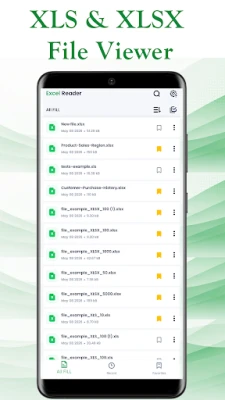
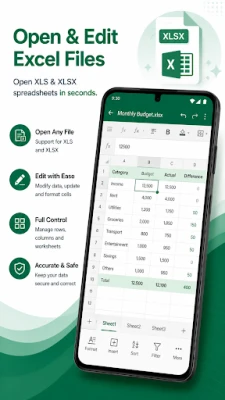
Excel Reader: XLS Editor is a powerful spreadsheet editor and Excel file manager that helps you open, edit, create, and organize XLS and XLSX files on your Android device. Whether you're working on business reports, financial spreadsheets, school assignments, invoices, or personal budgets, Excel Reader gives you the tools you need to stay productive anytime, anywhere.
Designed for students, professionals, accountants, business owners, teachers, office workers, and anyone who works with spreadsheets, the app combines fast performance with professional editing tools in an intuitive and easy-to-use interface.
Open Excel Files Instantly
Quickly open and view Excel spreadsheets stored on your device, downloaded from the web, received as email attachments, or shared from other apps.
• Open XLS files
• Open XLSX files
• View large spreadsheets smoothly
• Read workbooks from device storage
• Open email attachments directly
• Access recently opened files
• Fast document loading
• Offline spreadsheet access
Powerful Spreadsheet Editing
Edit your spreadsheets with professional tools designed for everyday work.
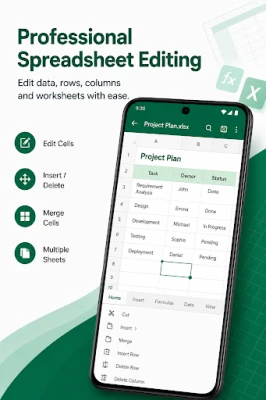
• Edit existing Excel files
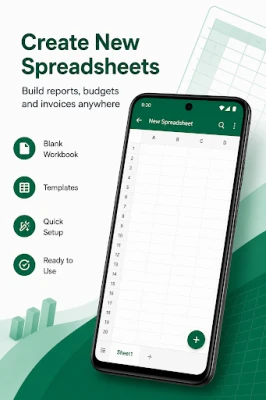
• Create new spreadsheets
• Update cell values
• Copy and paste cells
• Undo and redo changes
• Insert and delete rows
• Insert and delete columns
• Merge and unmerge cells
• Rename worksheets
• Add, duplicate, and delete sheets
Professional Formatting Tools
Create clean and professional spreadsheets with flexible formatting options.
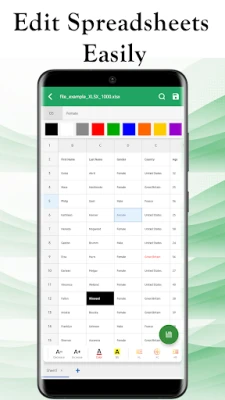
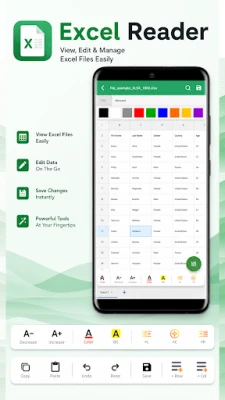
• Change fonts and text size
• Apply bold, italic, and underline
• Adjust text alignment
• Customize cell colors
• Add borders and styles
• Format numbers, currency, dates, and percentages
• Resize rows and columns
Work with Formulas and Charts
Manage calculations and visualize your data more effectively.
• Create formulas
• Edit formulas
• Update calculations
• View charts
• Create charts
• Edit charts
Organize Your Data Efficiently
Keep your spreadsheets organized and easy to manage.
• Sort data
• Filter data
• Freeze panes
• Search within spreadsheets
• Navigate worksheets quickly
• Manage multiple workbooks
Export, Print and Share
Work wherever you are and share your files with ease.
• Save changes instantly
• Export spreadsheets as PDF
• Print spreadsheets
• Share Excel documents with others
Why Choose Excel Reader: XLS Editor?
✓ Fast and lightweight performance
✓ Open, edit and create Excel spreadsheets
✓ Supports XLS and XLSX formats
✓ Professional spreadsheet editing tools
✓ Simple and modern interface
✓ Offline support
✓ Easy file management
✓ Quick document access
✓ Optimized for phones and tablets
✓ Suitable for work, school and personal use
Whether you're updating financial reports, reviewing business documents, editing school assignments, managing inventory, tracking expenses, or organizing personal data, Excel Reader: XLS Editor provides a complete spreadsheet experience right from your Android device.
Download Excel Reader: XLS Editor today and enjoy a fast, reliable, and professional way to open, edit, create, and manage Excel spreadsheets anytime, anywhere.
Disclaimer
This app is an independent application and is not affiliated with, sponsored by, authorized by, or endorsed by Microsoft Corporation or any other third-party company.
Microsoft Excel®, XLS®, XLSX®, and all related trademarks are the property of their respective owners and are used solely to describe compatibility with supported file formats.
Designed for students, professionals, accountants, business owners, teachers, office workers, and anyone who works with spreadsheets, the app combines fast performance with professional editing tools in an intuitive and easy-to-use interface.
Open Excel Files Instantly
Quickly open and view Excel spreadsheets stored on your device, downloaded from the web, received as email attachments, or shared from other apps.
• Open XLS files
• Open XLSX files
• View large spreadsheets smoothly
• Read workbooks from device storage
• Open email attachments directly
• Access recently opened files
• Fast document loading
• Offline spreadsheet access
Powerful Spreadsheet Editing
Edit your spreadsheets with professional tools designed for everyday work.
• Edit existing Excel files
• Create new spreadsheets
• Update cell values
• Copy and paste cells
• Undo and redo changes
• Insert and delete rows
• Insert and delete columns
• Merge and unmerge cells
• Rename worksheets
• Add, duplicate, and delete sheets
Professional Formatting Tools
Create clean and professional spreadsheets with flexible formatting options.
• Change fonts and text size
• Apply bold, italic, and underline
• Adjust text alignment
• Customize cell colors
• Add borders and styles
• Format numbers, currency, dates, and percentages
• Resize rows and columns
Work with Formulas and Charts
Manage calculations and visualize your data more effectively.
• Create formulas
• Edit formulas
• Update calculations
• View charts
• Create charts
• Edit charts
Organize Your Data Efficiently
Keep your spreadsheets organized and easy to manage.
• Sort data
• Filter data
• Freeze panes
• Search within spreadsheets
• Navigate worksheets quickly
• Manage multiple workbooks
Export, Print and Share
Work wherever you are and share your files with ease.
• Save changes instantly
• Export spreadsheets as PDF
• Print spreadsheets
• Share Excel documents with others
Why Choose Excel Reader: XLS Editor?
✓ Fast and lightweight performance
✓ Open, edit and create Excel spreadsheets
✓ Supports XLS and XLSX formats
✓ Professional spreadsheet editing tools
✓ Simple and modern interface
✓ Offline support
✓ Easy file management
✓ Quick document access
✓ Optimized for phones and tablets
✓ Suitable for work, school and personal use
Whether you're updating financial reports, reviewing business documents, editing school assignments, managing inventory, tracking expenses, or organizing personal data, Excel Reader: XLS Editor provides a complete spreadsheet experience right from your Android device.
Download Excel Reader: XLS Editor today and enjoy a fast, reliable, and professional way to open, edit, create, and manage Excel spreadsheets anytime, anywhere.
Disclaimer
This app is an independent application and is not affiliated with, sponsored by, authorized by, or endorsed by Microsoft Corporation or any other third-party company.
Microsoft Excel®, XLS®, XLSX®, and all related trademarks are the property of their respective owners and are used solely to describe compatibility with supported file formats.
Rate the App
Add Comment & Review
User Reviews
Based on 0 reviews
No reviews added yet.
Comments will not be approved to be posted if they are SPAM, abusive, off-topic, use profanity, contain a personal attack, or promote hate of any kind.














More »

Popular Apps

phpFoxPHPFOX LLC

Moon Chai StoryOlha Dobel

World War Heroes — WW2 PvP FPSAzur Interactive Games Limited

Govee LiteGovee

AvSeaAvionics Electronics Geeks!

Viking Clan: RagnarokKano Games

Vikings: War of ClansPlarium LLC

Build World AdventureExplore city in cube world

Asphalt 9: LegendsGameloft SE

Dawn of Zombies: Survival GameRoyal Ark
More »
Editor's Choice

Grim Soul: Dark Survival RPGBrickworks Games Ltd

Craft of Survival - Gladiators101XP LIMITED

Last Shelter: SurvivalLong Tech Network Limited
Dawn of Zombies: Survival GameRoyal Ark

Merge Survival : WastelandStickyHands Inc.

AoD Vikings: Valhalla GameRoboBot Studio
Viking Clan: RagnarokKano Games
Vikings: War of ClansPlarium LLC
Asphalt 9: LegendsGameloft SE

Modern Tanks: War Tank GamesXDEVS LTD