

Latest Version
Update
September 15, 2026
September 15, 2026
Developer
RealPainPoints
RealPainPoints
Categories
Productivity
Productivity
Platforms
Android
Android
Downloads
1
1
License
Free
Free
Package Name
com.bonkalarm.app
com.bonkalarm.app
Report
Report a Problem
Report a Problem
More About Ember: Alarm Clock & Wake Up
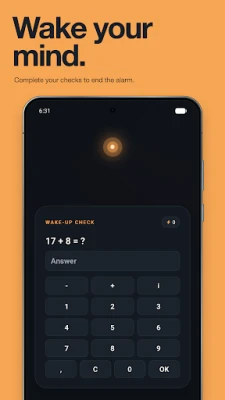
Turn off your alarm half-asleep, then fall back asleep? Ember keeps your wake-up active until you finish the checks you chose. Silencing the sound is only the beginning.
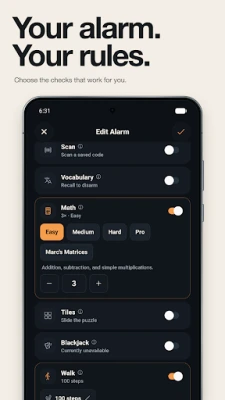
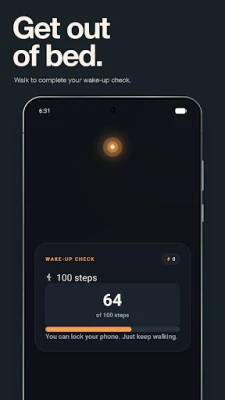
Walk a few steps. Scan the barcode on your toothpaste. Solve a puzzle. Choose one check or combine several into a routine that gets you moving.
FIVE WAYS TO WAKE UP
• Walk: set a step target. Ember stays quiet while you move and can ring again if you stop before finishing.
• Scan: save a barcode or QR code away from your bed, then get up and scan it.
• Math: choose your difficulty and question count, from quick sums to harder problems.
• Tiles: put a 3×3 or 4×4 sliding puzzle back in order.
• Vocabulary: practice your own word pairs while you wake up.
YOUR ALARM, YOUR ROUTINE
Set the time, repeat days and checks separately for each alarm. Skip individual dates without deleting your schedule. If you want a planned pause, enable one-time snooze. An optional Emergency Override lets you end a wake-up with your chosen passphrase.
MAKE YOUR PROGRESS VISIBLE
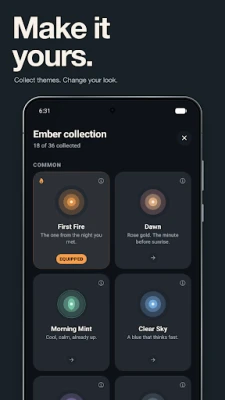
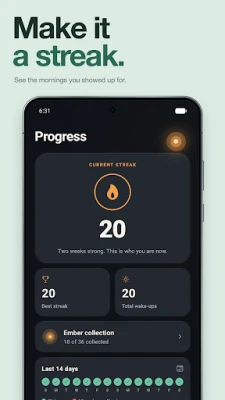
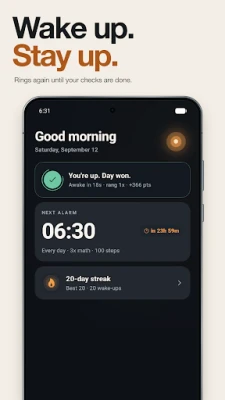
Build a streak, see your wake-up history and beat your own scores. Add friends for a little morning competition. Unlock collectible embers and themes as you reach milestones.
BUILT AROUND YOUR DEVICE
Alarms and checks run on your device. You do not need an Ember account; an optional account adds cloud backup and friend features. Camera access is used for scanning, and physical activity access for walking.
Allow alarm and notification access during setup. Full-screen alarm access and battery settings can affect wake-ups on Android; Ember guides you through the relevant settings.
MEMBERSHIP
Full access requires a paid Ember membership. Choose a monthly or annual subscription, or a one-time Lifetime purchase. Available plans and local prices are shown in the app before purchase. Subscriptions renew automatically until cancelled in your Google Play account. Trial eligibility, when offered, is confirmed by the store.
Privacy: https://emberalarm.com/en/privacy
Terms: https://emberalarm.com/en/terms
Support: [email protected]
FIVE WAYS TO WAKE UP
• Walk: set a step target. Ember stays quiet while you move and can ring again if you stop before finishing.
• Scan: save a barcode or QR code away from your bed, then get up and scan it.
• Math: choose your difficulty and question count, from quick sums to harder problems.
• Tiles: put a 3×3 or 4×4 sliding puzzle back in order.
• Vocabulary: practice your own word pairs while you wake up.
YOUR ALARM, YOUR ROUTINE
Set the time, repeat days and checks separately for each alarm. Skip individual dates without deleting your schedule. If you want a planned pause, enable one-time snooze. An optional Emergency Override lets you end a wake-up with your chosen passphrase.
MAKE YOUR PROGRESS VISIBLE
Build a streak, see your wake-up history and beat your own scores. Add friends for a little morning competition. Unlock collectible embers and themes as you reach milestones.
BUILT AROUND YOUR DEVICE
Alarms and checks run on your device. You do not need an Ember account; an optional account adds cloud backup and friend features. Camera access is used for scanning, and physical activity access for walking.
Allow alarm and notification access during setup. Full-screen alarm access and battery settings can affect wake-ups on Android; Ember guides you through the relevant settings.
MEMBERSHIP
Full access requires a paid Ember membership. Choose a monthly or annual subscription, or a one-time Lifetime purchase. Available plans and local prices are shown in the app before purchase. Subscriptions renew automatically until cancelled in your Google Play account. Trial eligibility, when offered, is confirmed by the store.
Privacy: https://emberalarm.com/en/privacy
Terms: https://emberalarm.com/en/terms
Support: [email protected]
Rate the App
Add Comment & Review
User Reviews
Based on 0 reviews
No reviews added yet.
Comments will not be approved to be posted if they are SPAM, abusive, off-topic, use profanity, contain a personal attack, or promote hate of any kind.











More »

Popular Apps

phpFoxPHPFOX LLC

Moon Chai StoryOlha Dobel

World War Heroes — WW2 PvP FPSAzur Interactive Games Limited

Govee LiteGovee

AvSeaAvionics Electronics Geeks!

Viking Clan: RagnarokKano Games

Vikings: War of ClansPlarium LLC

Build World AdventureExplore city in cube world

Asphalt 9: LegendsGameloft SE

Dawn of Zombies: Survival GameRoyal Ark
More »
Editor's Choice

Grim Soul: Dark Survival RPGBrickworks Games Ltd

Craft of Survival - Gladiators101XP LIMITED

Last Shelter: SurvivalLong Tech Network Limited
Dawn of Zombies: Survival GameRoyal Ark

Merge Survival : WastelandStickyHands Inc.

AoD Vikings: Valhalla GameRoboBot Studio
Viking Clan: RagnarokKano Games
Vikings: War of ClansPlarium LLC
Asphalt 9: LegendsGameloft SE

Modern Tanks: War Tank GamesXDEVS LTD