

Latest Version
Update
December 07, 2025
December 07, 2025
Developer
Million Dollar
Million Dollar
Categories
Tools
Tools
Platforms
Android
Android
Downloads
0
0
License
Free
Free
Package Name
backup.and.restore.my.contacts
backup.and.restore.my.contacts
Report
Report a Problem
Report a Problem
More About Contact Backup PDF VCF & Excel
How to Use the App – Step by Step
Step 1: Grant Permissions
After installing the app, open it.
Allow access to your contacts when prompted to enable backup functionality.
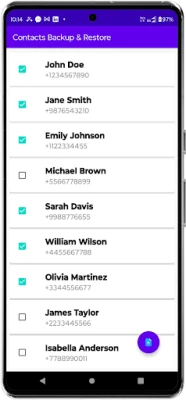
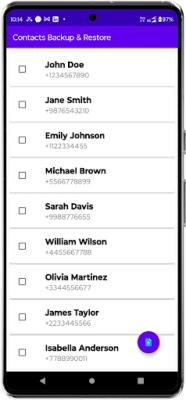
Step 2: Locate the Floating Action Button
Look for the floating action button at the bottom right corner of the screen.
This button is used to start the export process.
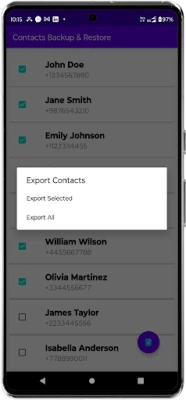
Step 3: Choose Your Export Option
Tap the floating action button to open the export menu.
Select one of the following options:
Export All: Backup all your saved contacts.
Export Selected: Manually choose specific contacts to export.
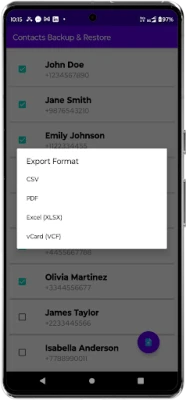
Step 4: Select Your Preferred Format
Choose the file format in which you want to save your contacts.
Available formats: Excel, PDF, CSV, or VCard (VCF).
Step 5: Access Your Exported Files
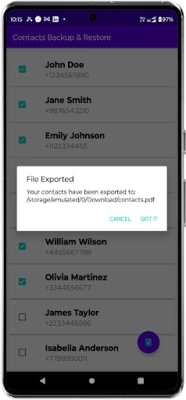
Once the export is complete, the backup file will be saved in the Downloads folder on your device.
You can access, share, or store the file for future use.
Additional Feature
The app works completely offline, so no internet connection is required for contact backup.
After installing the app, open it.
Allow access to your contacts when prompted to enable backup functionality.
Step 2: Locate the Floating Action Button
Look for the floating action button at the bottom right corner of the screen.
This button is used to start the export process.
Step 3: Choose Your Export Option
Tap the floating action button to open the export menu.
Select one of the following options:
Export All: Backup all your saved contacts.
Export Selected: Manually choose specific contacts to export.
Step 4: Select Your Preferred Format
Choose the file format in which you want to save your contacts.
Available formats: Excel, PDF, CSV, or VCard (VCF).
Step 5: Access Your Exported Files
Once the export is complete, the backup file will be saved in the Downloads folder on your device.
You can access, share, or store the file for future use.
Additional Feature
The app works completely offline, so no internet connection is required for contact backup.
Rate the App
Add Comment & Review
User Reviews
Based on 0 reviews
No reviews added yet.
Comments will not be approved to be posted if they are SPAM, abusive, off-topic, use profanity, contain a personal attack, or promote hate of any kind.











More »

Popular Apps

Moon Chai StoryOlha Dobel

phpFoxPHPFOX LLC

Govee LiteGovee

World War Heroes — WW2 PvP FPSAzur Interactive Games Limited

Build World AdventureExplore city in cube world

Viking Clan: RagnarokKano Games

Vikings: War of ClansPlarium LLC

Asphalt 9: LegendsGameloft SE

Submarine Car Diving SimulatorSwim with dolphins & penguins

Union VPN - Secure VPN ProxyPureBrowser
More »
Editor's Choice

Grim Soul: Dark Survival RPGBrickworks Games Ltd

Craft of Survival - Gladiators101XP LIMITED

Last Shelter: SurvivalLong Tech Network Limited

Dawn of Zombies: Survival GameRoyal Ark

Merge Survival : WastelandStickyHands Inc.

AoD Vikings: Valhalla GameRoboBot Studio
Viking Clan: RagnarokKano Games
Vikings: War of ClansPlarium LLC
Asphalt 9: LegendsGameloft SE

Modern Tanks: War Tank GamesXDEVS LTD