
Latest Version
Update
April 08, 2026
April 08, 2026
Developer
RbTech Apps
RbTech Apps
Categories
Tools
Tools
Platforms
Android
Android
Downloads
1
1
License
Free
Free
Package Name
com.recover.chat.messages.status.nk.app
com.recover.chat.messages.status.nk.app
Report
Report a Problem
Report a Problem
More About Recover Deleted Messages App
➤ Retrieve and View Deleted Messages and Media with Ease
➤ Accidentally deleted an important message or a status photo/video?
➤ Want to review what was removed before it’s gone?
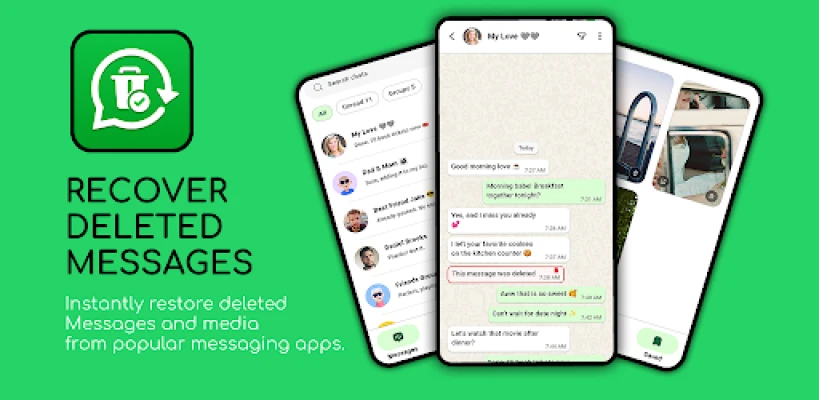
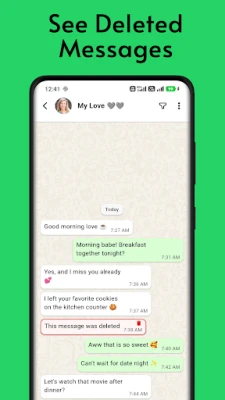
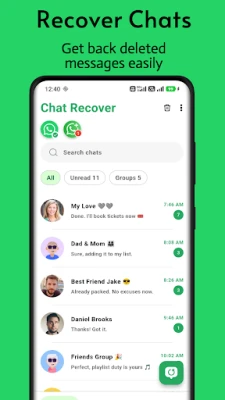
Chat Recover helps you recover and review deleted chat message text and status media (photos/videos) using notification access and the folder you select in Android.
Q: Can I recover deleted messages?
A: Yes. When deleted-message information is available from notification history, Chat Recover shows the recovered text inside the app.
Q: How do I recover deleted messages?
A: Enable notification access in Android settings, and grant folder access for status photos/videos. When a message or status item is deleted, Chat Recover helps you review the available information.
Moreover… Do you want?
➤ Read messages without being seen?
➤ Read messages even others deleted right away?
ChatRecover: Recover Deleted Messages & Status Media in one place. Restore recovered text and save status photos/videos from the viewer so you can view and share them later. 100% FREE!
Status Saver
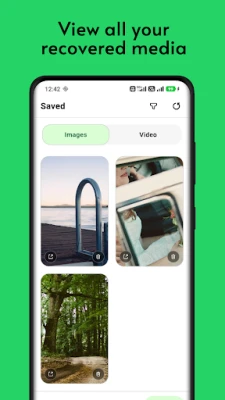
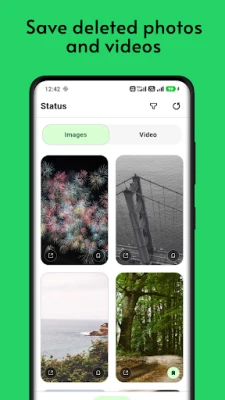
➤ Save status photos/videos from the status viewer, then download, view, and share your saved items when you want.
Key Features:
1) Recover deleted chat messages
➤ Review deleted message text using notification access.
2) Download & Bookmark the Status
➤ Easily save and bookmark important moments with status updates, ensuring you never miss a thing.
3) Real-time notification monitoring
➤ Get faster recovery when deletion-related notification information is still available.
4) On-device only
➤ Recovered content is stored locally on your device, and you can clear it anytime from inside the app.
How it Works:
➤ Notification Access: This permission allows the app to monitor notifications on your device, so it can help detect when messages (or related content) are deleted, if still available.
➤ Storage Permission: This permission is used to store status media (photos and videos) locally on your device for easy recovery and viewing inside the app.
➤ Ignore Battery Optimization: To ensure smooth background operation, the app can request to run with fewer battery restrictions (only if you enable it).
➤ Enable Auto-Start: Allows the app to start automatically when your device boots for continuous operation.
➤ Folder Access: Allow the app to view and manage the folder/location you select in Android settings for status media inside Chat Recover.
Privacy Commitment:
➤ Chat Recover cannot access deleted messages directly. It can only save messages from notifications before they are deleted.
Why Choose?
➤ Losing important content is frustrating. With Chat Recover, you can attempt to retrieve deleted messages and status media, or save status media you want to keep. Keep your memories and important moments safe.
Why Some Messages Can't Be Recovered?
➤ Notification access or required permissions are not enabled.
➤ The conversation was muted, so recovery details may not be captured.
➤ You were not viewing the chat at the time the message was deleted.
➤ Messages deleted before you installed Chat Recover cannot be restored.
Download Chat Recover: Recover Deleted Messages now and view available deleted message details inside the app quickly.
Disclaimer:
➤ All product names, logos, brands, trademarks, and registered trademarks not owned by us are the property of their respective owners. Any company, product, or service names mentioned within the app are for identification purposes only. The use of these names does not imply endorsement or affiliation. Chat Recover is independently owned and is not affiliated with any other apps or companies.
➤ Want to review what was removed before it’s gone?
Chat Recover helps you recover and review deleted chat message text and status media (photos/videos) using notification access and the folder you select in Android.
Q: Can I recover deleted messages?
A: Yes. When deleted-message information is available from notification history, Chat Recover shows the recovered text inside the app.
Q: How do I recover deleted messages?
A: Enable notification access in Android settings, and grant folder access for status photos/videos. When a message or status item is deleted, Chat Recover helps you review the available information.
Moreover… Do you want?
➤ Read messages without being seen?
➤ Read messages even others deleted right away?
ChatRecover: Recover Deleted Messages & Status Media in one place. Restore recovered text and save status photos/videos from the viewer so you can view and share them later. 100% FREE!
Status Saver
➤ Save status photos/videos from the status viewer, then download, view, and share your saved items when you want.
Key Features:
1) Recover deleted chat messages
➤ Review deleted message text using notification access.
2) Download & Bookmark the Status
➤ Easily save and bookmark important moments with status updates, ensuring you never miss a thing.
3) Real-time notification monitoring
➤ Get faster recovery when deletion-related notification information is still available.
4) On-device only
➤ Recovered content is stored locally on your device, and you can clear it anytime from inside the app.
How it Works:
➤ Notification Access: This permission allows the app to monitor notifications on your device, so it can help detect when messages (or related content) are deleted, if still available.
➤ Storage Permission: This permission is used to store status media (photos and videos) locally on your device for easy recovery and viewing inside the app.
➤ Ignore Battery Optimization: To ensure smooth background operation, the app can request to run with fewer battery restrictions (only if you enable it).
➤ Enable Auto-Start: Allows the app to start automatically when your device boots for continuous operation.
➤ Folder Access: Allow the app to view and manage the folder/location you select in Android settings for status media inside Chat Recover.
Privacy Commitment:
➤ Chat Recover cannot access deleted messages directly. It can only save messages from notifications before they are deleted.
Why Choose?
➤ Losing important content is frustrating. With Chat Recover, you can attempt to retrieve deleted messages and status media, or save status media you want to keep. Keep your memories and important moments safe.
Why Some Messages Can't Be Recovered?
➤ Notification access or required permissions are not enabled.
➤ The conversation was muted, so recovery details may not be captured.
➤ You were not viewing the chat at the time the message was deleted.
➤ Messages deleted before you installed Chat Recover cannot be restored.
Download Chat Recover: Recover Deleted Messages now and view available deleted message details inside the app quickly.
Disclaimer:
➤ All product names, logos, brands, trademarks, and registered trademarks not owned by us are the property of their respective owners. Any company, product, or service names mentioned within the app are for identification purposes only. The use of these names does not imply endorsement or affiliation. Chat Recover is independently owned and is not affiliated with any other apps or companies.
Rate the App
Add Comment & Review
User Reviews
Based on 0 reviews
No reviews added yet.
Comments will not be approved to be posted if they are SPAM, abusive, off-topic, use profanity, contain a personal attack, or promote hate of any kind.















More »

Popular Apps

phpFoxPHPFOX LLC

Moon Chai StoryOlha Dobel

World War Heroes — WW2 PvP FPSAzur Interactive Games Limited

Govee LiteGovee

Build World AdventureExplore city in cube world

Viking Clan: RagnarokKano Games

Vikings: War of ClansPlarium LLC

Asphalt 9: LegendsGameloft SE

Submarine Car Diving SimulatorSwim with dolphins & penguins

Dawn of Zombies: Survival GameRoyal Ark
More »
Editor's Choice

Grim Soul: Dark Survival RPGBrickworks Games Ltd

Craft of Survival - Gladiators101XP LIMITED

Last Shelter: SurvivalLong Tech Network Limited
Dawn of Zombies: Survival GameRoyal Ark

Merge Survival : WastelandStickyHands Inc.

AoD Vikings: Valhalla GameRoboBot Studio
Viking Clan: RagnarokKano Games
Vikings: War of ClansPlarium LLC
Asphalt 9: LegendsGameloft SE

Modern Tanks: War Tank GamesXDEVS LTD