

Latest Version
Update
November 28, 2026
Developer
EmirElçi
Categories
Tools
Platforms
Android
Downloads
0
License
Free
Package Name
com.panzs.calculator
Report
Report a Problem
More About Calculator Vault: Photo Lock
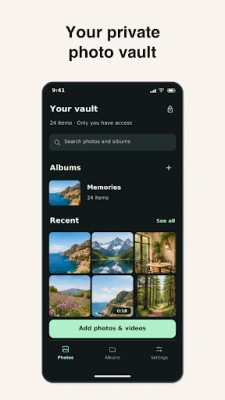
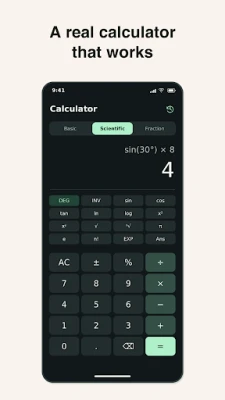
Calculator Vault looks and works like a real calculator. Enter your secret PIN and press "=" to open a private, encrypted vault for your photos and videos.
Most calculator vault apps make you choose: a calculator buried in ads, or a vault that loses your files. We built this app to fix both.
A REAL CALCULATOR, NOT JUST A DISGUISE
• Basic and scientific calculator (trig, log, powers, roots, parentheses)
• Fraction and percentage calculator
• Calculation history you can scroll, copy and reuse
• No ads while you calculate. Ever.
A VAULT YOU CAN TRUST
• Photo lock with AES-256 encryption for every photo and video
• Files stay on your device. No account, no tracking
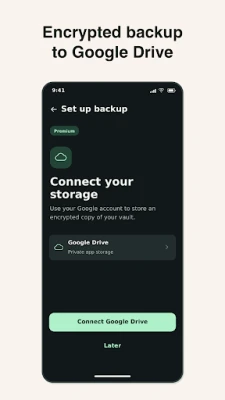
• Encrypted backup to your own Google Drive, so changing phones or reinstalling never wipes your vault
• Recycle Bin: deleted files are kept for 30 days before they're gone for good
• Simple PIN recovery with your email, no secret codes
PRIVACY TOOLS THAT MATTER
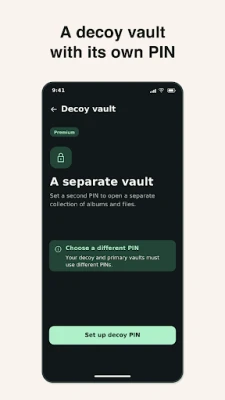
• Decoy vault: a second PIN opens a fake vault
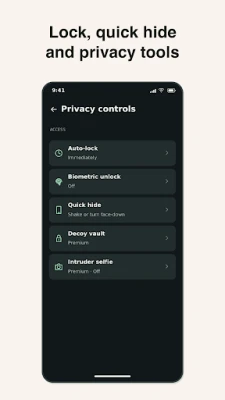
• Intruder selfie: see who tried a wrong PIN
• Fingerprint and face unlock
• Quick hide: flip or shake your phone to close the vault instantly
• Hide the app from recent apps
ORGANIZED, NOT MESSY
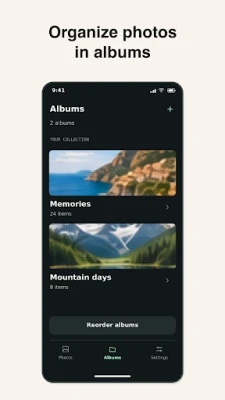
• Albums with drag-and-drop sorting
• Search your albums
• The viewer remembers where you left off, even in albums with thousands of photos
• Import straight from your gallery, camera or files
• Move files back to your gallery in one tap
FAIR PRICING
The calculator is free forever. The vault is free for your first 100 items.
Upgrade once with Lifetime Premium, or choose a yearly plan. No weekly subscriptions and no surprise charges.
HOW TO START
1. Open the app and set a 4–8 digit PIN.
2. Type your PIN on the calculator and press "=".
3. Add photos and videos. They're hidden from your gallery right away.
Call it a secret calculator, a calculator lock or a photo vault: it's for people who want a clean calculator and a private place for their photos and videos, without the clutter.
Rate the App
Add Comment & Review
User Reviews
Based on 0 reviews
No reviews added yet.
Comments will not be approved to be posted if they are SPAM, abusive, off-topic, use profanity, contain a personal attack, or promote hate of any kind.












More »

Popular Apps

phpFoxPHPFOX LLC

Moon Chai StoryOlha Dobel

World War Heroes — WW2 PvP FPSAzur Interactive Games Limited

Govee LiteGovee

AvSeaAvionics Electronics Geeks!

Viking Clan: RagnarokKano Games

Vikings: War of ClansPlarium LLC

Build World AdventureExplore city in cube world

Asphalt 9: LegendsGameloft SE

Dawn of Zombies: Survival GameRoyal Ark
More »
Editor's Choice

Grim Soul: Dark Survival RPGBrickworks Games Ltd

Craft of Survival - Gladiators101XP LIMITED

Last Shelter: SurvivalLong Tech Network Limited
Dawn of Zombies: Survival GameRoyal Ark

Merge Survival : WastelandStickyHands Inc.

AoD Vikings: Valhalla GameRoboBot Studio
Viking Clan: RagnarokKano Games
Vikings: War of ClansPlarium LLC
Asphalt 9: LegendsGameloft SE

Modern Tanks: War Tank GamesXDEVS LTD