


Latest Version
Version
3.0.34
3.0.34
Update
November 09, 2026
November 09, 2026
Developer
CadRemit
CadRemit
Categories
Finance
Finance
Platforms
Android
Android
Downloads
0
0
License
Free
Free
Package Name
com.studentpay.finance.app.studentpay
com.studentpay.finance.app.studentpay
Report
Report a Problem
Report a Problem
More About CadRemit: Money Transfer App
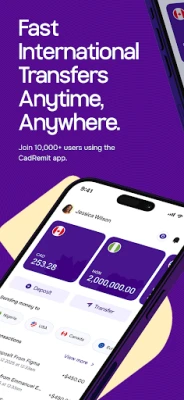
Send and receive money across borders with CadRemit, an international money transfer app supporting customers in Canada, Nigeria, USA and Europe.
Send money internationally, check exchange rates, receive international payments and receive multiple currencies from one app.
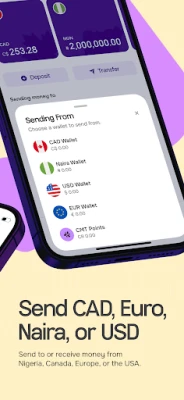
Whether you need to send CAD to NGN, USD to NGN, EUR to NGN, CAD to USD or another supported currency pair, CadRemit helps you enable cross-border transfers conveniently.
Send Money Internationally
Send money to supported destinations using available currency routes.
Supported currencies include:
CAD — Canadian Dollar
USD — US Dollar
EUR — Euro
NGN — Nigerian Naira
Supported transfer routes include:
CAD to NGN
USD to NGN
EUR to NGN
CAD to USD
USD to CAD
EUR to USD
CAD to EUR
Other supported currency pairs
Available routes depend on your location and account eligibility.
Multi-Currency Transfers
Receive supported currencies and send money across borders from one app.
CadRemit supports international transfers across available countries in Canada, United States, Europe and Nigeria.
Currency Converter
Use the CadRemit currency converter to check conversions between CAD, USD, EUR and NGN.
See how much your money is worth before making a transfer and review applicable exchange rates.
Receive International Payments
Receive international payments through virtual accounts in supported currencies, subject to account eligibility and applicable requirements.
Use your supported account details to receive payments from eligible sources, including clients, businesses and other payment providers.
Multi-Currency Wallets
Receive supported CAD, USD, EUR and NGN balances from one app.
Receive and transfer supported currencies, and receive your available funds through your CadRemit wallet.
International Payment Methods
Depending on the currency, destination and transaction, CadRemit supports payment methods and payment rails including:
Interac
EFT
SEPA
ACH
Push to Card
Available payment methods vary by currency, destination and transaction.
CMT Rewards
Eligible transfers to Nigeria can earn CMT Points, subject to applicable reward and redemption rules.
Earn points on qualifying transfers and use them towards supported future transfers.
Stablecoin Funding
Eligible customers can fund their USD wallet using supported stablecoins, including USDC and USDT, subject to availability and applicable requirements.
Who Can Use CadRemit?
CadRemit supports eligible individuals and businesses managing money across borders, including:
Immigrants and diaspora communities
International students
People making cross-border payments
Freelancers and remote workers
Travelers and newcomers
Families supporting relatives abroad
Small and medium-sized businesses
Importers and exporters
Businesses making international supplier payments
Why Choose CadRemit?
Send money internationally
Access competitive exchange rates
Transfer money across supported currency routes
Send CAD to NGN and other supported currency pairs
Send USD to NGN
Send EUR to NGN
Convert CAD, USD, EUR and NGN
Receive international payments
Access virtual accounts in supported currencies
Receive multiple currencies in one app
Use supported international payment methods
Earn CMT Points on eligible transfers to Nigeria
Access supported stablecoin funding options
Move your money across borders with CadRemit.
For account or transaction support, contact the CadRemit support team through the app or email [email protected] .
Website: https://cadremit.com/
Facebook: @cadremit
X: @cadremit
Instagram: @cadremithq
Whether you need to send CAD to NGN, USD to NGN, EUR to NGN, CAD to USD or another supported currency pair, CadRemit helps you enable cross-border transfers conveniently.
Send Money Internationally
Send money to supported destinations using available currency routes.
Supported currencies include:
CAD — Canadian Dollar
USD — US Dollar
EUR — Euro
NGN — Nigerian Naira
Supported transfer routes include:
CAD to NGN
USD to NGN
EUR to NGN
CAD to USD
USD to CAD
EUR to USD
CAD to EUR
Other supported currency pairs
Available routes depend on your location and account eligibility.
Multi-Currency Transfers
Receive supported currencies and send money across borders from one app.
CadRemit supports international transfers across available countries in Canada, United States, Europe and Nigeria.
Currency Converter
Use the CadRemit currency converter to check conversions between CAD, USD, EUR and NGN.
See how much your money is worth before making a transfer and review applicable exchange rates.
Receive International Payments
Receive international payments through virtual accounts in supported currencies, subject to account eligibility and applicable requirements.
Use your supported account details to receive payments from eligible sources, including clients, businesses and other payment providers.
Multi-Currency Wallets
Receive supported CAD, USD, EUR and NGN balances from one app.
Receive and transfer supported currencies, and receive your available funds through your CadRemit wallet.
International Payment Methods
Depending on the currency, destination and transaction, CadRemit supports payment methods and payment rails including:
Interac
EFT
SEPA
ACH
Push to Card
Available payment methods vary by currency, destination and transaction.
CMT Rewards
Eligible transfers to Nigeria can earn CMT Points, subject to applicable reward and redemption rules.
Earn points on qualifying transfers and use them towards supported future transfers.
Stablecoin Funding
Eligible customers can fund their USD wallet using supported stablecoins, including USDC and USDT, subject to availability and applicable requirements.
Who Can Use CadRemit?
CadRemit supports eligible individuals and businesses managing money across borders, including:
Immigrants and diaspora communities
International students
People making cross-border payments
Freelancers and remote workers
Travelers and newcomers
Families supporting relatives abroad
Small and medium-sized businesses
Importers and exporters
Businesses making international supplier payments
Why Choose CadRemit?
Send money internationally
Access competitive exchange rates
Transfer money across supported currency routes
Send CAD to NGN and other supported currency pairs
Send USD to NGN
Send EUR to NGN
Convert CAD, USD, EUR and NGN
Receive international payments
Access virtual accounts in supported currencies
Receive multiple currencies in one app
Use supported international payment methods
Earn CMT Points on eligible transfers to Nigeria
Access supported stablecoin funding options
Move your money across borders with CadRemit.
For account or transaction support, contact the CadRemit support team through the app or email [email protected] .
Website: https://cadremit.com/
Facebook: @cadremit
X: @cadremit
Instagram: @cadremithq
Rate the App
Add Comment & Review
User Reviews
Based on 0 reviews
No reviews added yet.
Comments will not be approved to be posted if they are SPAM, abusive, off-topic, use profanity, contain a personal attack, or promote hate of any kind.











More »

Popular Apps

phpFoxPHPFOX LLC

Moon Chai StoryOlha Dobel

World War Heroes — WW2 PvP FPSAzur Interactive Games Limited
Govee LiteGovee

AvSeaAvionics Electronics Geeks!

Viking Clan: RagnarokKano Games

Vikings: War of ClansPlarium LLC

Build World AdventureExplore city in cube world

Asphalt 9: LegendsGameloft SE

Dawn of Zombies: Survival GameRoyal Ark
More »
Editor's Choice

Grim Soul: Dark Survival RPGBrickworks Games Ltd

Craft of Survival - Gladiators101XP LIMITED

Last Shelter: SurvivalLong Tech Network Limited
Dawn of Zombies: Survival GameRoyal Ark

Merge Survival : WastelandStickyHands Inc.

AoD Vikings: Valhalla GameRoboBot Studio
Viking Clan: RagnarokKano Games
Vikings: War of ClansPlarium LLC
Asphalt 9: LegendsGameloft SE

Modern Tanks: War Tank GamesXDEVS LTD