

Latest Version
Update
November 09, 2026
November 09, 2026
Developer
Signal Copier
Signal Copier
Categories
Finance
Finance
Platforms
Android
Android
Downloads
0
0
License
Free
Free
Package Name
com.signalcopier.app
com.signalcopier.app
Report
Report a Problem
Report a Problem
More About Signal Copier
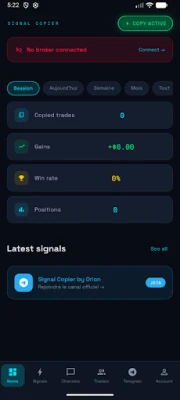
Signal Copier automatically copies trading signals from your Telegram channels directly to your MT4 or MT5 broker account — 24/7, with no manual intervention required.
HOW IT WORKS
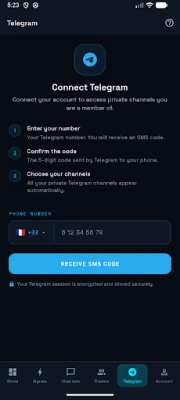
1. Connect your Telegram account with your phone number
2. Select the signal channels you want to copy
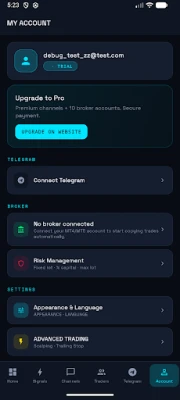
3. Link your MT4 or MT5 broker account
4. Every signal is automatically executed on your broker
KEY FEATURES
⚡ Instant Execution
Signals are received, parsed and sent to your broker in under 1 second. Never miss an entry again.
🛡️ Automatic Break-Even
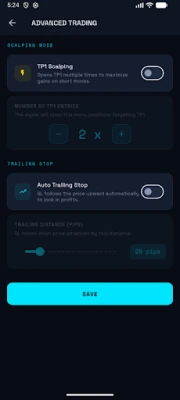
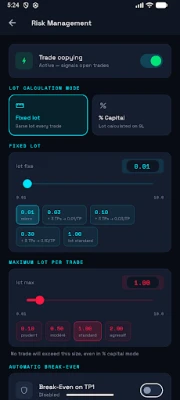
Once TP1 is hit, the stop loss is automatically moved to the entry price. Protect your gains without watching the screen.
📊 Multi-TP Split
When a signal has TP1, TP2 and TP3, three separate orders open automatically — each with 1/3 of the lot size.
💰 Risk Management
Choose between fixed lot size or % of capital. Set a maximum lot cap to protect your account.
📱 Multi-Channel Support
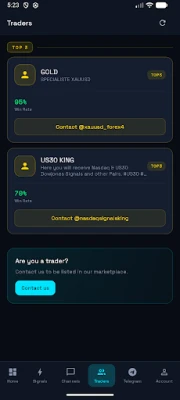
Follow up to 3 Telegram channels simultaneously (Basic) or unlimited channels (Pro).
🌍 5 Languages
Available in French, English, Arabic, Spanish and Turkish. Native RTL support for Arabic.
COMPATIBLE WITH
• All MetaTrader 4 brokers
• All MetaTrader 5 brokers
• Automatic symbol normalization (GOLD → XAUUSD, etc.)
PLANS
• Basic — up to 3 Telegram channels
• Pro — unlimited channels + priority support
Subscription is billed through Google Play. It automatically renews unless auto-renew is turned off at least 24 hours before the end of the current billing period. Manage or cancel anytime in Google Play > Account > Payments & subscriptions.
⚠️ Trading involves significant risk of loss. Past performance is not indicative of future results.
1. Connect your Telegram account with your phone number
2. Select the signal channels you want to copy
3. Link your MT4 or MT5 broker account
4. Every signal is automatically executed on your broker
KEY FEATURES
⚡ Instant Execution
Signals are received, parsed and sent to your broker in under 1 second. Never miss an entry again.
🛡️ Automatic Break-Even
Once TP1 is hit, the stop loss is automatically moved to the entry price. Protect your gains without watching the screen.
📊 Multi-TP Split
When a signal has TP1, TP2 and TP3, three separate orders open automatically — each with 1/3 of the lot size.
💰 Risk Management
Choose between fixed lot size or % of capital. Set a maximum lot cap to protect your account.
📱 Multi-Channel Support
Follow up to 3 Telegram channels simultaneously (Basic) or unlimited channels (Pro).
🌍 5 Languages
Available in French, English, Arabic, Spanish and Turkish. Native RTL support for Arabic.
COMPATIBLE WITH
• All MetaTrader 4 brokers
• All MetaTrader 5 brokers
• Automatic symbol normalization (GOLD → XAUUSD, etc.)
PLANS
• Basic — up to 3 Telegram channels
• Pro — unlimited channels + priority support
Subscription is billed through Google Play. It automatically renews unless auto-renew is turned off at least 24 hours before the end of the current billing period. Manage or cancel anytime in Google Play > Account > Payments & subscriptions.
⚠️ Trading involves significant risk of loss. Past performance is not indicative of future results.
Rate the App
Add Comment & Review
User Reviews
Based on 0 reviews
No reviews added yet.
Comments will not be approved to be posted if they are SPAM, abusive, off-topic, use profanity, contain a personal attack, or promote hate of any kind.















More »

Popular Apps

phpFoxPHPFOX LLC

Moon Chai StoryOlha Dobel

World War Heroes — WW2 PvP FPSAzur Interactive Games Limited

Govee LiteGovee

AvSeaAvionics Electronics Geeks!

Viking Clan: RagnarokKano Games

Vikings: War of ClansPlarium LLC

Build World AdventureExplore city in cube world

Asphalt 9: LegendsGameloft SE

Dawn of Zombies: Survival GameRoyal Ark
More »
Editor's Choice

Grim Soul: Dark Survival RPGBrickworks Games Ltd

Craft of Survival - Gladiators101XP LIMITED

Last Shelter: SurvivalLong Tech Network Limited
Dawn of Zombies: Survival GameRoyal Ark

Merge Survival : WastelandStickyHands Inc.

AoD Vikings: Valhalla GameRoboBot Studio
Viking Clan: RagnarokKano Games
Vikings: War of ClansPlarium LLC
Asphalt 9: LegendsGameloft SE

Modern Tanks: War Tank GamesXDEVS LTD