
Latest Version
Update
October 27, 2026
October 27, 2026
Developer
RBH Studios
RBH Studios
Categories
Tools
Tools
Platforms
Android
Android
Downloads
0
0
License
Free
Free
Package Name
app.bluelightfilter
app.bluelightfilter
Report
Report a Problem
Report a Problem
More About Blue Light Filter
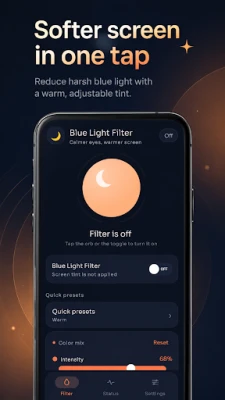
Blue Light Filter makes your screen warmer and more comfortable for nighttime reading, browsing, studying, and everyday phone use.
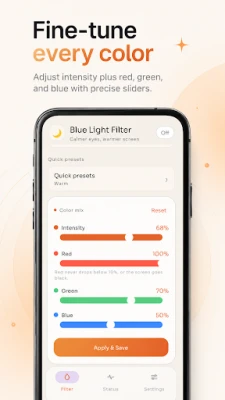
Apply a customizable blue light filter in one tap and adjust the screen tint exactly the way you want. Choose a quick preset or fine-tune the intensity, red, green, and blue values to create your preferred warm screen.
Blue Light Filter and Night Mode
Turn on the blue light filter whenever your screen feels too cool or bright at night. A warm screen filter is applied across your apps, giving you a softer night viewing experience without changing the content you are viewing.
Quick Presets
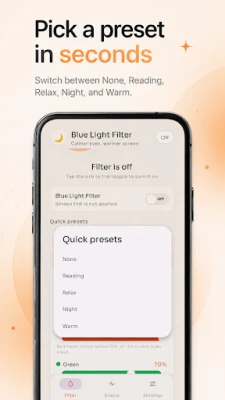
Switch between ready-made screen filter presets in seconds:
• None
• Reading
• Relax
• Night
• Warm
Pick a preset and continue using your phone without manually adjusting every color setting.
Fine-Tune Your Screen Filter
Want more control? Customize your night filter with precise controls for:
• Filter intensity
• Red level
• Green level
• Blue level
• Custom screen tint
Save your settings and quickly apply your preferred warm screen whenever you need it.
Works Across Apps
The blue light filter uses a simple screen overlay so your selected tint can remain visible while you browse, read, message, or use other apps.
No Root Required
Use the screen filter without rooting your Android device. Set your preferred color, adjust the intensity, and control the filter directly from the app.
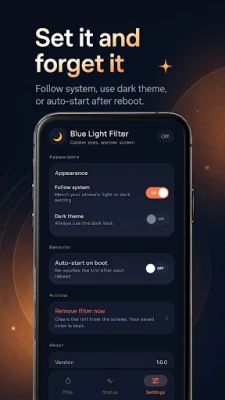
Light and Dark Appearance
Choose the interface that suits you:
• Follow system theme
• Light appearance
• Dark appearance
The clean interface is designed to look comfortable during both daytime and nighttime use.
Start After Reboot
Enable auto-start on boot when you want your saved screen tint to be reapplied after restarting your phone.
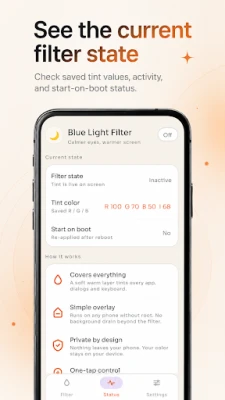
Check Your Filter Status
The Status screen gives you a quick overview of:
• Current filter state
• Saved RGB tint values
• Filter intensity
• Start-on-boot setting
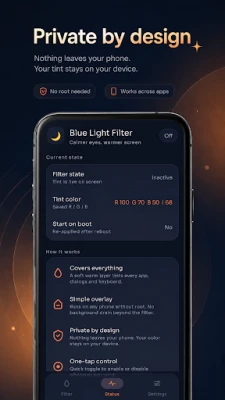
Private by Design
Your filter settings stay on your device. No account is required to customize your screen tint.
Blue Light Filter Features
• One-tap blue light filter
• Night mode for a warmer screen
• Reading, Relax, Night and Warm presets
• Adjustable filter intensity
• Custom RGB screen filter
• Works across apps
• No root required
• Light and dark themes
• Follow system appearance
• Auto-start after reboot
• Filter status information
• Simple and lightweight interface
Whether you are reading at night, browsing in bed, studying, or simply prefer warmer screen colors, Blue Light Filter gives you simple control over your screen tint with presets and precise RGB adjustment.
Blue Light Filter and Night Mode
Turn on the blue light filter whenever your screen feels too cool or bright at night. A warm screen filter is applied across your apps, giving you a softer night viewing experience without changing the content you are viewing.
Quick Presets
Switch between ready-made screen filter presets in seconds:
• None
• Reading
• Relax
• Night
• Warm
Pick a preset and continue using your phone without manually adjusting every color setting.
Fine-Tune Your Screen Filter
Want more control? Customize your night filter with precise controls for:
• Filter intensity
• Red level
• Green level
• Blue level
• Custom screen tint
Save your settings and quickly apply your preferred warm screen whenever you need it.
Works Across Apps
The blue light filter uses a simple screen overlay so your selected tint can remain visible while you browse, read, message, or use other apps.
No Root Required
Use the screen filter without rooting your Android device. Set your preferred color, adjust the intensity, and control the filter directly from the app.
Light and Dark Appearance
Choose the interface that suits you:
• Follow system theme
• Light appearance
• Dark appearance
The clean interface is designed to look comfortable during both daytime and nighttime use.
Start After Reboot
Enable auto-start on boot when you want your saved screen tint to be reapplied after restarting your phone.
Check Your Filter Status
The Status screen gives you a quick overview of:
• Current filter state
• Saved RGB tint values
• Filter intensity
• Start-on-boot setting
Private by Design
Your filter settings stay on your device. No account is required to customize your screen tint.
Blue Light Filter Features
• One-tap blue light filter
• Night mode for a warmer screen
• Reading, Relax, Night and Warm presets
• Adjustable filter intensity
• Custom RGB screen filter
• Works across apps
• No root required
• Light and dark themes
• Follow system appearance
• Auto-start after reboot
• Filter status information
• Simple and lightweight interface
Whether you are reading at night, browsing in bed, studying, or simply prefer warmer screen colors, Blue Light Filter gives you simple control over your screen tint with presets and precise RGB adjustment.
Rate the App
Add Comment & Review
User Reviews
Based on 0 reviews
No reviews added yet.
Comments will not be approved to be posted if they are SPAM, abusive, off-topic, use profanity, contain a personal attack, or promote hate of any kind.













More »

Popular Apps

phpFoxPHPFOX LLC

Moon Chai StoryOlha Dobel

World War Heroes — WW2 PvP FPSAzur Interactive Games Limited

Govee LiteGovee

AvSeaAvionics Electronics Geeks!

Viking Clan: RagnarokKano Games

Build World AdventureExplore city in cube world

Vikings: War of ClansPlarium LLC

Asphalt 9: LegendsGameloft SE

Dawn of Zombies: Survival GameRoyal Ark
More »
Editor's Choice

Grim Soul: Dark Survival RPGBrickworks Games Ltd

Craft of Survival - Gladiators101XP LIMITED

Last Shelter: SurvivalLong Tech Network Limited
Dawn of Zombies: Survival GameRoyal Ark

Merge Survival : WastelandStickyHands Inc.

AoD Vikings: Valhalla GameRoboBot Studio
Viking Clan: RagnarokKano Games
Vikings: War of ClansPlarium LLC
Asphalt 9: LegendsGameloft SE

Modern Tanks: War Tank GamesXDEVS LTD