

Latest Version
Update
October 26, 2026
October 26, 2026
Developer
Saurabh-7973
Saurabh-7973
Categories
Tools
Tools
Platforms
Android
Android
Downloads
0
0
License
Free
Free
Package Name
in.getsnapdrop.app
in.getsnapdrop.app
Report
Report a Problem
Report a Problem
More About Snapdrop: Phone to Figma
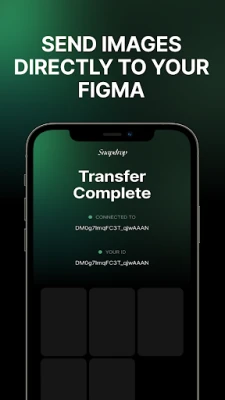
Snapdrop is the fastest way to get images from your phone into Figma.
No cables. No cloud uploads. No emailing yourself screenshots. Just scan a QR code and your photos land straight in your Figma canvas.
HOW IT WORKS
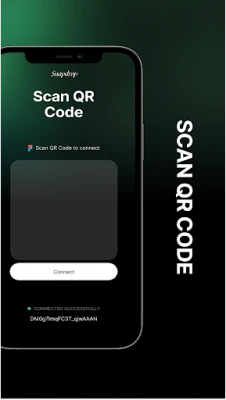
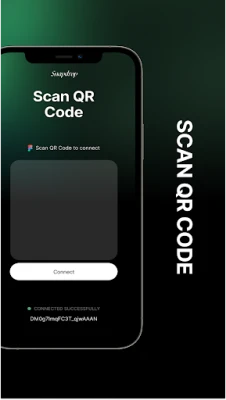
1. Open the Snapdrop plugin in Figma on your computer — it shows a QR code.
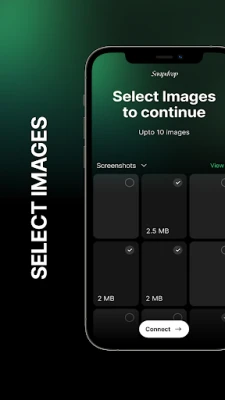
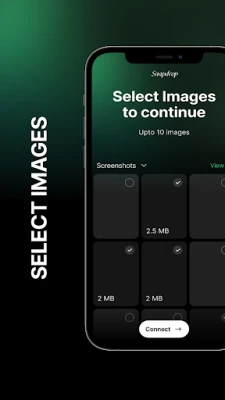
2. On your phone, open Snapdrop, pick up to 10 images, and tap Connect.
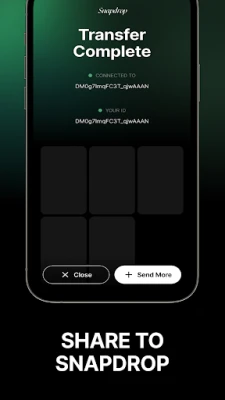
3. Scan the QR code. Your images upload instantly into your Figma session.
BUILT FOR DESIGNERS
Whether it's reference photos, textures, hand-drawn sketches, product shots, or screenshots from your device — Snapdrop puts them in your design file in seconds, right where you need them.
WHY SNAPDROP
- Fast — pair once, send in a tap
- Simple — no account, no sign-up, no login
- Private — images go straight to your Figma session and aren't stored on our servers
- Lightweight — does one thing and does it well
Snapdrop is an independent tool and is not affiliated with, endorsed by, or sponsored by Figma.
Requires the companion Snapdrop plugin running in Figma on a desktop computer.
HOW IT WORKS
1. Open the Snapdrop plugin in Figma on your computer — it shows a QR code.
2. On your phone, open Snapdrop, pick up to 10 images, and tap Connect.
3. Scan the QR code. Your images upload instantly into your Figma session.
BUILT FOR DESIGNERS
Whether it's reference photos, textures, hand-drawn sketches, product shots, or screenshots from your device — Snapdrop puts them in your design file in seconds, right where you need them.
WHY SNAPDROP
- Fast — pair once, send in a tap
- Simple — no account, no sign-up, no login
- Private — images go straight to your Figma session and aren't stored on our servers
- Lightweight — does one thing and does it well
Snapdrop is an independent tool and is not affiliated with, endorsed by, or sponsored by Figma.
Requires the companion Snapdrop plugin running in Figma on a desktop computer.
Rate the App
Add Comment & Review
User Reviews
Based on 0 reviews
No reviews added yet.
Comments will not be approved to be posted if they are SPAM, abusive, off-topic, use profanity, contain a personal attack, or promote hate of any kind.














More »

Popular Apps

phpFoxPHPFOX LLC

Moon Chai StoryOlha Dobel

World War Heroes — WW2 PvP FPSAzur Interactive Games Limited

Govee LiteGovee

AvSeaAvionics Electronics Geeks!

Viking Clan: RagnarokKano Games

Build World AdventureExplore city in cube world

Vikings: War of ClansPlarium LLC

Asphalt 9: LegendsGameloft SE

Dawn of Zombies: Survival GameRoyal Ark
More »
Editor's Choice

Grim Soul: Dark Survival RPGBrickworks Games Ltd

Craft of Survival - Gladiators101XP LIMITED

Last Shelter: SurvivalLong Tech Network Limited
Dawn of Zombies: Survival GameRoyal Ark

Merge Survival : WastelandStickyHands Inc.

AoD Vikings: Valhalla GameRoboBot Studio
Viking Clan: RagnarokKano Games
Vikings: War of ClansPlarium LLC
Asphalt 9: LegendsGameloft SE

Modern Tanks: War Tank GamesXDEVS LTD