

Latest Version
Update
August 23, 2026
August 23, 2026
Developer
PathOr
PathOr
Categories
Productivity
Productivity
Platforms
Android
Android
Downloads
0
0
License
Free
Free
Package Name
ava.pathor.in
ava.pathor.in
Report
Report a Problem
Report a Problem
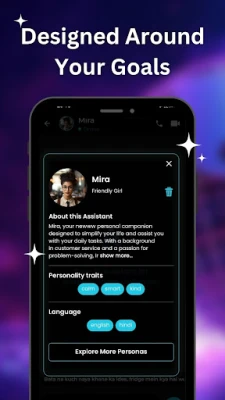
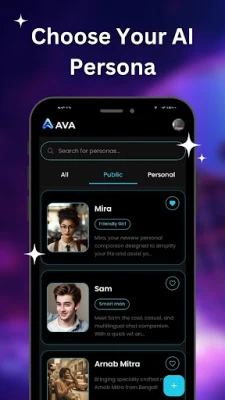
More About AvA - AI Assistant
# AvA – AI Assistant for Voice, Productivity & Everyday Help
Meet AvA, your intelligent AI assistant that helps you communicate, write, organize tasks, and complete everyday activities using voice, text, and AI voice calls.
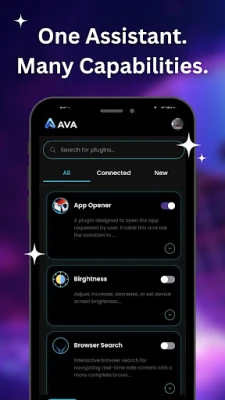
More than a chatbot, AvA combines conversational AI with productivity tools to help you get things done faster.
## 📞 AI Voice Calls
Talk naturally with AvA through incoming AI voice calls.
AvA supports AI voice calling with a dedicated incoming call interface, allowing you to answer or decline AI calls for scheduled conversations, reminders, follow-ups, and hands-free assistance.
To provide a reliable calling experience, AvA uses Android call-style notifications and a dedicated full-screen incoming call interface only for AI voice calls.
## 🗣️ Talk to Your AI Assistant
Speak naturally to:
* Ask questions
* Get instant answers
* Open apps
* Draft messages and emails
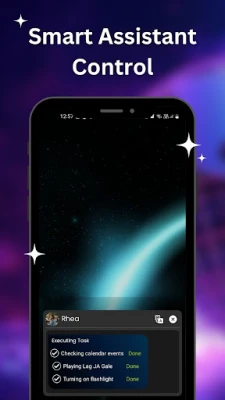
* Create reminders and calendar events
* Automate supported actions
## ✍️ AI Writing Assistant
* Grammar correction
* Rewrite text
* Summarization
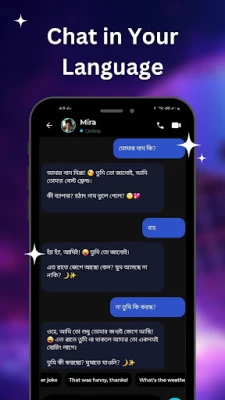
* Translation
* Reply suggestions
* Email drafting
* Message drafting
* Tone adjustment
* Improve clarity and readability
## 💬 WhatsApp Messaging Assistance
Need to send a message quickly? Just ask.
For example:
*"Send a WhatsApp message to Rohan to schedule a meeting at 10 AM tomorrow."*
AvA can:
* Write a message based on your request
* Open the WhatsApp chat with the selected contact
* Place the generated message in the chat for you
You can review or edit the message before sending it. **AvA never sends messages automatically—you are always in control of when to send the message.**
## 🗓️ Productivity
* Reminders
* Calendar events
* Meeting scheduling
* To-do assistance
## 📧 Email & Communication
* Professional emails
* Smart replies
* Grammar improvements
* AI-generated responses
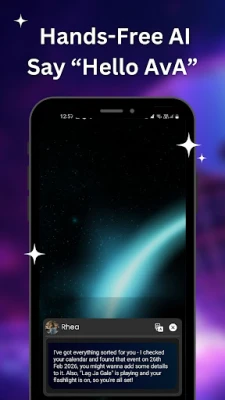
## 🎤 Hands-Free Voice Assistant
Use your voice for faster, hands-free assistance.
Wake word detection runs locally whenever possible for better privacy.
## 🖥️ Screen Assistance
AvA can assist with text you are actively writing across supported apps using its AI Writing Tool.
The Writing Tool helps you rewrite, summarize, translate, change tone, and improve text without copying and pasting between apps.
This feature is always user-controlled and only works after you explicitly enable it.
## ✍️ Accessibility & Privacy
**Accessibility Service:** AvA uses Android Accessibility Services exclusively to power its system-wide AI Writing Tool. When enabled by you, the service reads only the text in the active input field so it can provide writing assistance such as rewriting, summarization, translation, grammar correction, and tone adjustments. Accessibility is used only for these writing features and is never used to collect personal data, monitor user activity, modify device settings, bypass Android security or privacy protections, or serve advertisements. All writing assistance is processed locally on your device.
## 🔒 Privacy First
* User-controlled permissions
* Accessibility is optional
* All writing assistance is processed locally on your device
* No sale of personal data
* User-initiated interactions only
## 🌟 Why Choose AvA?
* AI voice calls
* AI writing assistant
* WhatsApp message drafting
* Voice productivity
* Smart reminders
* System-wide AI writing
---
### Note
**Accessibility Service:** AvA uses Android Accessibility Services only to provide its system-wide AI Writing Tool. This permission is used exclusively for writing assistance features such as rewriting, summarization, translation, grammar correction, and tone adjustment after you explicitly enable it. Text is processed locally on your device, and no personal data is collected or shared through Accessibility Services.
More than a chatbot, AvA combines conversational AI with productivity tools to help you get things done faster.
## 📞 AI Voice Calls
Talk naturally with AvA through incoming AI voice calls.
AvA supports AI voice calling with a dedicated incoming call interface, allowing you to answer or decline AI calls for scheduled conversations, reminders, follow-ups, and hands-free assistance.
To provide a reliable calling experience, AvA uses Android call-style notifications and a dedicated full-screen incoming call interface only for AI voice calls.
## 🗣️ Talk to Your AI Assistant
Speak naturally to:
* Ask questions
* Get instant answers
* Open apps
* Draft messages and emails
* Create reminders and calendar events
* Automate supported actions
## ✍️ AI Writing Assistant
* Grammar correction
* Rewrite text
* Summarization
* Translation
* Reply suggestions
* Email drafting
* Message drafting
* Tone adjustment
* Improve clarity and readability
## 💬 WhatsApp Messaging Assistance
Need to send a message quickly? Just ask.
For example:
*"Send a WhatsApp message to Rohan to schedule a meeting at 10 AM tomorrow."*
AvA can:
* Write a message based on your request
* Open the WhatsApp chat with the selected contact
* Place the generated message in the chat for you
You can review or edit the message before sending it. **AvA never sends messages automatically—you are always in control of when to send the message.**
## 🗓️ Productivity
* Reminders
* Calendar events
* Meeting scheduling
* To-do assistance
## 📧 Email & Communication
* Professional emails
* Smart replies
* Grammar improvements
* AI-generated responses
## 🎤 Hands-Free Voice Assistant
Use your voice for faster, hands-free assistance.
Wake word detection runs locally whenever possible for better privacy.
## 🖥️ Screen Assistance
AvA can assist with text you are actively writing across supported apps using its AI Writing Tool.
The Writing Tool helps you rewrite, summarize, translate, change tone, and improve text without copying and pasting between apps.
This feature is always user-controlled and only works after you explicitly enable it.
## ✍️ Accessibility & Privacy
**Accessibility Service:** AvA uses Android Accessibility Services exclusively to power its system-wide AI Writing Tool. When enabled by you, the service reads only the text in the active input field so it can provide writing assistance such as rewriting, summarization, translation, grammar correction, and tone adjustments. Accessibility is used only for these writing features and is never used to collect personal data, monitor user activity, modify device settings, bypass Android security or privacy protections, or serve advertisements. All writing assistance is processed locally on your device.
## 🔒 Privacy First
* User-controlled permissions
* Accessibility is optional
* All writing assistance is processed locally on your device
* No sale of personal data
* User-initiated interactions only
## 🌟 Why Choose AvA?
* AI voice calls
* AI writing assistant
* WhatsApp message drafting
* Voice productivity
* Smart reminders
* System-wide AI writing
---
### Note
**Accessibility Service:** AvA uses Android Accessibility Services only to provide its system-wide AI Writing Tool. This permission is used exclusively for writing assistance features such as rewriting, summarization, translation, grammar correction, and tone adjustment after you explicitly enable it. Text is processed locally on your device, and no personal data is collected or shared through Accessibility Services.
Rate the App
Add Comment & Review
User Reviews
Based on 0 reviews
No reviews added yet.
Comments will not be approved to be posted if they are SPAM, abusive, off-topic, use profanity, contain a personal attack, or promote hate of any kind.













More »

Popular Apps

phpFoxPHPFOX LLC

Moon Chai StoryOlha Dobel

World War Heroes — WW2 PvP FPSAzur Interactive Games Limited

Govee LiteGovee

AvSeaAvionics Electronics Geeks!

Viking Clan: RagnarokKano Games

Vikings: War of ClansPlarium LLC

Build World AdventureExplore city in cube world

Asphalt 9: LegendsGameloft SE

Dawn of Zombies: Survival GameRoyal Ark
More »
Editor's Choice

Grim Soul: Dark Survival RPGBrickworks Games Ltd

Craft of Survival - Gladiators101XP LIMITED

Last Shelter: SurvivalLong Tech Network Limited
Dawn of Zombies: Survival GameRoyal Ark

Merge Survival : WastelandStickyHands Inc.

AoD Vikings: Valhalla GameRoboBot Studio
Viking Clan: RagnarokKano Games
Vikings: War of ClansPlarium LLC
Asphalt 9: LegendsGameloft SE

Modern Tanks: War Tank GamesXDEVS LTD