
Latest Version
Update
September 20, 2026
September 20, 2026
Developer
Vizo Apps
Vizo Apps
Categories
Libraries & Demo
Libraries & Demo
Platforms
Android
Android
Downloads
1
1
License
Free
Free
Package Name
com.airplay.phonetotv
com.airplay.phonetotv
Report
Report a Problem
Report a Problem
More About AirPlay Cast: TV Screen Mirror
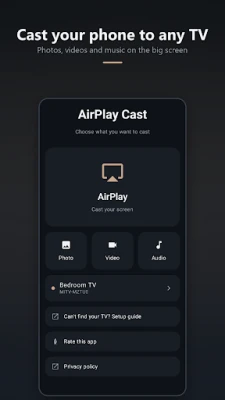
Cast to TV in one tap. AirPlay Cast turns any smart TV into a second screen for
your phone: cast photos, cast video, cast music, or start screen mirroring, all
over your own Wi-Fi. No cable, no account, no extra hardware.
WHAT YOU CAN CAST TO TV
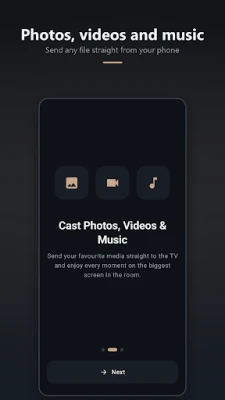
• Photos — put the whole album on the TV instead of passing the phone around
• Video — the clips you filmed and the videos you downloaded, full screen
• Music — play from your phone through the TV speakers
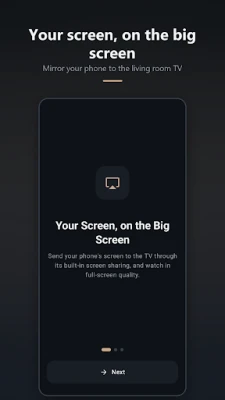
• Screen mirroring — start your phone's built-in screen mirroring from the app
WORKS WITH THE TV YOU ALREADY OWN
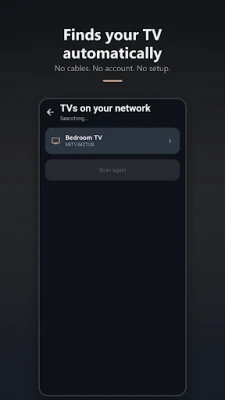
AirPlay Cast finds the TVs on your Wi-Fi automatically. It supports Google Cast
and Chromecast built-in devices, Android TV and Google TV, and DLNA smart TVs — so
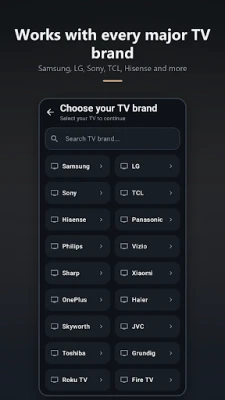
a Samsung, LG, Sony, TCL, Hisense, Philips, Panasonic, Sharp, Xiaomi, Vizio,
Toshiba, Roku TV or Fire TV on the same network shows up in the list, along with
Chromecast dongles and set-top boxes.
Not sure which TV you have? Pick your brand and the app walks you through the
exact casting steps for it.
A CASTING APP BUILT TO BE SIMPLE
• Automatic TV discovery — open the app and your TV is already there
• One tap to cast to TV, one tap to stop
• Remembers your TV and reconnects next time
• Streams local files straight from your phone — nothing is uploaded anywhere
• Clean dark interface, nothing to sign up for
HOW TO CAST YOUR PHONE TO THE TV
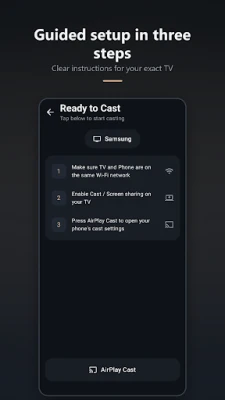
1. Put your phone and your smart TV on the same Wi-Fi network
2. Turn on casting or screen mirroring on the TV
3. Open AirPlay Cast, pick your TV, and choose what to send
GOOD TO KNOW
Your media never leaves your home network. Files stream from your phone to the TV
over Wi-Fi — nothing is uploaded to a server and no account is required.
Cast quality depends on your Wi-Fi. A 5 GHz network gives the smoothest video.
Some TVs need casting or screen mirroring switched on in their own settings before
they will appear.
AirPlay Cast sends media using the Google Cast and DLNA standards and your phone's
own built-in screen mirroring. This app is not affiliated with, endorsed by or
sponsored by Apple Inc. AirPlay is a trademark of Apple Inc.
A TV that will not connect? Write to [email protected] and we will
help.
over your own Wi-Fi. No cable, no account, no extra hardware.
WHAT YOU CAN CAST TO TV
• Photos — put the whole album on the TV instead of passing the phone around
• Video — the clips you filmed and the videos you downloaded, full screen
• Music — play from your phone through the TV speakers
• Screen mirroring — start your phone's built-in screen mirroring from the app
WORKS WITH THE TV YOU ALREADY OWN
AirPlay Cast finds the TVs on your Wi-Fi automatically. It supports Google Cast
and Chromecast built-in devices, Android TV and Google TV, and DLNA smart TVs — so
a Samsung, LG, Sony, TCL, Hisense, Philips, Panasonic, Sharp, Xiaomi, Vizio,
Toshiba, Roku TV or Fire TV on the same network shows up in the list, along with
Chromecast dongles and set-top boxes.
Not sure which TV you have? Pick your brand and the app walks you through the
exact casting steps for it.
A CASTING APP BUILT TO BE SIMPLE
• Automatic TV discovery — open the app and your TV is already there
• One tap to cast to TV, one tap to stop
• Remembers your TV and reconnects next time
• Streams local files straight from your phone — nothing is uploaded anywhere
• Clean dark interface, nothing to sign up for
HOW TO CAST YOUR PHONE TO THE TV
1. Put your phone and your smart TV on the same Wi-Fi network
2. Turn on casting or screen mirroring on the TV
3. Open AirPlay Cast, pick your TV, and choose what to send
GOOD TO KNOW
Your media never leaves your home network. Files stream from your phone to the TV
over Wi-Fi — nothing is uploaded to a server and no account is required.
Cast quality depends on your Wi-Fi. A 5 GHz network gives the smoothest video.
Some TVs need casting or screen mirroring switched on in their own settings before
they will appear.
AirPlay Cast sends media using the Google Cast and DLNA standards and your phone's
own built-in screen mirroring. This app is not affiliated with, endorsed by or
sponsored by Apple Inc. AirPlay is a trademark of Apple Inc.
A TV that will not connect? Write to [email protected] and we will
help.
Rate the App
Add Comment & Review
User Reviews
Based on 0 reviews
No reviews added yet.
Comments will not be approved to be posted if they are SPAM, abusive, off-topic, use profanity, contain a personal attack, or promote hate of any kind.











More »

Popular Apps

phpFoxPHPFOX LLC

Moon Chai StoryOlha Dobel

World War Heroes — WW2 PvP FPSAzur Interactive Games Limited

Govee LiteGovee

AvSeaAvionics Electronics Geeks!

Viking Clan: RagnarokKano Games

Vikings: War of ClansPlarium LLC

Build World AdventureExplore city in cube world

Asphalt 9: LegendsGameloft SE

Dawn of Zombies: Survival GameRoyal Ark
More »
Editor's Choice

Grim Soul: Dark Survival RPGBrickworks Games Ltd

Craft of Survival - Gladiators101XP LIMITED

Last Shelter: SurvivalLong Tech Network Limited
Dawn of Zombies: Survival GameRoyal Ark

Merge Survival : WastelandStickyHands Inc.

AoD Vikings: Valhalla GameRoboBot Studio
Viking Clan: RagnarokKano Games
Vikings: War of ClansPlarium LLC
Asphalt 9: LegendsGameloft SE

Modern Tanks: War Tank GamesXDEVS LTD