
Latest Version
Update
August 20, 2026
August 20, 2026
Developer
Appnex Technologies
Appnex Technologies
Categories
Tools
Tools
Platforms
Android
Android
Downloads
0
0
License
Free
Free
Package Name
com.force5glte.fivegonly.four4glte.networkmode
com.force5glte.fivegonly.four4glte.networkmode
Report
Report a Problem
Report a Problem
More About 5G Only LTE Mode: Force 4G LTE
Is your phone constantly switching from 5G to 4G, or dropping to slow 3G without asking? Take control of your network connection.
Force your Android to stay on 5G only or 4G LTE only mode. This 5G settings app opens the hidden network settings menu on your device so you can lock your preferred network type in one tap. No more automatic switching between networks.
📶 Main Feature — Force & Lock Network Mode
Open the hidden Android network settings and choose your preferred network mode:
▸ 5G Only (NR Only)
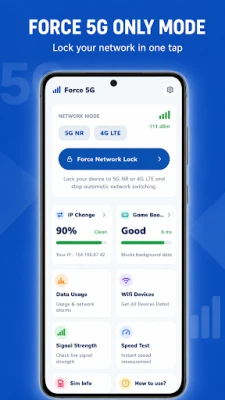
Force 5G mode and lock your phone to the 5G network only, so it stops dropping back to 4G automatically. Best for users in strong 5G coverage areas who want to stay connected to 5G at all times.
▸ 4G LTE Only
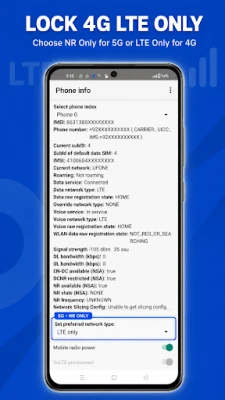
Force LTE mode and lock your phone to the 4G LTE network only, stopping automatic switching to slow 3G or 2G signals. Best for users in areas with reliable 4G coverage who want a stable connection.
▸ 3G / 2G Mode
Switch to lower network modes manually when needed in low-signal areas to save battery or maintain basic connectivity.
Once locked, your network mode stays until you change it. This network switcher works on Samsung, Xiaomi, Redmi, Realme, OPPO, OnePlus, Vivo, Infinix, Tecno and most Android phones. No root required.
📡 More Features
▸ Signal Strength Meter
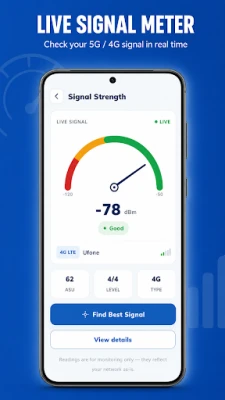
Check your live 5G or 4G LTE signal strength in real time. See exactly how strong your current network signal is and find better spots for stronger connectivity.
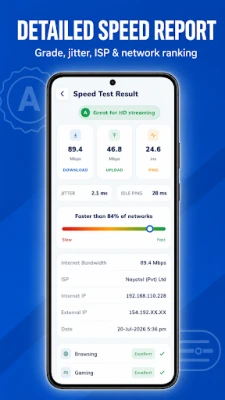
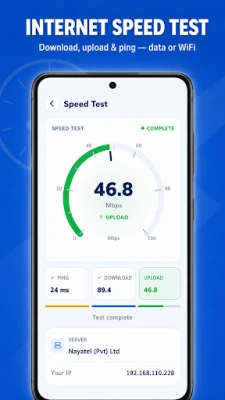
▸ Internet Speed Test
Test your internet speed — measure download speed, upload speed and ping on both mobile data and WiFi. Useful after locking your network mode to check your connection.
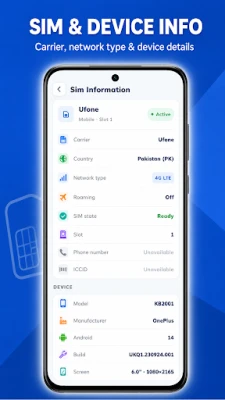
▸ SIM & Device Info
View your SIM card details, network operator name, connection type and full device information in one place.
▸ Network Information
See detailed information about your current network, including connection type, LTE band and network status data.
👤 Who Is This App For?
✔ 5G phone users who want to stay on the 5G network
✔ 4G LTE users who want a stable connection without signal drops
✔ Anyone tired of their phone switching to slow 3G automatically
✔ People living in areas with mixed 5G and 4G coverage
📲 How It Works
1. Open the app and tap Force 5G or Force LTE
2. The hidden 5G settings / network settings menu will open
3. Select your preferred network mode (NR Only, LTE Only, WCDMA, GSM)
4. Your phone locks to the selected network mode
🛡️ Permissions & Disclosures
▸ VPN Usage (Game Focus Mode)
The game focus feature uses the Android VpnService API to pause internet access for background apps while you play. It works entirely on your device — no traffic goes through external servers and nothing is logged, stored or transmitted.
▸ Alarms & Data Usage Alerts
Set your own mobile data limit and get notified when usage reaches it. You can also schedule reminders for specific times to stay aware of your data consumption.
▸ Accessibility Service
This app requests the Accessibility Service for one purpose only: to open the system network settings screen and select the network mode you chose, so the switch happens automatically on your behalf. It never reads personal content, monitors activity, collects sensitive information or shares anything with third parties.
⚠️ Important Notes
- Network mode availability depends on your device model, chipset and carrier. Some manufacturers restrict access to the hidden settings menu on certain models.
- Selecting NR Only (5G) or LTE Only (4G) may affect calls on some carriers if VoLTE or VoNR is not supported. If you face call issues, switch back to a combined mode such as NR/LTE/GSM/WCDMA.
- 5G Only mode requires a 5G-capable device and an active 5G network in your area.
Download 5G Only LTE Mode today and take control of your network connection — force 5G, lock 4G LTE and stop automatic network switching.
📶 Main Feature — Force & Lock Network Mode
Open the hidden Android network settings and choose your preferred network mode:
▸ 5G Only (NR Only)
Force 5G mode and lock your phone to the 5G network only, so it stops dropping back to 4G automatically. Best for users in strong 5G coverage areas who want to stay connected to 5G at all times.
▸ 4G LTE Only
Force LTE mode and lock your phone to the 4G LTE network only, stopping automatic switching to slow 3G or 2G signals. Best for users in areas with reliable 4G coverage who want a stable connection.
▸ 3G / 2G Mode
Switch to lower network modes manually when needed in low-signal areas to save battery or maintain basic connectivity.
Once locked, your network mode stays until you change it. This network switcher works on Samsung, Xiaomi, Redmi, Realme, OPPO, OnePlus, Vivo, Infinix, Tecno and most Android phones. No root required.
📡 More Features
▸ Signal Strength Meter
Check your live 5G or 4G LTE signal strength in real time. See exactly how strong your current network signal is and find better spots for stronger connectivity.
▸ Internet Speed Test
Test your internet speed — measure download speed, upload speed and ping on both mobile data and WiFi. Useful after locking your network mode to check your connection.
▸ SIM & Device Info
View your SIM card details, network operator name, connection type and full device information in one place.
▸ Network Information
See detailed information about your current network, including connection type, LTE band and network status data.
👤 Who Is This App For?
✔ 5G phone users who want to stay on the 5G network
✔ 4G LTE users who want a stable connection without signal drops
✔ Anyone tired of their phone switching to slow 3G automatically
✔ People living in areas with mixed 5G and 4G coverage
📲 How It Works
1. Open the app and tap Force 5G or Force LTE
2. The hidden 5G settings / network settings menu will open
3. Select your preferred network mode (NR Only, LTE Only, WCDMA, GSM)
4. Your phone locks to the selected network mode
🛡️ Permissions & Disclosures
▸ VPN Usage (Game Focus Mode)
The game focus feature uses the Android VpnService API to pause internet access for background apps while you play. It works entirely on your device — no traffic goes through external servers and nothing is logged, stored or transmitted.
▸ Alarms & Data Usage Alerts
Set your own mobile data limit and get notified when usage reaches it. You can also schedule reminders for specific times to stay aware of your data consumption.
▸ Accessibility Service
This app requests the Accessibility Service for one purpose only: to open the system network settings screen and select the network mode you chose, so the switch happens automatically on your behalf. It never reads personal content, monitors activity, collects sensitive information or shares anything with third parties.
⚠️ Important Notes
- Network mode availability depends on your device model, chipset and carrier. Some manufacturers restrict access to the hidden settings menu on certain models.
- Selecting NR Only (5G) or LTE Only (4G) may affect calls on some carriers if VoLTE or VoNR is not supported. If you face call issues, switch back to a combined mode such as NR/LTE/GSM/WCDMA.
- 5G Only mode requires a 5G-capable device and an active 5G network in your area.
Download 5G Only LTE Mode today and take control of your network connection — force 5G, lock 4G LTE and stop automatic network switching.
Rate the App
Add Comment & Review
User Reviews
Based on 0 reviews
No reviews added yet.
Comments will not be approved to be posted if they are SPAM, abusive, off-topic, use profanity, contain a personal attack, or promote hate of any kind.














More »

Popular Apps

phpFoxPHPFOX LLC

Moon Chai StoryOlha Dobel

World War Heroes — WW2 PvP FPSAzur Interactive Games Limited

Govee LiteGovee

Build World AdventureExplore city in cube world

Viking Clan: RagnarokKano Games

Vikings: War of ClansPlarium LLC

Asphalt 9: LegendsGameloft SE

Submarine Car Diving SimulatorSwim with dolphins & penguins

Dawn of Zombies: Survival GameRoyal Ark
More »
Editor's Choice

Grim Soul: Dark Survival RPGBrickworks Games Ltd

Craft of Survival - Gladiators101XP LIMITED

Last Shelter: SurvivalLong Tech Network Limited
Dawn of Zombies: Survival GameRoyal Ark

Merge Survival : WastelandStickyHands Inc.

AoD Vikings: Valhalla GameRoboBot Studio
Viking Clan: RagnarokKano Games
Vikings: War of ClansPlarium LLC
Asphalt 9: LegendsGameloft SE

Modern Tanks: War Tank GamesXDEVS LTD