



Latest Version
Update
August 19, 2026
August 19, 2026
Developer
MotionWave & AI Tech
MotionWave & AI Tech
Categories
Tools
Tools
Platforms
Android
Android
Downloads
0
0
License
Free
Free
Package Name
com.aurax.aicleaner.cleanstorage
com.aurax.aicleaner.cleanstorage
Report
Report a Problem
Report a Problem
More About AI Cleaner: Clean up Storage
Running low on storage? AI Cleaner scans your device, shows what is taking up space, and helps you clean or compress selected files. Nothing is deleted unless you review and confirm it.
Photo and video analysis is performed on your device. Your media is not uploaded for cleaning or classification.
SMART CLEANUP SCAN
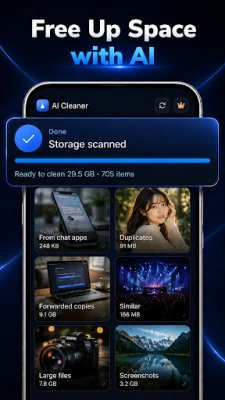
Scan photos, videos, music, documents, downloads, and other files, then review clear categories based on what you can clean:
• Duplicate photos matched as identical files
• Similar photos and burst shots
• Blurry or low-quality photos
• Screenshots you may no longer need
• Large photos and videos
• Duplicate videos, music, and audio files
• Duplicate documents, archives, downloads, and other files
• APK installer files, including older or duplicate installers
Each category shows its estimated storage usage and potential space savings. Open a category, review the items, keep what matters, and remove only what you select.
SMART PHOTO CLEANER
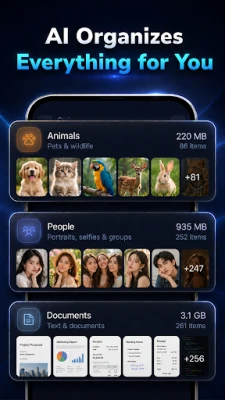
Organize your gallery with on-device image analysis that looks at visual content, not only file names.
AI Cleaner can help you find:
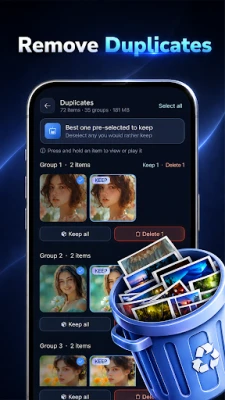
• Exact duplicates — identical copies matched byte for byte
• Re-saved copies — visually matching photos that may have been forwarded, downloaded, or saved again
• Similar photos — retakes and burst shots from the same moment
• Best-shot suggestions — compare similar photos and review the clearest option
• Blurry photos — out-of-focus or shaken pictures
• Screenshots — receipts, chats, confirmations, and temporary images
• Chat media — photos and videos saved by messaging apps
• Large media — photos and videos ranked by file size
You review every suggestion before deletion and always decide what to keep.
LARGE FILE CLEANER
Find large videos, downloads, documents, archives, APK files, and other storage-heavy items. Sort by size, check file details, and remove only the files you confirm.
SWIPE TO CLEAN
Open the swipe deck to review photos quickly:
• Swipe left to move a photo to the app trash
• Swipe right to keep it
• Restore items from trash before permanent deletion
• Close the app and continue where you left off
Swiping does not permanently delete your files.
SORT YOUR GALLERY
Browse your media in two useful views:
• Gallery — photos and videos grouped by date
• Sort by AI — photos grouped by detected content, such as people, animals, food, nature, vehicles, documents, electronics, furniture, and home decor
PHOTO AND VIDEO COMPRESSION
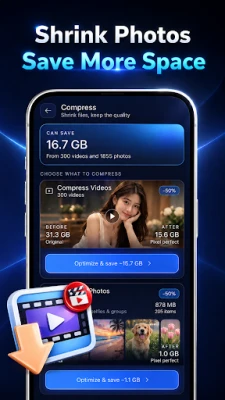
Reduce file sizes while keeping compressed copies in your gallery. Choose a compression level for each selected file:
• Maximum — highest estimated space savings
• Balanced — a practical balance of quality and size
• Light — gentler compression with smaller savings
Preview the estimated result before processing. Compressed copies are saved in a dedicated album, while original files remain unchanged until you choose to delete them. Actual savings and output quality vary by file.
WHY CHOOSE AI CLEANER?
• Scan photos, videos, music, documents, and downloads
• On-device photo and video analysis
• Find duplicate, similar, and blurry photos
• Review large files by size
• Compress selected photos and videos
• Swipe to clean with restorable trash
• Preview files and estimated savings before each action
• Pause scanning whenever needed
• Available in 19 languages
STORAGE ACCESS
To scan and manage supported files across shared storage, AI Cleaner may request All Files Access on supported Android versions. This access is used only for the storage cleaning and file-management features you choose. The app does not delete files without your confirmation.
Important: Some deletions are permanent and are clearly identified before confirmation. Features and file access may vary by device and Android version.
SMART CLEANUP SCAN
Scan photos, videos, music, documents, downloads, and other files, then review clear categories based on what you can clean:
• Duplicate photos matched as identical files
• Similar photos and burst shots
• Blurry or low-quality photos
• Screenshots you may no longer need
• Large photos and videos
• Duplicate videos, music, and audio files
• Duplicate documents, archives, downloads, and other files
• APK installer files, including older or duplicate installers
Each category shows its estimated storage usage and potential space savings. Open a category, review the items, keep what matters, and remove only what you select.
SMART PHOTO CLEANER
Organize your gallery with on-device image analysis that looks at visual content, not only file names.
AI Cleaner can help you find:
• Exact duplicates — identical copies matched byte for byte
• Re-saved copies — visually matching photos that may have been forwarded, downloaded, or saved again
• Similar photos — retakes and burst shots from the same moment
• Best-shot suggestions — compare similar photos and review the clearest option
• Blurry photos — out-of-focus or shaken pictures
• Screenshots — receipts, chats, confirmations, and temporary images
• Chat media — photos and videos saved by messaging apps
• Large media — photos and videos ranked by file size
You review every suggestion before deletion and always decide what to keep.
LARGE FILE CLEANER
Find large videos, downloads, documents, archives, APK files, and other storage-heavy items. Sort by size, check file details, and remove only the files you confirm.
SWIPE TO CLEAN
Open the swipe deck to review photos quickly:
• Swipe left to move a photo to the app trash
• Swipe right to keep it
• Restore items from trash before permanent deletion
• Close the app and continue where you left off
Swiping does not permanently delete your files.
SORT YOUR GALLERY
Browse your media in two useful views:
• Gallery — photos and videos grouped by date
• Sort by AI — photos grouped by detected content, such as people, animals, food, nature, vehicles, documents, electronics, furniture, and home decor
PHOTO AND VIDEO COMPRESSION
Reduce file sizes while keeping compressed copies in your gallery. Choose a compression level for each selected file:
• Maximum — highest estimated space savings
• Balanced — a practical balance of quality and size
• Light — gentler compression with smaller savings
Preview the estimated result before processing. Compressed copies are saved in a dedicated album, while original files remain unchanged until you choose to delete them. Actual savings and output quality vary by file.
WHY CHOOSE AI CLEANER?
• Scan photos, videos, music, documents, and downloads
• On-device photo and video analysis
• Find duplicate, similar, and blurry photos
• Review large files by size
• Compress selected photos and videos
• Swipe to clean with restorable trash
• Preview files and estimated savings before each action
• Pause scanning whenever needed
• Available in 19 languages
STORAGE ACCESS
To scan and manage supported files across shared storage, AI Cleaner may request All Files Access on supported Android versions. This access is used only for the storage cleaning and file-management features you choose. The app does not delete files without your confirmation.
Important: Some deletions are permanent and are clearly identified before confirmation. Features and file access may vary by device and Android version.
Rate the App
Add Comment & Review
User Reviews
Based on 0 reviews
No reviews added yet.
Comments will not be approved to be posted if they are SPAM, abusive, off-topic, use profanity, contain a personal attack, or promote hate of any kind.














More »

Popular Apps

phpFoxPHPFOX LLC

Moon Chai StoryOlha Dobel

World War Heroes — WW2 PvP FPSAzur Interactive Games Limited

Govee LiteGovee

Build World AdventureExplore city in cube world

Viking Clan: RagnarokKano Games

Vikings: War of ClansPlarium LLC

Asphalt 9: LegendsGameloft SE

Submarine Car Diving SimulatorSwim with dolphins & penguins

Dawn of Zombies: Survival GameRoyal Ark
More »
Editor's Choice

Grim Soul: Dark Survival RPGBrickworks Games Ltd

Craft of Survival - Gladiators101XP LIMITED

Last Shelter: SurvivalLong Tech Network Limited
Dawn of Zombies: Survival GameRoyal Ark

Merge Survival : WastelandStickyHands Inc.

AoD Vikings: Valhalla GameRoboBot Studio
Viking Clan: RagnarokKano Games
Vikings: War of ClansPlarium LLC
Asphalt 9: LegendsGameloft SE

Modern Tanks: War Tank GamesXDEVS LTD