

Latest Version
Update
November 05, 2026
November 05, 2026
Developer
Duck Software
Duck Software
Categories
Tools
Tools
Platforms
Android
Android
Downloads
0
0
License
Free
Free
Package Name
pl.wifitethering
pl.wifitethering
Report
Report a Problem
Report a Problem
More About WiFi Hotspot Pro
WiFi Hotspot Pro turns your phone into a Wi-Fi access point and gives you the controls your system settings are missing: a data limit, a sleep timer and a schedule. Share internet with your laptop, tablet or family without burning through your mobile plan.
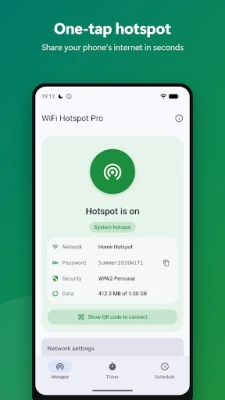
ONE-TAP HOTSPOT
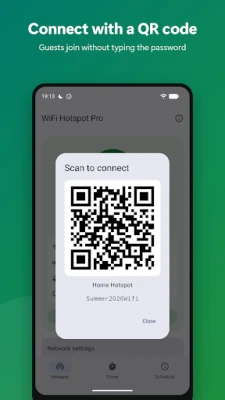
A big button in the middle of the screen turns internet sharing on and off. See the network name, password and connected devices at a glance, and let guests join by scanning a QR code.
DATA LIMIT
Set a limit such as 1 GB per session, per day or per month. The app counts data downloaded and uploaded by all connected devices, warns you at 90% and switches the hotspot off automatically when the limit is reached.
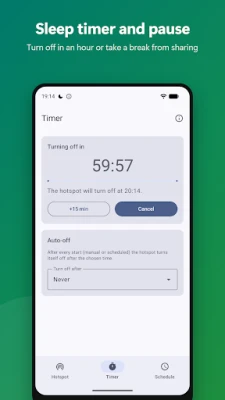
SLEEP TIMER AND PAUSE
• Turn the hotspot off in 15 minutes, an hour or any time you choose
• Pause: stop sharing now and resume automatically later
• Auto-off after every start
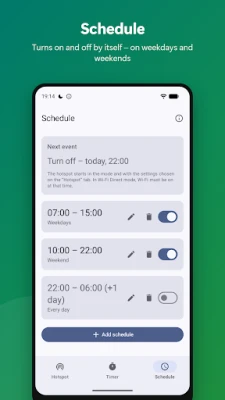
SCHEDULE
The hotspot turns on and off by itself – for example 7:00–15:00 on weekdays and 10:00–22:00 at weekends. Overnight ranges and any days of the week are supported.
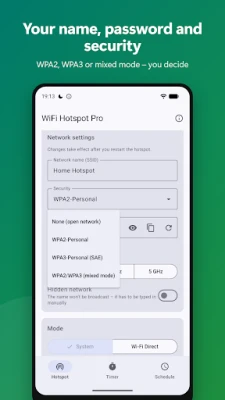
YOUR NAME, PASSWORD AND SECURITY
Set the network name (SSID), password (with a strong password generator), WPA2, WPA3 or mixed mode, 2.4 / 5 GHz band and hidden network.
TWO MODES
• System hotspot – the real Android hotspot: internet works instantly on every device. Changing the name, password and security (and, on Android 16 or newer, turning it on) requires the free Shizuku app, which you install yourself from Google Play.
• Wi-Fi Direct – works right away, no root and no extra apps, with your own network name and password (WPA2). Internet is shared through a built-in proxy: on the connecting device you set a proxy in the Wi-Fi network settings (the app shows step-by-step instructions). Browsers and most apps work; some games and VPN connections may ignore the proxy.
PRIVACY
No ads, no accounts, no data collection. Everything runs locally on your phone – the app never sends information about you or your traffic anywhere.
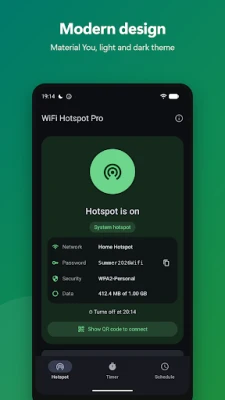
MODERN DESIGN
Material You, light and dark theme, a notification with a "Turn off" button and a clear data usage view.
IMPORTANT
Using a hotspot consumes data from your plan. Check that your carrier allows tethering on your tariff. Requires Android 10 or newer; system mode requires Android 11 or newer.
A big button in the middle of the screen turns internet sharing on and off. See the network name, password and connected devices at a glance, and let guests join by scanning a QR code.
DATA LIMIT
Set a limit such as 1 GB per session, per day or per month. The app counts data downloaded and uploaded by all connected devices, warns you at 90% and switches the hotspot off automatically when the limit is reached.
SLEEP TIMER AND PAUSE
• Turn the hotspot off in 15 minutes, an hour or any time you choose
• Pause: stop sharing now and resume automatically later
• Auto-off after every start
SCHEDULE
The hotspot turns on and off by itself – for example 7:00–15:00 on weekdays and 10:00–22:00 at weekends. Overnight ranges and any days of the week are supported.
YOUR NAME, PASSWORD AND SECURITY
Set the network name (SSID), password (with a strong password generator), WPA2, WPA3 or mixed mode, 2.4 / 5 GHz band and hidden network.
TWO MODES
• System hotspot – the real Android hotspot: internet works instantly on every device. Changing the name, password and security (and, on Android 16 or newer, turning it on) requires the free Shizuku app, which you install yourself from Google Play.
• Wi-Fi Direct – works right away, no root and no extra apps, with your own network name and password (WPA2). Internet is shared through a built-in proxy: on the connecting device you set a proxy in the Wi-Fi network settings (the app shows step-by-step instructions). Browsers and most apps work; some games and VPN connections may ignore the proxy.
PRIVACY
No ads, no accounts, no data collection. Everything runs locally on your phone – the app never sends information about you or your traffic anywhere.
MODERN DESIGN
Material You, light and dark theme, a notification with a "Turn off" button and a clear data usage view.
IMPORTANT
Using a hotspot consumes data from your plan. Check that your carrier allows tethering on your tariff. Requires Android 10 or newer; system mode requires Android 11 or newer.
Rate the App
Add Comment & Review
User Reviews
Based on 0 reviews
No reviews added yet.
Comments will not be approved to be posted if they are SPAM, abusive, off-topic, use profanity, contain a personal attack, or promote hate of any kind.












More »

Popular Apps

phpFoxPHPFOX LLC

Moon Chai StoryOlha Dobel

World War Heroes — WW2 PvP FPSAzur Interactive Games Limited

Govee LiteGovee

AvSeaAvionics Electronics Geeks!

Viking Clan: RagnarokKano Games

Vikings: War of ClansPlarium LLC

Build World AdventureExplore city in cube world

Asphalt 9: LegendsGameloft SE

Dawn of Zombies: Survival GameRoyal Ark
More »
Editor's Choice

Grim Soul: Dark Survival RPGBrickworks Games Ltd

Craft of Survival - Gladiators101XP LIMITED

Last Shelter: SurvivalLong Tech Network Limited
Dawn of Zombies: Survival GameRoyal Ark

Merge Survival : WastelandStickyHands Inc.

AoD Vikings: Valhalla GameRoboBot Studio
Viking Clan: RagnarokKano Games
Vikings: War of ClansPlarium LLC
Asphalt 9: LegendsGameloft SE

Modern Tanks: War Tank GamesXDEVS LTD