

Latest Version
Update
November 05, 2026
November 05, 2026
Developer
Aice Xpert
Aice Xpert
Categories
Tools
Tools
Platforms
Android
Android
Downloads
0
0
License
Free
Free
Package Name
om.downloader.downloaderfortiktok
om.downloader.downloaderfortiktok
Report
Report a Problem
Report a Problem
More About Download video no watermark
### Download Videos Without Watermark
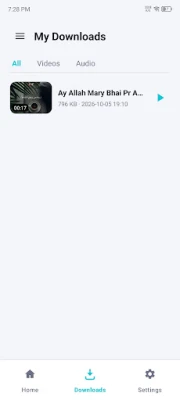
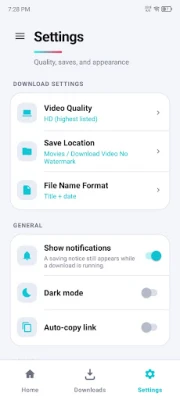
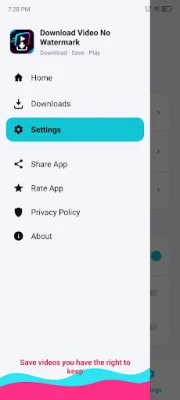
Want to save your favorite videos without a watermark? Try our **Video Downloader for TT Without Watermark** to download videos and music quickly and easily.
Save your favorite content for offline viewing, create live wallpapers, or set your favorite music as a ringtone — all with just a few simple taps.
### Feature Highlights
* **No Login Required:** Download videos without creating an account or signing in.
* **No Watermark:** Save short and HD videos without unwanted watermarks.
* **Fast Video Downloads:** Download your favorite videos quickly and conveniently.
* **Music Downloader:** Save supported music and audio files for offline listening.
* **Background Downloads:** Keep downloading content while using other apps.
* **Multiple Downloads:** Save several videos at the same time.
* **Live Wallpaper:** Turn your favorite downloaded videos into live wallpapers.
* **Ringtone Maker:** Use downloaded music or videos to create a ringtone.
* **Lightweight App:** Small size, fast performance, and an easy-to-use interface.
### How to Download Videos
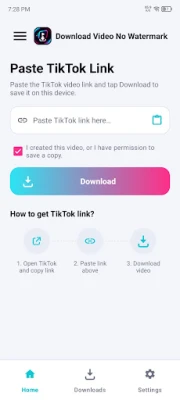
**Method 1: Copy the Video Link**
① Open the video you want to download and copy its link.
② Open the Video Downloader app and use the copied link.
③ Start the download and save the video to your device.
**Method 2: Share the Video**
① Open your favorite video and tap the **Share** option.
② Select **Video Downloader** from the available sharing options.
③ The app will process the link and begin downloading.
### How to Set Live Wallpaper or Ringtone
① Download your favorite video or music.
② Open the downloaded file and select the live wallpaper or ringtone option.
③ Follow the instructions to complete the setup.
### Important Notice
Video Downloader may not support deleted, private, unavailable, or region-restricted content. Download availability may also depend on the source platform and its restrictions.
### Disclaimer
The ownership, copyright, intellectual property rights, and other rights related to videos, photos, and music belong to their respective creators, publishers, or owners.
Please make sure you have the required permission before downloading, sharing, or using copyrighted content. We recommend giving proper credit to the original creator or source when using downloaded content.
**Video Downloader for TT** is an independent application and is not affiliated with, sponsored by, or officially connected to any third-party social media, video, or content platform.
Save your favorite content for offline viewing, create live wallpapers, or set your favorite music as a ringtone — all with just a few simple taps.
### Feature Highlights
* **No Login Required:** Download videos without creating an account or signing in.
* **No Watermark:** Save short and HD videos without unwanted watermarks.
* **Fast Video Downloads:** Download your favorite videos quickly and conveniently.
* **Music Downloader:** Save supported music and audio files for offline listening.
* **Background Downloads:** Keep downloading content while using other apps.
* **Multiple Downloads:** Save several videos at the same time.
* **Live Wallpaper:** Turn your favorite downloaded videos into live wallpapers.
* **Ringtone Maker:** Use downloaded music or videos to create a ringtone.
* **Lightweight App:** Small size, fast performance, and an easy-to-use interface.
### How to Download Videos
**Method 1: Copy the Video Link**
① Open the video you want to download and copy its link.
② Open the Video Downloader app and use the copied link.
③ Start the download and save the video to your device.
**Method 2: Share the Video**
① Open your favorite video and tap the **Share** option.
② Select **Video Downloader** from the available sharing options.
③ The app will process the link and begin downloading.
### How to Set Live Wallpaper or Ringtone
① Download your favorite video or music.
② Open the downloaded file and select the live wallpaper or ringtone option.
③ Follow the instructions to complete the setup.
### Important Notice
Video Downloader may not support deleted, private, unavailable, or region-restricted content. Download availability may also depend on the source platform and its restrictions.
### Disclaimer
The ownership, copyright, intellectual property rights, and other rights related to videos, photos, and music belong to their respective creators, publishers, or owners.
Please make sure you have the required permission before downloading, sharing, or using copyrighted content. We recommend giving proper credit to the original creator or source when using downloaded content.
**Video Downloader for TT** is an independent application and is not affiliated with, sponsored by, or officially connected to any third-party social media, video, or content platform.
Rate the App
Add Comment & Review
User Reviews
Based on 0 reviews
No reviews added yet.
Comments will not be approved to be posted if they are SPAM, abusive, off-topic, use profanity, contain a personal attack, or promote hate of any kind.














More »

Popular Apps

phpFoxPHPFOX LLC

Moon Chai StoryOlha Dobel

World War Heroes — WW2 PvP FPSAzur Interactive Games Limited

Govee LiteGovee

AvSeaAvionics Electronics Geeks!

Viking Clan: RagnarokKano Games

Vikings: War of ClansPlarium LLC

Build World AdventureExplore city in cube world

Asphalt 9: LegendsGameloft SE

Dawn of Zombies: Survival GameRoyal Ark
More »
Editor's Choice

Grim Soul: Dark Survival RPGBrickworks Games Ltd

Craft of Survival - Gladiators101XP LIMITED

Last Shelter: SurvivalLong Tech Network Limited
Dawn of Zombies: Survival GameRoyal Ark

Merge Survival : WastelandStickyHands Inc.

AoD Vikings: Valhalla GameRoboBot Studio
Viking Clan: RagnarokKano Games
Vikings: War of ClansPlarium LLC
Asphalt 9: LegendsGameloft SE

Modern Tanks: War Tank GamesXDEVS LTD