
Latest Version
Update
October 20, 2026
October 20, 2026
Developer
FLUM
FLUM
Categories
Tools
Tools
Platforms
Android
Android
Downloads
0
0
License
Free
Free
Package Name
com.flum.zoomeasy
com.flum.zoomeasy
Report
Report a Problem
Report a Problem
More About ZoomEasy - Screen Magnifier
Struggling with small text on your phone? "ZoomEasy - Screen Magnifier" clears it up instantly! Whether the print is too small or you need to examine fine details, ZoomEasy becomes your eyes and takes the strain out of everyday phone use.
4.0 Major Renewal:
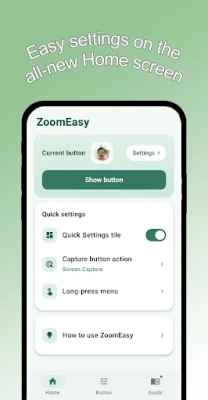
We rebuilt the app from the ground up! Organized into three intuitive tabs—Home, Button, and Guide—every step from capture to results is now bigger, faster, and easier to use.
Main Features & How to Use:
- Easy Screen Capture: Capture whatever is on your screen instantly with a single floating button.
- Camera Magnifier: Use your camera to read tiny print on real-world objects, medicine bottles, and labels.
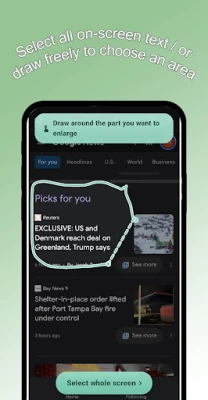
- Intuitive Area Selection: Circle the exact area you want to enlarge, or use "Select Whole Screen" to grab everything at once.
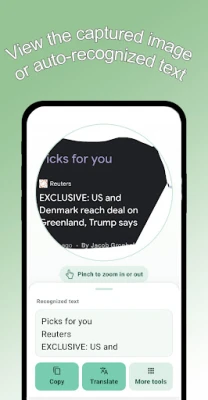
- Expansive Result Screen: Pinch to zoom in further, and swipe up to comfortably read all recognized text.
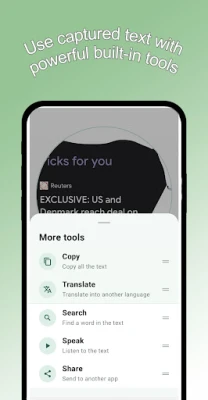
- Powerful Text Tools: Translate, read aloud (TTS), copy, and share recognized text. Pin your two favorite tools to the quick-access bottom bar.
- Word Search: Quickly search for specific words within captured text and step between matches.
- Offline Translation: Download language models once to translate instantly anywhere without using mobile data.
- Real-Time Magnifier: Freely magnify any part of your screen in real time without taking a screenshot—perfect for webtoons and articles.
- Customizable Long-Press Menu: Choose which shortcuts appear when you press and hold the button. Add camera, magnifier, or one-touch full-screen translate/copy/read tools.
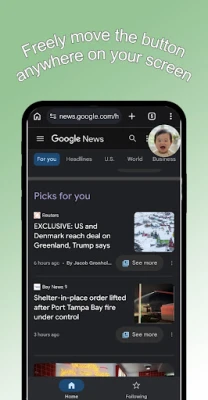
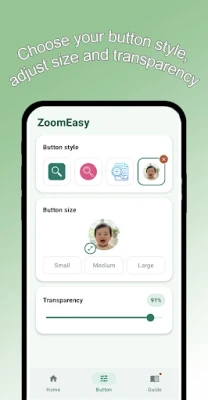
- Personalized Button: Customize the floating button with photos of family, pets, or scenery. Adjust size (Small/Medium/Large), transparency, and position freely.
- Home Screen Widget: Place a 1x1 widget on your home screen to turn the floating button on and off with a single tap.
- Quick Settings Tile: Toggle the floating button straight from your notification panel without opening the app.
Highly Recommended For:
- Anyone who has trouble reading fine print or viewing small images on a smartphone
- Users needing to inspect complex manuals, product labels, or terms & conditions
- Anyone who wants quick, on-the-fly magnification across web, social media, and chat apps
Required Permissions:
"ZoomEasy" requires the following permission to deliver its core functionality:
- Accessibility Service (AccessibilityService API):
* Purpose: Required to perform instant screen capture and provide the floating real-time magnifier overlay.
* Privacy & Data Policy: ZoomEasy accesses screen content only temporarily to perform the actions you request. It does not collect, store, transmit, or share any personal or sensitive data.
ZoomEasy requests only the essential permissions needed for your convenience. Please use with complete peace of mind.
Please Note:
- The real-time magnifier requires Android 13 or higher.
- Some premium features can be unlocked by viewing ads, or permanently ad-free via the "Remove Ads" purchase.
Stop squinting at small text. Built by a developer who needed it for aging eyes, "ZoomEasy - Screen Magnifier" brings you a clearer, more comfortable smartphone experience!
We rebuilt the app from the ground up! Organized into three intuitive tabs—Home, Button, and Guide—every step from capture to results is now bigger, faster, and easier to use.
Main Features & How to Use:
- Easy Screen Capture: Capture whatever is on your screen instantly with a single floating button.
- Camera Magnifier: Use your camera to read tiny print on real-world objects, medicine bottles, and labels.
- Intuitive Area Selection: Circle the exact area you want to enlarge, or use "Select Whole Screen" to grab everything at once.
- Expansive Result Screen: Pinch to zoom in further, and swipe up to comfortably read all recognized text.
- Powerful Text Tools: Translate, read aloud (TTS), copy, and share recognized text. Pin your two favorite tools to the quick-access bottom bar.
- Word Search: Quickly search for specific words within captured text and step between matches.
- Offline Translation: Download language models once to translate instantly anywhere without using mobile data.
- Real-Time Magnifier: Freely magnify any part of your screen in real time without taking a screenshot—perfect for webtoons and articles.
- Customizable Long-Press Menu: Choose which shortcuts appear when you press and hold the button. Add camera, magnifier, or one-touch full-screen translate/copy/read tools.
- Personalized Button: Customize the floating button with photos of family, pets, or scenery. Adjust size (Small/Medium/Large), transparency, and position freely.
- Home Screen Widget: Place a 1x1 widget on your home screen to turn the floating button on and off with a single tap.
- Quick Settings Tile: Toggle the floating button straight from your notification panel without opening the app.
Highly Recommended For:
- Anyone who has trouble reading fine print or viewing small images on a smartphone
- Users needing to inspect complex manuals, product labels, or terms & conditions
- Anyone who wants quick, on-the-fly magnification across web, social media, and chat apps
Required Permissions:
"ZoomEasy" requires the following permission to deliver its core functionality:
- Accessibility Service (AccessibilityService API):
* Purpose: Required to perform instant screen capture and provide the floating real-time magnifier overlay.
* Privacy & Data Policy: ZoomEasy accesses screen content only temporarily to perform the actions you request. It does not collect, store, transmit, or share any personal or sensitive data.
ZoomEasy requests only the essential permissions needed for your convenience. Please use with complete peace of mind.
Please Note:
- The real-time magnifier requires Android 13 or higher.
- Some premium features can be unlocked by viewing ads, or permanently ad-free via the "Remove Ads" purchase.
Stop squinting at small text. Built by a developer who needed it for aging eyes, "ZoomEasy - Screen Magnifier" brings you a clearer, more comfortable smartphone experience!
Rate the App
Add Comment & Review
User Reviews
Based on 0 reviews
No reviews added yet.
Comments will not be approved to be posted if they are SPAM, abusive, off-topic, use profanity, contain a personal attack, or promote hate of any kind.









More »

Popular Apps

phpFoxPHPFOX LLC

Moon Chai StoryOlha Dobel

World War Heroes — WW2 PvP FPSAzur Interactive Games Limited

Govee LiteGovee

AvSeaAvionics Electronics Geeks!

Viking Clan: RagnarokKano Games

Build World AdventureExplore city in cube world

Vikings: War of ClansPlarium LLC

Asphalt 9: LegendsGameloft SE

Dawn of Zombies: Survival GameRoyal Ark
More »
Editor's Choice

Grim Soul: Dark Survival RPGBrickworks Games Ltd

Craft of Survival - Gladiators101XP LIMITED

Last Shelter: SurvivalLong Tech Network Limited
Dawn of Zombies: Survival GameRoyal Ark

Merge Survival : WastelandStickyHands Inc.

AoD Vikings: Valhalla GameRoboBot Studio
Viking Clan: RagnarokKano Games
Vikings: War of ClansPlarium LLC
Asphalt 9: LegendsGameloft SE

Modern Tanks: War Tank GamesXDEVS LTD