
Latest Version
Update
September 27, 2026
September 27, 2026
Developer
Noisoba Labs
Noisoba Labs
Categories
Tools
Tools
Platforms
Android
Android
Downloads
0
0
License
Free
Free
Package Name
app.hiddencam.detector
app.hiddencam.detector
Report
Report a Problem
Report a Problem
More About Zavira Hidden Camera Detector
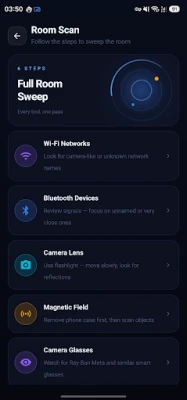
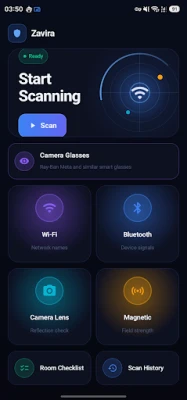
Worried about a hidden camera or a listening bug in your hotel room, Airbnb, rental, or changing room? Zavira gives you 6 scanning tools to sweep a room in minutes. Every scan runs on your own device, offline, with no account.
── 6 DETECTION TOOLS ──
Wi-Fi Scanner
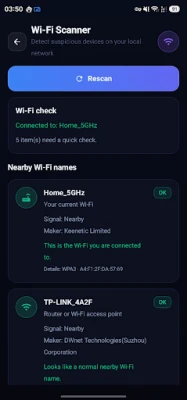
Lists nearby Wi-Fi names and the devices on your network, flagging names typically used by IP cameras and DVRs — IPCAM, V380, Yoosee, Hikvision and similar.
Bluetooth Scanner
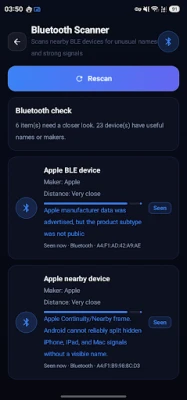
Reads the Bluetooth LE advertisements around you and sorts them into plain categories: possible camera or recorder, tracker tag, headphones, watch, smart home device, or an unnamed signal. Distance is shown as Very close, Nearby, or Farther away, not raw signal numbers.
It also flags locator tags — Apple Find My / AirTag-style signals, Tile-type tags, and devices advertising a locator profile — as "Tracker or locator signal", so you know to search bags, coats, luggage linings, shelves, and decorations.
Being straight about the limits: this is a scan you run, not a background watchdog. It cannot follow a tag over time to tell you whether it is travelling with you, and it cannot make it play a sound. Android's built-in unknown tracker alerts do those things — use both.
Camera Glasses
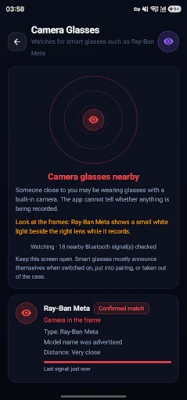
Watches for smart glasses that carry a camera in the frame — Ray-Ban Meta, Oakley Meta, Snap Spectacles and similar — by reading the Bluetooth signature they broadcast, and tells you how firm each match is.
Being straight about the limits: glasses already paired to their owner's phone often stay silent and rotate their Bluetooth address, so a quiet screen is not proof that nobody is filming, and no scan can tell whether a camera is recording. Look at the frame — Ray-Ban Meta lights a small white LED while it records.
Lens Finder
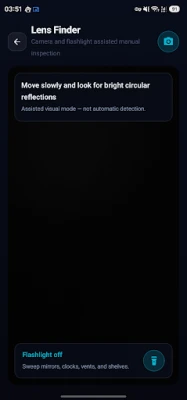
A camera preview with the flashlight, to help you catch the bright circular reflection of a lens in smoke detectors, clocks, sockets, vents, and mirrors.
Magnetic Detector
Reads your phone's magnetometer and warns on a spike against a calibrated baseline. Remove magnetic cases, wallets, and ring holders first, then recalibrate.
Room Checklist
A guided 10-point sweep of the places cameras are usually hidden.
── FREE VS PRO ──
Free: all 6 tools, every scan, and every result, with the same warnings. This app never hides a finding behind a payment. If something suspicious is in your room, you see it.
Pro adds convenience, not access:
- Scan history kept between sessions
- An exportable PDF or text report — location, time, what was checked, what was found — for a hotel, a landlord, or the police
- Deep scan: repeated passes with a longer listening window
- Background guard that keeps listening for camera glasses after you close the app
── WHY THIS APP ──
- Runs entirely on your device; scans are never uploaded
- Works with no internet connection
- No account, no sign-in, no registration
- Plain-language results instead of raw signal dumps
- One-time purchase available — a subscription is not required
── HOW TO USE ──
1. Tap Scan Room for a guided sweep
2. Run the Wi-Fi and Bluetooth scans first, then inspect by hand with the Checklist and Lens Finder
3. Name the location so it appears on your report
── PERMISSIONS ──
Location — required by Android to scan Wi-Fi and Bluetooth. Your coordinates are never read or stored.
Camera — used only for the Lens Finder preview. Nothing is recorded or saved.
Notifications — only so the background guard can tell you when it spots camera glasses.
── IMPORTANT ──
This app supports a manual inspection using the sensors in an ordinary phone. It is not a certified counter-surveillance device and cannot prove a room is clear: a camera that is switched off, wired-only, or recording to a local card without transmitting may not appear in any scan. If you genuinely believe you are being recorded, contact local authorities.
Wi-Fi Scanner
Lists nearby Wi-Fi names and the devices on your network, flagging names typically used by IP cameras and DVRs — IPCAM, V380, Yoosee, Hikvision and similar.
Bluetooth Scanner
Reads the Bluetooth LE advertisements around you and sorts them into plain categories: possible camera or recorder, tracker tag, headphones, watch, smart home device, or an unnamed signal. Distance is shown as Very close, Nearby, or Farther away, not raw signal numbers.
It also flags locator tags — Apple Find My / AirTag-style signals, Tile-type tags, and devices advertising a locator profile — as "Tracker or locator signal", so you know to search bags, coats, luggage linings, shelves, and decorations.
Being straight about the limits: this is a scan you run, not a background watchdog. It cannot follow a tag over time to tell you whether it is travelling with you, and it cannot make it play a sound. Android's built-in unknown tracker alerts do those things — use both.
Camera Glasses
Watches for smart glasses that carry a camera in the frame — Ray-Ban Meta, Oakley Meta, Snap Spectacles and similar — by reading the Bluetooth signature they broadcast, and tells you how firm each match is.
Being straight about the limits: glasses already paired to their owner's phone often stay silent and rotate their Bluetooth address, so a quiet screen is not proof that nobody is filming, and no scan can tell whether a camera is recording. Look at the frame — Ray-Ban Meta lights a small white LED while it records.
Lens Finder
A camera preview with the flashlight, to help you catch the bright circular reflection of a lens in smoke detectors, clocks, sockets, vents, and mirrors.
Magnetic Detector
Reads your phone's magnetometer and warns on a spike against a calibrated baseline. Remove magnetic cases, wallets, and ring holders first, then recalibrate.
Room Checklist
A guided 10-point sweep of the places cameras are usually hidden.
── FREE VS PRO ──
Free: all 6 tools, every scan, and every result, with the same warnings. This app never hides a finding behind a payment. If something suspicious is in your room, you see it.
Pro adds convenience, not access:
- Scan history kept between sessions
- An exportable PDF or text report — location, time, what was checked, what was found — for a hotel, a landlord, or the police
- Deep scan: repeated passes with a longer listening window
- Background guard that keeps listening for camera glasses after you close the app
── WHY THIS APP ──
- Runs entirely on your device; scans are never uploaded
- Works with no internet connection
- No account, no sign-in, no registration
- Plain-language results instead of raw signal dumps
- One-time purchase available — a subscription is not required
── HOW TO USE ──
1. Tap Scan Room for a guided sweep
2. Run the Wi-Fi and Bluetooth scans first, then inspect by hand with the Checklist and Lens Finder
3. Name the location so it appears on your report
── PERMISSIONS ──
Location — required by Android to scan Wi-Fi and Bluetooth. Your coordinates are never read or stored.
Camera — used only for the Lens Finder preview. Nothing is recorded or saved.
Notifications — only so the background guard can tell you when it spots camera glasses.
── IMPORTANT ──
This app supports a manual inspection using the sensors in an ordinary phone. It is not a certified counter-surveillance device and cannot prove a room is clear: a camera that is switched off, wired-only, or recording to a local card without transmitting may not appear in any scan. If you genuinely believe you are being recorded, contact local authorities.
Rate the App
Add Comment & Review
User Reviews
Based on 0 reviews
No reviews added yet.
Comments will not be approved to be posted if they are SPAM, abusive, off-topic, use profanity, contain a personal attack, or promote hate of any kind.














More »

Popular Apps

phpFoxPHPFOX LLC

Moon Chai StoryOlha Dobel

World War Heroes — WW2 PvP FPSAzur Interactive Games Limited

Govee LiteGovee

Viking Clan: RagnarokKano Games

Build World AdventureExplore city in cube world

Vikings: War of ClansPlarium LLC

AvSeaAvionics Electronics Geeks!

Asphalt 9: LegendsGameloft SE

Dawn of Zombies: Survival GameRoyal Ark
More »
Editor's Choice

Grim Soul: Dark Survival RPGBrickworks Games Ltd

Craft of Survival - Gladiators101XP LIMITED

Last Shelter: SurvivalLong Tech Network Limited
Dawn of Zombies: Survival GameRoyal Ark

Merge Survival : WastelandStickyHands Inc.

AoD Vikings: Valhalla GameRoboBot Studio
Viking Clan: RagnarokKano Games
Vikings: War of ClansPlarium LLC
Asphalt 9: LegendsGameloft SE

Modern Tanks: War Tank GamesXDEVS LTD