


Latest Version
Update
July 15, 2026
July 15, 2026
Developer
Darwin Technology L.L.C
Darwin Technology L.L.C
Categories
Productivity
Productivity
Platforms
Android
Android
Downloads
1
1
License
Free
Free
Package Name
filemanager.ai.personnel.assistant
filemanager.ai.personnel.assistant
Report
Report a Problem
Report a Problem
More About XeNo: AI Files Assistant
With XeNo AI, Your Files are Truly One Voice Away
XeNo is an on-device AI files assistant that searches, summarizes, and connects information across files on your phones including, PDFs, documents, spreadsheets, and images, without uploading a single byte to the cloud.
XeNo is designed for privacy-conscious users who want to use the power of AI but without compromising their files.
Main Features:
• AI Search Across All Files:
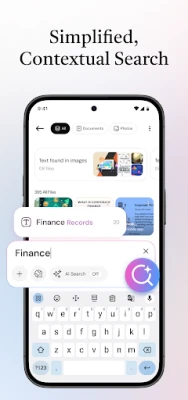
Ask a question in plain language. XeNo searches across everything - not just filenames, but the actual content inside your PDFs, Docs, and images - and returns contextual answers with source references.
• Voice-powered Search:
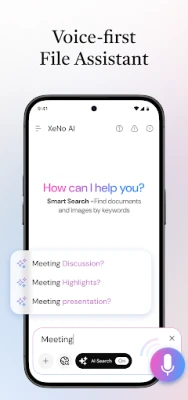
Speak your query naturally. XeNo processes your voice on-device and searches across your entire library in seconds. No cloud transcription, no recordings stored.
• Chat With Any Document:
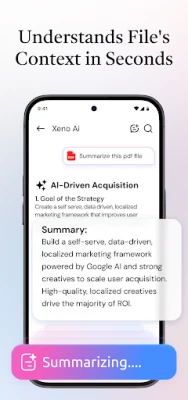
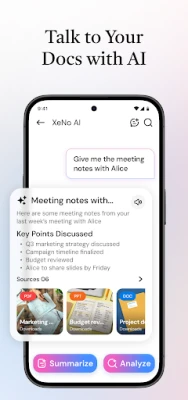
Open a PDF, report, or spreadsheet and ask it questions directly - summarize it, extract key points, or compare it against another file.
• Auto-Sorting of Files:
XeNo automatically categorizes and organizes your files, grouping by topic, project, or file type. No manual tagging needed.
• Reads Images & Scanned Documents:
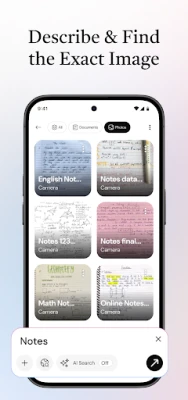
XeNo reads text within images, scanned documents, and handwritten notes using on-device OCR, - making every file in your library fully searchable.
• Cross-File Contextual Answers:
Ask questions that span multiple files: “What risks did the legal brief flag that also appear in the Q3 report?” XeNo connects the dots and cites its sources.
How It Works:
• Allow storage access - XeNo reads your files, on your device:
No uploading required, XeNo works like your built-in Files app - it reads locally, so nothing ever leaves your phone.
• Search by typing or speaking, in plain language:
Ask anything across your entire library - "summarize last week's contract" or "what risks came up in the legal brief?" No folders, no filenames needed.
• Get contextual answers in seconds:
XeNo searches inside your files, connects information across them, and responds with cited, accurate answers - entirely on your phone.
Built for People Who Handle Sensitive Information:
Lawyers, researchers, consultants, analysts, and students rely on XeNo because their files aren't meant for the cloud.
• Your files are never used to train our AI.
Your personal information stays private property - it is never used to improve or teach any model.
• No cloud means no third-party access.
Your data is not stored, uploaded, or shared. No server ever sees it.
People don't need more files; they need answers. Between academic papers, client briefs, and disorganized galleries, it’s impossible to remember everything you have. XeNo is the AI files assistant that turns that pain into clarity by searching, interpreting, and sorting your files and images, with AI that works completely on your phone, 100% offline.
Download XeNo - search, organize, and get answers from your files.
Disclaimer:
XeNo AI: Smart File Assistant is designed to help users search, organize, and access files stored on their devices. The app does not guarantee recovery of deleted, corrupted, or inaccessible files. Search results and file matches depend on the content available on the device and user-provided permissions. XeNo should be used as a file management and assistance tool only and does not replace cloud storage, backup services, or data recovery software.
Privacy and Data Usage:
Your privacy is important to us. Xeno AI: Smart File Assistant only accesses files on your device to provide search and organization features, and all access is controlled by you. We do not store, upload, or share your personal files or data with third parties. For more details, please review our full Privacy Policy.
XeNo is designed for privacy-conscious users who want to use the power of AI but without compromising their files.
Main Features:
• AI Search Across All Files:
Ask a question in plain language. XeNo searches across everything - not just filenames, but the actual content inside your PDFs, Docs, and images - and returns contextual answers with source references.
• Voice-powered Search:
Speak your query naturally. XeNo processes your voice on-device and searches across your entire library in seconds. No cloud transcription, no recordings stored.
• Chat With Any Document:
Open a PDF, report, or spreadsheet and ask it questions directly - summarize it, extract key points, or compare it against another file.
• Auto-Sorting of Files:
XeNo automatically categorizes and organizes your files, grouping by topic, project, or file type. No manual tagging needed.
• Reads Images & Scanned Documents:
XeNo reads text within images, scanned documents, and handwritten notes using on-device OCR, - making every file in your library fully searchable.
• Cross-File Contextual Answers:
Ask questions that span multiple files: “What risks did the legal brief flag that also appear in the Q3 report?” XeNo connects the dots and cites its sources.
How It Works:
• Allow storage access - XeNo reads your files, on your device:
No uploading required, XeNo works like your built-in Files app - it reads locally, so nothing ever leaves your phone.
• Search by typing or speaking, in plain language:
Ask anything across your entire library - "summarize last week's contract" or "what risks came up in the legal brief?" No folders, no filenames needed.
• Get contextual answers in seconds:
XeNo searches inside your files, connects information across them, and responds with cited, accurate answers - entirely on your phone.
Built for People Who Handle Sensitive Information:
Lawyers, researchers, consultants, analysts, and students rely on XeNo because their files aren't meant for the cloud.
• Your files are never used to train our AI.
Your personal information stays private property - it is never used to improve or teach any model.
• No cloud means no third-party access.
Your data is not stored, uploaded, or shared. No server ever sees it.
People don't need more files; they need answers. Between academic papers, client briefs, and disorganized galleries, it’s impossible to remember everything you have. XeNo is the AI files assistant that turns that pain into clarity by searching, interpreting, and sorting your files and images, with AI that works completely on your phone, 100% offline.
Download XeNo - search, organize, and get answers from your files.
Disclaimer:
XeNo AI: Smart File Assistant is designed to help users search, organize, and access files stored on their devices. The app does not guarantee recovery of deleted, corrupted, or inaccessible files. Search results and file matches depend on the content available on the device and user-provided permissions. XeNo should be used as a file management and assistance tool only and does not replace cloud storage, backup services, or data recovery software.
Privacy and Data Usage:
Your privacy is important to us. Xeno AI: Smart File Assistant only accesses files on your device to provide search and organization features, and all access is controlled by you. We do not store, upload, or share your personal files or data with third parties. For more details, please review our full Privacy Policy.
Rate the App
Add Comment & Review
User Reviews
Based on 0 reviews
No reviews added yet.
Comments will not be approved to be posted if they are SPAM, abusive, off-topic, use profanity, contain a personal attack, or promote hate of any kind.















More »

Popular Apps

phpFoxPHPFOX LLC

Moon Chai StoryOlha Dobel

World War Heroes — WW2 PvP FPSAzur Interactive Games Limited

Govee LiteGovee

AvSeaAvionics Electronics Geeks!

Viking Clan: RagnarokKano Games

Vikings: War of ClansPlarium LLC

Build World AdventureExplore city in cube world

Asphalt 9: LegendsGameloft SE

Dawn of Zombies: Survival GameRoyal Ark
More »
Editor's Choice

Grim Soul: Dark Survival RPGBrickworks Games Ltd

Craft of Survival - Gladiators101XP LIMITED

Last Shelter: SurvivalLong Tech Network Limited
Dawn of Zombies: Survival GameRoyal Ark

Merge Survival : WastelandStickyHands Inc.

AoD Vikings: Valhalla GameRoboBot Studio
Viking Clan: RagnarokKano Games
Vikings: War of ClansPlarium LLC
Asphalt 9: LegendsGameloft SE

Modern Tanks: War Tank GamesXDEVS LTD