

Latest Version
Update
October 09, 2026
October 09, 2026
Developer
Apex App Solution
Apex App Solution
Categories
Communication
Communication
Platforms
Android
Android
Downloads
0
0
License
Free
Free
Package Name
com.apex.wamr.recover.deleted.messages.app
com.apex.wamr.recover.deleted.messages.app
Report
Report a Problem
Report a Problem
More About WMR: Recover deleted messages
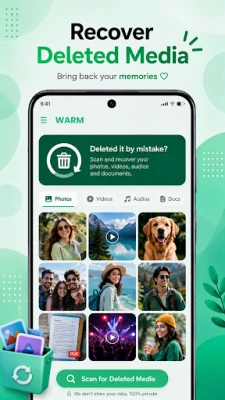
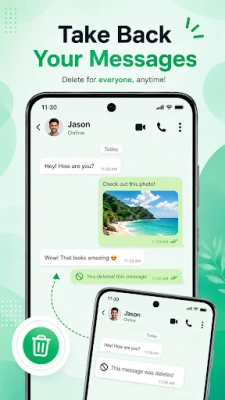
Accidentally deleted an important message and need it back? WMR: Recover Deleted Messages helps you recover deleted messages, photos, videos, voice notes and documents that arrived on your phone - quickly, privately, and without root.
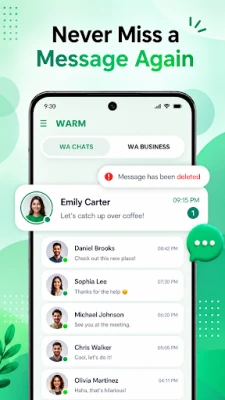
WARM is a lightweight message recovery app and status saver built around your own notification history. Messages your phone receives are saved locally on your device, so when a chat is removed you can still open WARM and read it again.
HOW DELETED MESSAGE RECOVERY WORKS
WMR saves incoming notifications and media to a private local log the moment they reach your device. Nothing is pulled from any server or account. If a message is later deleted, WMR shows you the saved copy from your own notification history. This is why WARM can only recover messages received after you install and enable it.
KEY FEATURES
• Recover deleted messages: restore deleted text messages, chats and group messages you received
• Recover deleted photos and videos: get back deleted images, videos, GIFs and stickers from your chats
• Recover deleted voice notes and audio: replay deleted voice messages, audio files and documents
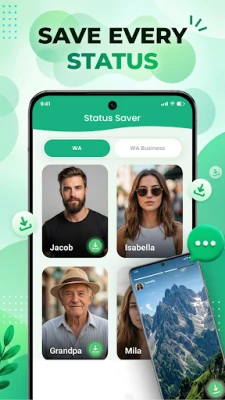
• Status saver and status downloader: save status photos and status videos straight to your gallery
• Notification history log: browse a searchable log of every notification you received today, yesterday or last week
• Group chat recovery: see deleted messages in group chats without leaving the group
• Broad messenger support: recovers notifications from most messaging and social apps on your phone
• Offline and private: recovered data stays on your device, with no cloud upload, no account and no login
• No root required: deleted message recovery on any Android phone, no rooting and no PC needed
• Fast search: find a deleted chat by contact name, keyword or date
• Dark mode and a simple interface anyone can use
• Lightweight: runs quietly in the background with minimal battery drain
WHY PEOPLE USE WARM
• Recover deleted messages without a backup
• Read a message that was deleted before you opened it
• Get back a deleted photo, address, OTP, link or phone number
• Save a status video to your gallery before it expires
• Keep an archive of important chats and receipts
• Check notification history after clearing the notification bar
PRIVACY FIRST
WARM needs notification access and media permissions to save and restore your messages and media. Everything is stored only on your own phone. WARM does not read your accounts, does not access chats stored inside other apps, and never uploads your messages anywhere.
IMPORTANT
WMR is an independent app and is not affiliated with, endorsed by, or connected to any messaging service. WARM can only recover content received on your device while WARM was installed and enabled. Media that was never downloaded, and messages deleted before installation, cannot be restored.
COMMON QUESTIONS
How do I recover deleted messages on Android? Install WMR, enable notification access, and WMR will log incoming messages so you can restore them later.
Can I recover deleted messages without a backup? Yes. WMR does not need a chat backup file, a PC or a rooted phone.
Can I see deleted photos and videos? Yes, if the media reached your device while WMR was running.
Does it work for group chats? Yes, WARM recovers deleted group messages the same way as direct chats.
Is a deleted message recovery app safe? WARM keeps everything offline on your phone and asks only for the permissions it needs.
Download WMR: Recover Deleted Messages and stop losing the messages that matter.
Questions or feedback? Email [email protected]
HOW DELETED MESSAGE RECOVERY WORKS
WMR saves incoming notifications and media to a private local log the moment they reach your device. Nothing is pulled from any server or account. If a message is later deleted, WMR shows you the saved copy from your own notification history. This is why WARM can only recover messages received after you install and enable it.
KEY FEATURES
• Recover deleted messages: restore deleted text messages, chats and group messages you received
• Recover deleted photos and videos: get back deleted images, videos, GIFs and stickers from your chats
• Recover deleted voice notes and audio: replay deleted voice messages, audio files and documents
• Status saver and status downloader: save status photos and status videos straight to your gallery
• Notification history log: browse a searchable log of every notification you received today, yesterday or last week
• Group chat recovery: see deleted messages in group chats without leaving the group
• Broad messenger support: recovers notifications from most messaging and social apps on your phone
• Offline and private: recovered data stays on your device, with no cloud upload, no account and no login
• No root required: deleted message recovery on any Android phone, no rooting and no PC needed
• Fast search: find a deleted chat by contact name, keyword or date
• Dark mode and a simple interface anyone can use
• Lightweight: runs quietly in the background with minimal battery drain
WHY PEOPLE USE WARM
• Recover deleted messages without a backup
• Read a message that was deleted before you opened it
• Get back a deleted photo, address, OTP, link or phone number
• Save a status video to your gallery before it expires
• Keep an archive of important chats and receipts
• Check notification history after clearing the notification bar
PRIVACY FIRST
WARM needs notification access and media permissions to save and restore your messages and media. Everything is stored only on your own phone. WARM does not read your accounts, does not access chats stored inside other apps, and never uploads your messages anywhere.
IMPORTANT
WMR is an independent app and is not affiliated with, endorsed by, or connected to any messaging service. WARM can only recover content received on your device while WARM was installed and enabled. Media that was never downloaded, and messages deleted before installation, cannot be restored.
COMMON QUESTIONS
How do I recover deleted messages on Android? Install WMR, enable notification access, and WMR will log incoming messages so you can restore them later.
Can I recover deleted messages without a backup? Yes. WMR does not need a chat backup file, a PC or a rooted phone.
Can I see deleted photos and videos? Yes, if the media reached your device while WMR was running.
Does it work for group chats? Yes, WARM recovers deleted group messages the same way as direct chats.
Is a deleted message recovery app safe? WARM keeps everything offline on your phone and asks only for the permissions it needs.
Download WMR: Recover Deleted Messages and stop losing the messages that matter.
Questions or feedback? Email [email protected]
Rate the App
Add Comment & Review
User Reviews
Based on 0 reviews
No reviews added yet.
Comments will not be approved to be posted if they are SPAM, abusive, off-topic, use profanity, contain a personal attack, or promote hate of any kind.













More »

Popular Apps

phpFoxPHPFOX LLC

Moon Chai StoryOlha Dobel

World War Heroes — WW2 PvP FPSAzur Interactive Games Limited

Govee LiteGovee

Viking Clan: RagnarokKano Games

Build World AdventureExplore city in cube world

Vikings: War of ClansPlarium LLC

AvSeaAvionics Electronics Geeks!

Asphalt 9: LegendsGameloft SE

Dawn of Zombies: Survival GameRoyal Ark
More »
Editor's Choice

Grim Soul: Dark Survival RPGBrickworks Games Ltd

Craft of Survival - Gladiators101XP LIMITED

Last Shelter: SurvivalLong Tech Network Limited
Dawn of Zombies: Survival GameRoyal Ark

Merge Survival : WastelandStickyHands Inc.

AoD Vikings: Valhalla GameRoboBot Studio
Viking Clan: RagnarokKano Games
Vikings: War of ClansPlarium LLC
Asphalt 9: LegendsGameloft SE

Modern Tanks: War Tank GamesXDEVS LTD