
Latest Version
Update
March 08, 2026
March 08, 2026
Developer
Prime Life Tools LABS
Prime Life Tools LABS
Categories
Video Players
Video Players
Platforms
Android
Android
Downloads
0
0
License
Free
Free
Package Name
com.webcast.roku.video.browser
com.webcast.roku.video.browser
Report
Report a Problem
Report a Problem
More About Web Cast Pro: Web Video Caster
Welcome to the casting experience with Web Cast Pro, a web video caster and browser designed to transform your TV into a smart cinema. With WebCast Pro, you can easily cast to TV web videos, online movies, favorite TV shows, live streams, sports, and IPTV directly to your big screen in HD and 4K!
🔥 WHY CHOOSE WEBCAST PRO
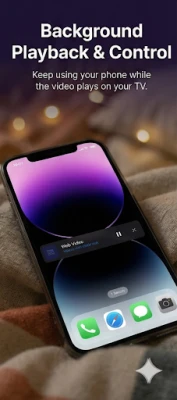
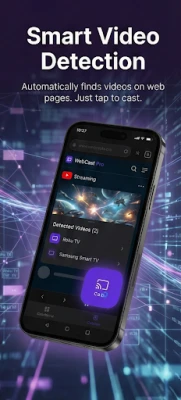
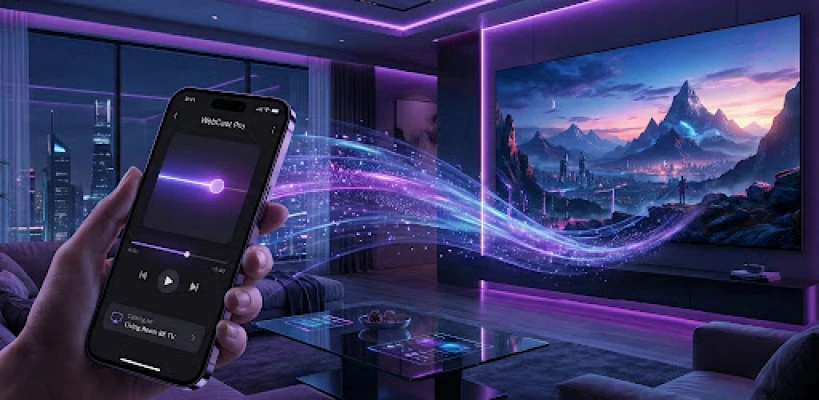
Unlike standard screen mirroring apps that drain your battery, lag, and freeze your phone, WebCast Pro acts as a smart bridge. Our built-in web browser automatically detects video links on websites and sends them directly to your streaming device for native playback. Once the TV cast starts, you can use other apps, lock your phone, and save battery while the video plays flawlessly on your TV.
📺 SUPPORTED STREAMING DEVICES:
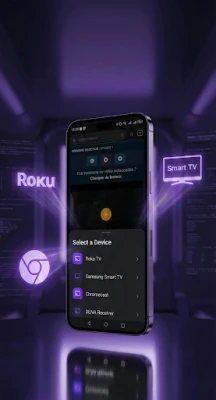
We support almost all major smart devices for a seamless cast to TV experience:
• Roku TVs (TCL, Hisense, etc.), Roku Stick, and Roku Express.
• Google Chromecast and TVs with Chromecast built-in (Android TV, Google TV).
• Smart TVs: Samsung (Tizen), LG (WebOS), Sony, Hisense, Panasonic, Philips.
• Amazon Fire TV & Fire Stick.
• Gaming Consoles: Xbox One, Xbox Series X/S.
• Any DLNA receiver, UPnP device, and compatible internet boxes.
🎬 SUPPORTED MEDIA & FORMATS:
Our smart video player is built to handle whatever the web has to offer:
• Online streaming movies and TV series (MP4, MKV, WebM).
• Live streams, news, and sports (HLS, M3U8).
• Custom IPTV playlists.
• Local Media Cast: Beam your local videos, photo galleries, and music stored on your phone directly to the TV.
🌟 ADVANCED FEATURES:
• Advanced Web Browser: Smooth, multi-tab browsing to search for your favorite media securely.
• Smart Video Detection: Our AI-driven browser instantly isolates playable video links on any web page.
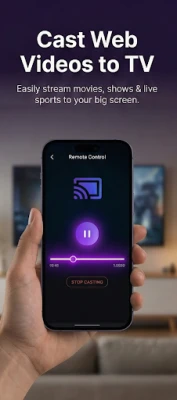
• Zero-Lag Remote Control: Control playback directly from your couch! Our highly responsive progress slider lets you seek, manage volume, pause, or rewind instantly, perfectly synced with your TV.
• Clean Navigation: Built-in tools to block annoying pop-ups so you can find your videos faster.
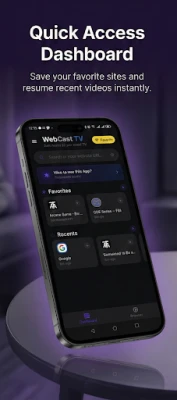
• Bookmarks & History: Save your favorite streaming sites and resume playback right where you left off.
📱 HOW IT WORKS (3 SIMPLE STEPS):
Ensure your phone and your Smart TV (or Roku/DLNA device) are connected to the same Wi-Fi network.
Open WebCast Pro, tap the "Cast" icon, and select your TV from the list.
Browse any website, let the app detect the video, tap "Play," and enjoy the show!
⚠️ COMPLIANCE & POLICIES (PLEASE READ):
At Prime Life Tools LABS, we provide a technological tool that respects creators and marketplace rules.
🚫 YOUTUBE IS NOT SUPPORTED: In strict compliance with YouTube's Terms of Service, WebCast Pro DOES NOT allow downloading, casting, background playing, or streaming of any YouTube videos.
🚫 Copyright: WebCast Pro is a browser and transmission tool. We do not host, provide, or promote any copyrighted content. The user is solely responsible for the web media they choose to cast.
ℹ️ Trademark Disclaimer: WebCast Pro is an independent application developed to facilitate DLNA/Cast streaming. We are NOT affiliated with, associated with, authorized by, or endorsed by Roku Inc., Google LLC, Amazon, Samsung, LG, or any other trademark mentioned in this description.
🚀 DOWNLOAD NOW!
Whether you need to cast a live football match to your Roku, beam vacation photos via DLNA, or use a web video caster for your Smart TV, WebCast Pro is ready for your home entertainment!
Unlike standard screen mirroring apps that drain your battery, lag, and freeze your phone, WebCast Pro acts as a smart bridge. Our built-in web browser automatically detects video links on websites and sends them directly to your streaming device for native playback. Once the TV cast starts, you can use other apps, lock your phone, and save battery while the video plays flawlessly on your TV.
📺 SUPPORTED STREAMING DEVICES:
We support almost all major smart devices for a seamless cast to TV experience:
• Roku TVs (TCL, Hisense, etc.), Roku Stick, and Roku Express.
• Google Chromecast and TVs with Chromecast built-in (Android TV, Google TV).
• Smart TVs: Samsung (Tizen), LG (WebOS), Sony, Hisense, Panasonic, Philips.
• Amazon Fire TV & Fire Stick.
• Gaming Consoles: Xbox One, Xbox Series X/S.
• Any DLNA receiver, UPnP device, and compatible internet boxes.
🎬 SUPPORTED MEDIA & FORMATS:
Our smart video player is built to handle whatever the web has to offer:
• Online streaming movies and TV series (MP4, MKV, WebM).
• Live streams, news, and sports (HLS, M3U8).
• Custom IPTV playlists.
• Local Media Cast: Beam your local videos, photo galleries, and music stored on your phone directly to the TV.
🌟 ADVANCED FEATURES:
• Advanced Web Browser: Smooth, multi-tab browsing to search for your favorite media securely.
• Smart Video Detection: Our AI-driven browser instantly isolates playable video links on any web page.
• Zero-Lag Remote Control: Control playback directly from your couch! Our highly responsive progress slider lets you seek, manage volume, pause, or rewind instantly, perfectly synced with your TV.
• Clean Navigation: Built-in tools to block annoying pop-ups so you can find your videos faster.
• Bookmarks & History: Save your favorite streaming sites and resume playback right where you left off.
📱 HOW IT WORKS (3 SIMPLE STEPS):
Ensure your phone and your Smart TV (or Roku/DLNA device) are connected to the same Wi-Fi network.
Open WebCast Pro, tap the "Cast" icon, and select your TV from the list.
Browse any website, let the app detect the video, tap "Play," and enjoy the show!
⚠️ COMPLIANCE & POLICIES (PLEASE READ):
At Prime Life Tools LABS, we provide a technological tool that respects creators and marketplace rules.
🚫 YOUTUBE IS NOT SUPPORTED: In strict compliance with YouTube's Terms of Service, WebCast Pro DOES NOT allow downloading, casting, background playing, or streaming of any YouTube videos.
🚫 Copyright: WebCast Pro is a browser and transmission tool. We do not host, provide, or promote any copyrighted content. The user is solely responsible for the web media they choose to cast.
ℹ️ Trademark Disclaimer: WebCast Pro is an independent application developed to facilitate DLNA/Cast streaming. We are NOT affiliated with, associated with, authorized by, or endorsed by Roku Inc., Google LLC, Amazon, Samsung, LG, or any other trademark mentioned in this description.
🚀 DOWNLOAD NOW!
Whether you need to cast a live football match to your Roku, beam vacation photos via DLNA, or use a web video caster for your Smart TV, WebCast Pro is ready for your home entertainment!
Rate the App
Add Comment & Review
User Reviews
Based on 0 reviews
No reviews added yet.
Comments will not be approved to be posted if they are SPAM, abusive, off-topic, use profanity, contain a personal attack, or promote hate of any kind.







More »

Popular Apps

phpFoxPHPFOX LLC

Moon Chai StoryOlha Dobel

World War Heroes — WW2 PvP FPSAzur Interactive Games Limited

Govee LiteGovee

Viking Clan: RagnarokKano Games

Build World AdventureExplore city in cube world

Vikings: War of ClansPlarium LLC

Asphalt 9: LegendsGameloft SE

Submarine Car Diving SimulatorSwim with dolphins & penguins

Dawn of Zombies: Survival GameRoyal Ark
More »
Editor's Choice

Grim Soul: Dark Survival RPGBrickworks Games Ltd

Craft of Survival - Gladiators101XP LIMITED

Last Shelter: SurvivalLong Tech Network Limited
Dawn of Zombies: Survival GameRoyal Ark

Merge Survival : WastelandStickyHands Inc.

AoD Vikings: Valhalla GameRoboBot Studio
Viking Clan: RagnarokKano Games
Vikings: War of ClansPlarium LLC
Asphalt 9: LegendsGameloft SE

Modern Tanks: War Tank GamesXDEVS LTD