Latest Version
Update
February 05, 2024
February 05, 2024
Developer
GS Watchfaces
GS Watchfaces
Categories
Tools
Tools
Platforms
Android
Android
Downloads
3
3
License
Free
Free
Package Name
com.gs.complications.suite
com.gs.complications.suite
Report
Report a Problem
Report a Problem
More About Wear OS Toolset Complications
WearOS Toolset provides a variety of Complications and Tiles for Wear OS smartwatches that add valuable information to your favorite watchface and smartwatch. To understand how complications work check out the app's help section and this video https://youtu.be/2gfhtqg9UsY found also in the app's help section.
ATTENTION!
1. Please note that this app provides complications designed to be added to your favorite watchface, assuming the watchface supports complications.
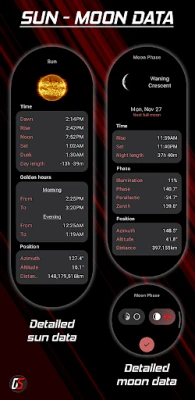
2. When you launch the app, it will display the complications settings. To access the detailed screens shown in the images, simply tap on the complications added to the watchface. For more in-depth instructions on applying complications, please consult the app's help section.
3. Some settings are not available in the free version.
4. Weather settings when changed will affect the complication settings and will not show anything on the app's main screen. For example, if you change the weather icons, check the weather complication you have already set to see the change.
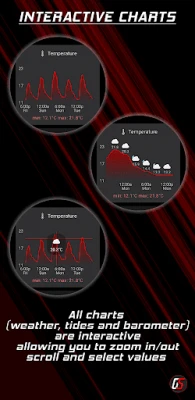
5. The swipe-to-dismiss gesture can be disabled on all chart screens so that gestures can be used on the charts. Enabling chart gestures will disable the swipe-to-dismiss gesture on all chart screens (barometer, weather, and tides). This setting is turned off by default.
The app has to be installed on both your phone and watch for certain complications to work, like the phone battery and phone shortcuts. The one installed on the phone acts as a service so you won't find it in your app launcher.
It comes with 8 predefined color themes to choose from
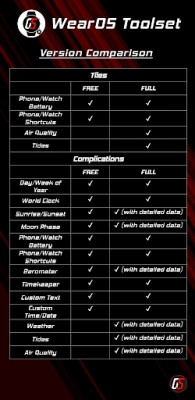
Available complications and tiles in the FREE version
Complications
- Barometer
- Day / Week of Year
- Moon Phase
- Phone / Watch Shortcuts
- Phone / Watch Battery
- Sun Rise / Set
- World Clock
- Timekeeper
- Custom text
- Custom time /date
Tiles
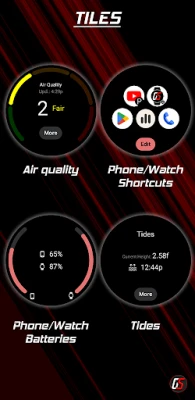
- Phone / Watch Shortcuts
- Phone / Watch Battery
The FULL version includes all of the above and:
Tiles
Air quality
Tides
Complications
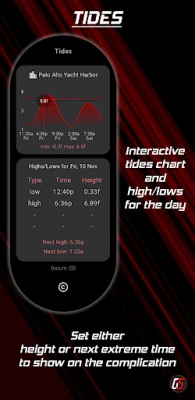
- Tides Complication with chart and highs and lows for the day.
- Air quality detailed data
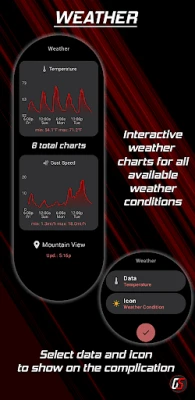
- Weather Complication with the following features:
- 2 weather providers (OpenWeatherMap and yr.no)
- Customizable weather icon sets.
- Complication data and forecast charts based on the provider.
- OpenWeatherMap:
- Temperature
- Temperature (high/low)
- Temperature (feels like)
- Precipitation (%)
- Clouds
- Pressure
- Humidity
- Wind speed
- Gust speed.
- Yr.No:
- Temperature
- UV index
- Precipitation (mm)
- Clouds
- Pressure
- Humidity
- Wind speed.
- You can choose the above data to be shown along with the current conditions icon, the data icon, or the wind direction icon.
- Sun and moon details screens for the Sun Rise / Set and Moon Phase complications.
- Barometer chart screen.
- All charts are interactive so you can check every detail.
Please feel free to send me requests/suggestions or bugs to [email protected]
www.gswatchfaces.com
1. Please note that this app provides complications designed to be added to your favorite watchface, assuming the watchface supports complications.
2. When you launch the app, it will display the complications settings. To access the detailed screens shown in the images, simply tap on the complications added to the watchface. For more in-depth instructions on applying complications, please consult the app's help section.
3. Some settings are not available in the free version.
4. Weather settings when changed will affect the complication settings and will not show anything on the app's main screen. For example, if you change the weather icons, check the weather complication you have already set to see the change.
5. The swipe-to-dismiss gesture can be disabled on all chart screens so that gestures can be used on the charts. Enabling chart gestures will disable the swipe-to-dismiss gesture on all chart screens (barometer, weather, and tides). This setting is turned off by default.
The app has to be installed on both your phone and watch for certain complications to work, like the phone battery and phone shortcuts. The one installed on the phone acts as a service so you won't find it in your app launcher.
It comes with 8 predefined color themes to choose from
Available complications and tiles in the FREE version
Complications
- Barometer
- Day / Week of Year
- Moon Phase
- Phone / Watch Shortcuts
- Phone / Watch Battery
- Sun Rise / Set
- World Clock
- Timekeeper
- Custom text
- Custom time /date
Tiles
- Phone / Watch Shortcuts
- Phone / Watch Battery
The FULL version includes all of the above and:
Tiles
Air quality
Tides
Complications
- Tides Complication with chart and highs and lows for the day.
- Air quality detailed data
- Weather Complication with the following features:
- 2 weather providers (OpenWeatherMap and yr.no)
- Customizable weather icon sets.
- Complication data and forecast charts based on the provider.
- OpenWeatherMap:
- Temperature
- Temperature (high/low)
- Temperature (feels like)
- Precipitation (%)
- Clouds
- Pressure
- Humidity
- Wind speed
- Gust speed.
- Yr.No:
- Temperature
- UV index
- Precipitation (mm)
- Clouds
- Pressure
- Humidity
- Wind speed.
- You can choose the above data to be shown along with the current conditions icon, the data icon, or the wind direction icon.
- Sun and moon details screens for the Sun Rise / Set and Moon Phase complications.
- Barometer chart screen.
- All charts are interactive so you can check every detail.
Please feel free to send me requests/suggestions or bugs to [email protected]
www.gswatchfaces.com
Rate the App
Add Comment & Review
User Reviews
Based on 0 reviews
No reviews added yet.
Comments will not be approved to be posted if they are SPAM, abusive, off-topic, use profanity, contain a personal attack, or promote hate of any kind.





More »

Popular Apps

phpFoxPHPFOX LLC

Moon Chai StoryOlha Dobel

World War Heroes — WW2 PvP FPSAzur Interactive Games Limited

Govee LiteGovee

Build World AdventureExplore city in cube world

Viking Clan: RagnarokKano Games

Vikings: War of ClansPlarium LLC

Asphalt 9: LegendsGameloft SE

Submarine Car Diving SimulatorSwim with dolphins & penguins

Dawn of Zombies: Survival GameRoyal Ark
More »
Editor's Choice

Grim Soul: Dark Survival RPGBrickworks Games Ltd

Craft of Survival - Gladiators101XP LIMITED

Last Shelter: SurvivalLong Tech Network Limited
Dawn of Zombies: Survival GameRoyal Ark

Merge Survival : WastelandStickyHands Inc.

AoD Vikings: Valhalla GameRoboBot Studio
Viking Clan: RagnarokKano Games
Vikings: War of ClansPlarium LLC
Asphalt 9: LegendsGameloft SE

Modern Tanks: War Tank GamesXDEVS LTD