

Latest Version
Update
November 17, 2026
November 17, 2026
Developer
D.T. Lab
D.T. Lab
Categories
Personalization
Personalization
Platforms
Android
Android
Downloads
0
0
License
Free
Free
Package Name
com.drewteresh.wallume
com.drewteresh.wallume
Report
Report a Problem
Report a Problem
More About Wallume: Wallpaper Changer
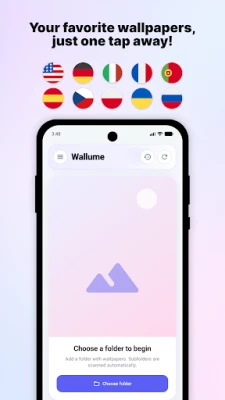
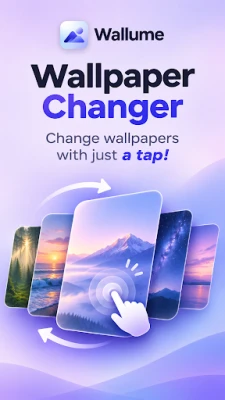
Keep your home screen fresh with an automatic wallpaper changer that uses images from your own folders.
Set flexible schedules, change wallpapers with a double tap, and organize your collections with customizable rotation rules. Choose random or sequential wallpaper rotation, create daily folder cycles, and enjoy full control over how and when your wallpapers change.
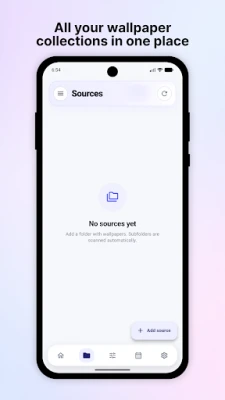
🖼️ Use your own wallpaper collection
Choose folders from your device and turn them into wallpaper sources. Add multiple collections, refresh them when their contents change, exclude individual images or entire folders, and keep your rotation organized.
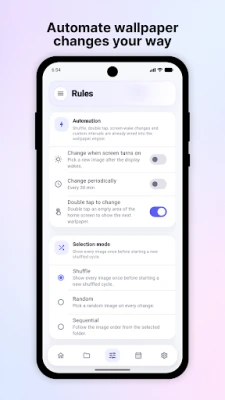
🔄 Automatic wallpaper changing
Decide how your wallpapers should rotate:
• Shuffle through your collection
• Pick images randomly
• Move through them sequentially
• Change at regular intervals
• Change when you wake your device
• Switch wallpapers with a double tap
📅 Smart scheduling
Make your wallpaper match your routine.
Create rules for specific days of the week, rotate between folders on a daily cycle, or use calendar overrides for special dates and date ranges.
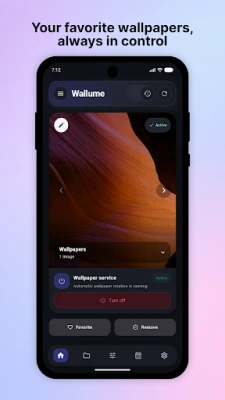
⭐ Favorites that work with your rotation
Mark wallpapers as favorites and choose how they should be used. Keep all images in rotation, give favorites priority, or rotate only through your favorite wallpapers.
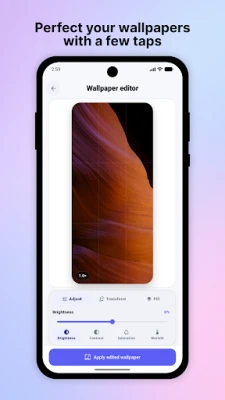
🎨 Built-in Wallpaper Editor
Adjust a wallpaper before applying it without changing the original image.
Fine-tune brightness, contrast, saturation and other adjustments, rotate or flip the image, reposition and zoom it, then choose crop, blur fill or a custom background color for the final composition.
🕘 Wallpaper history
See wallpapers you have recently used, return to a previous one, mark favorites, exclude images you no longer want in rotation, or apply a wallpaper again.
⚙️ Designed for control
Wallume keeps wallpaper automation flexible while giving you direct control whenever you want it. Your selected folders remain your collections, your original images stay unchanged, and you decide how your wallpapers are selected and displayed.
Whether you want a new wallpaper every few minutes, a different collection for each day, or carefully scheduled themes throughout the year, turn your own image collection into a beautifully personalized, automatically changing home screen.
🖼️ Use your own wallpaper collection
Choose folders from your device and turn them into wallpaper sources. Add multiple collections, refresh them when their contents change, exclude individual images or entire folders, and keep your rotation organized.
🔄 Automatic wallpaper changing
Decide how your wallpapers should rotate:
• Shuffle through your collection
• Pick images randomly
• Move through them sequentially
• Change at regular intervals
• Change when you wake your device
• Switch wallpapers with a double tap
📅 Smart scheduling
Make your wallpaper match your routine.
Create rules for specific days of the week, rotate between folders on a daily cycle, or use calendar overrides for special dates and date ranges.
⭐ Favorites that work with your rotation
Mark wallpapers as favorites and choose how they should be used. Keep all images in rotation, give favorites priority, or rotate only through your favorite wallpapers.
🎨 Built-in Wallpaper Editor
Adjust a wallpaper before applying it without changing the original image.
Fine-tune brightness, contrast, saturation and other adjustments, rotate or flip the image, reposition and zoom it, then choose crop, blur fill or a custom background color for the final composition.
🕘 Wallpaper history
See wallpapers you have recently used, return to a previous one, mark favorites, exclude images you no longer want in rotation, or apply a wallpaper again.
⚙️ Designed for control
Wallume keeps wallpaper automation flexible while giving you direct control whenever you want it. Your selected folders remain your collections, your original images stay unchanged, and you decide how your wallpapers are selected and displayed.
Whether you want a new wallpaper every few minutes, a different collection for each day, or carefully scheduled themes throughout the year, turn your own image collection into a beautifully personalized, automatically changing home screen.
Rate the App
Add Comment & Review
User Reviews
Based on 0 reviews
No reviews added yet.
Comments will not be approved to be posted if they are SPAM, abusive, off-topic, use profanity, contain a personal attack, or promote hate of any kind.











More »

Popular Apps

phpFoxPHPFOX LLC

Moon Chai StoryOlha Dobel

World War Heroes — WW2 PvP FPSAzur Interactive Games Limited

Govee LiteGovee

AvSeaAvionics Electronics Geeks!

Viking Clan: RagnarokKano Games

Vikings: War of ClansPlarium LLC

Build World AdventureExplore city in cube world

Asphalt 9: LegendsGameloft SE

Dawn of Zombies: Survival GameRoyal Ark
More »
Editor's Choice

Grim Soul: Dark Survival RPGBrickworks Games Ltd

Craft of Survival - Gladiators101XP LIMITED

Last Shelter: SurvivalLong Tech Network Limited
Dawn of Zombies: Survival GameRoyal Ark

Merge Survival : WastelandStickyHands Inc.

AoD Vikings: Valhalla GameRoboBot Studio
Viking Clan: RagnarokKano Games
Vikings: War of ClansPlarium LLC
Asphalt 9: LegendsGameloft SE

Modern Tanks: War Tank GamesXDEVS LTD