

Latest Version
Update
October 03, 2026
October 03, 2026
Developer
Mike Mera App
Mike Mera App
Categories
Video Players
Video Players
Platforms
Android
Android
Downloads
0
0
License
Free
Free
Package Name
com.hiddenappscan.videovolumebooster
com.hiddenappscan.videovolumebooster
Report
Report a Problem
Report a Problem
More About Video Volume Booster
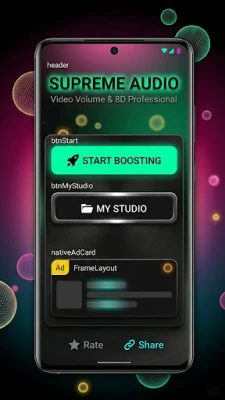
Experience professional audio enhancement with Video Volume Booster – your manual solution for crystal-clear sound and cinematic audio effects!
Are you struggling with low-volume videos? Is background noise ruining your favorite recordings? Whether you want to amplify a quiet clip or transform your music into a 3D surround experience, Video Volume Booster provides the tools you need for high-quality audio editing.
🚀 KEY FEATURES (Manual & High-Performance)
1. Manual Video Volume Booster
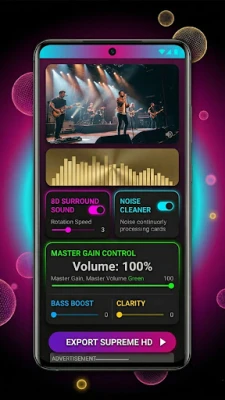
Increase the gain of any video file using our precision sliders. This feature allows you to boost the volume of soft dialogues and quiet background tracks to your desired level without digital distortion.
2. Pro Video Sound Booster
Enhance the dynamic range of your audio. Our Video Sound Booster makes high frequencies crisper and low frequencies deeper, giving your vlogs and movie clips a professional touch.
3. Precision Video Audio Booster
Take total control over your audio levels. The Video Audio Booster allows for manual gain adjustment, ensuring your output is loud, balanced, and perfectly optimized for any speaker.
4. 8D & 3D Spatial Audio Effects
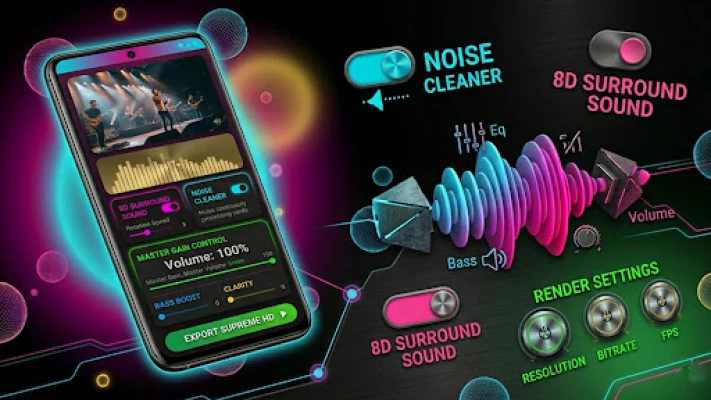
Transform standard stereo into an immersive 8D experience. Our custom spatializer algorithm moves the sound around the listener, creating a theater-like atmosphere for headphone users.
5. Smart Noise Reducer (No API Required)
Our built-in frequency filters help reduce unwanted background hiss, wind noise, or hums. It works locally on your device to ensure your voice remains the star of the video.
6. Manual Bass & Treble Equalizer
Customize your sound! Use the Bass Booster to add power to your music or adjust the Treble for clearer vocals.
🎨 WHY CHOOSE VIDEO VOLUME BOOSTER?
Premium My Studio: Access all your creations in one place. Play, share, or delete your exported videos from a sleek, dark-themed dashboard.
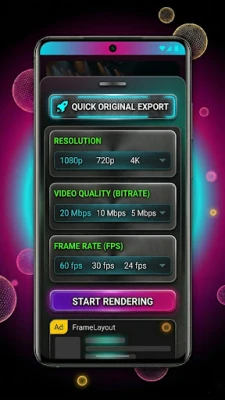
Multiple Export Options: Save videos in various resolutions, including 1080p Full HD and 4K Ultra HD, depending on your needs.
Fast Local Processing: Everything happens on your device. We use an optimized rendering engine for quick results without uploading data to any server.
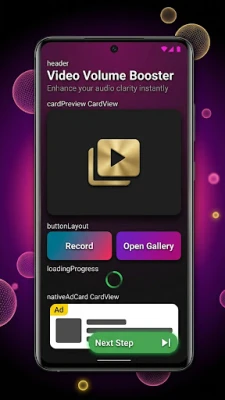
Clean & Simple UI: Designed for ease of use. No complex setup—just powerful manual controls.
🛡️ PRIVACY & POLICY COMPLIANCE
No External APIs: All processing is done locally using built-in audio algorithms. No data is sent to external AI servers.
Safe Amplification: We provide manual gain control. We recommend using reasonable volume levels to protect your hardware and hearing.
Privacy First: We do not collect, store, or share your personal video files.
Permissions: Only necessary storage access is requested to load and save your edited media.
⚠️ DISCLAIMER
Hardware Safety: This Video Audio Booster uses software-based gain. Excessive boosting may affect device speakers. Please use responsibly.
Source Quality: The final output depends on the original video's audio quality.
Storage: "My Studio" requires storage permission to manage your saved files.
🚀 KEY FEATURES (Manual & High-Performance)
1. Manual Video Volume Booster
Increase the gain of any video file using our precision sliders. This feature allows you to boost the volume of soft dialogues and quiet background tracks to your desired level without digital distortion.
2. Pro Video Sound Booster
Enhance the dynamic range of your audio. Our Video Sound Booster makes high frequencies crisper and low frequencies deeper, giving your vlogs and movie clips a professional touch.
3. Precision Video Audio Booster
Take total control over your audio levels. The Video Audio Booster allows for manual gain adjustment, ensuring your output is loud, balanced, and perfectly optimized for any speaker.
4. 8D & 3D Spatial Audio Effects
Transform standard stereo into an immersive 8D experience. Our custom spatializer algorithm moves the sound around the listener, creating a theater-like atmosphere for headphone users.
5. Smart Noise Reducer (No API Required)
Our built-in frequency filters help reduce unwanted background hiss, wind noise, or hums. It works locally on your device to ensure your voice remains the star of the video.
6. Manual Bass & Treble Equalizer
Customize your sound! Use the Bass Booster to add power to your music or adjust the Treble for clearer vocals.
🎨 WHY CHOOSE VIDEO VOLUME BOOSTER?
Premium My Studio: Access all your creations in one place. Play, share, or delete your exported videos from a sleek, dark-themed dashboard.
Multiple Export Options: Save videos in various resolutions, including 1080p Full HD and 4K Ultra HD, depending on your needs.
Fast Local Processing: Everything happens on your device. We use an optimized rendering engine for quick results without uploading data to any server.
Clean & Simple UI: Designed for ease of use. No complex setup—just powerful manual controls.
🛡️ PRIVACY & POLICY COMPLIANCE
No External APIs: All processing is done locally using built-in audio algorithms. No data is sent to external AI servers.
Safe Amplification: We provide manual gain control. We recommend using reasonable volume levels to protect your hardware and hearing.
Privacy First: We do not collect, store, or share your personal video files.
Permissions: Only necessary storage access is requested to load and save your edited media.
⚠️ DISCLAIMER
Hardware Safety: This Video Audio Booster uses software-based gain. Excessive boosting may affect device speakers. Please use responsibly.
Source Quality: The final output depends on the original video's audio quality.
Storage: "My Studio" requires storage permission to manage your saved files.
Rate the App
Add Comment & Review
User Reviews
Based on 0 reviews
No reviews added yet.
Comments will not be approved to be posted if they are SPAM, abusive, off-topic, use profanity, contain a personal attack, or promote hate of any kind.















More »

Popular Apps

phpFoxPHPFOX LLC

Moon Chai StoryOlha Dobel

World War Heroes — WW2 PvP FPSAzur Interactive Games Limited

Govee LiteGovee

AvSeaAvionics Electronics Geeks!

Viking Clan: RagnarokKano Games

Build World AdventureExplore city in cube world

Vikings: War of ClansPlarium LLC

Asphalt 9: LegendsGameloft SE

Dawn of Zombies: Survival GameRoyal Ark
More »
Editor's Choice

Grim Soul: Dark Survival RPGBrickworks Games Ltd

Craft of Survival - Gladiators101XP LIMITED

Last Shelter: SurvivalLong Tech Network Limited
Dawn of Zombies: Survival GameRoyal Ark

Merge Survival : WastelandStickyHands Inc.

AoD Vikings: Valhalla GameRoboBot Studio
Viking Clan: RagnarokKano Games
Vikings: War of ClansPlarium LLC
Asphalt 9: LegendsGameloft SE

Modern Tanks: War Tank GamesXDEVS LTD