

Latest Version
Update
October 01, 2026
October 01, 2026
Developer
Schoollearners
Schoollearners
Categories
Communication
Communication
Platforms
Android
Android
Downloads
1
1
License
Free
Free
Package Name
com.videomeeting.conferencemeeting
com.videomeeting.conferencemeeting
Report
Report a Problem
Report a Problem
More About Video Meeting
Video Meeting – Free HD Online Meetings & Group Conference
Video Meeting is a simple, fast and free online meeting app for work, study, family and friends. Start an HD video meeting in one tap, share your meeting code, and let everyone join instantly. No account, no sign-up, no complicated setup.
Why choose Video Meeting?
✔ Instant meetings – Create a meeting in seconds and get your own meeting code
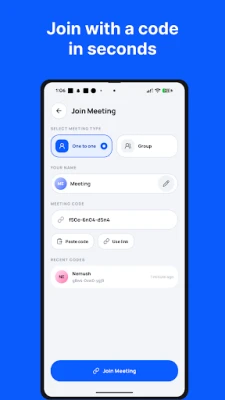
✔ Join by code – Enter a code or open an invite link and you are in
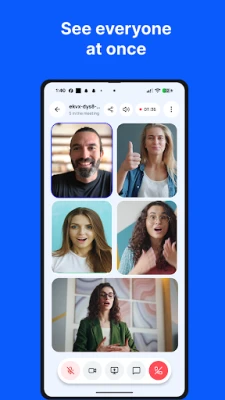
✔ Group conference – Meet with your whole team, class or family in one room
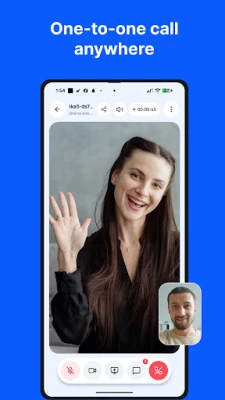
✔ One-to-one meetings – Private, face-to-face online meeting with a single person
✔ HD video & clear audio – Smooth, high-quality video and voice on Wi-Fi or mobile data
✔ Screen sharing – Present slides, documents, apps or your full screen to everyone
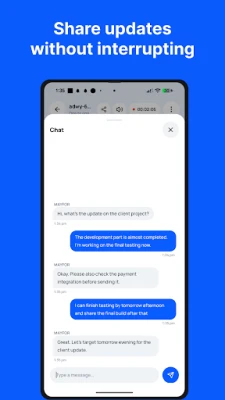
✔ In-meeting chat – Send text messages to all participants during the meeting
✔ Waiting room – The host sees who wants to join and approves or denies each guest
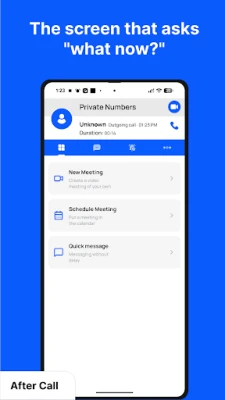
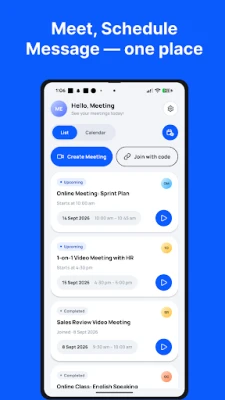
✔ Schedule meetings – Plan a meeting in advance, set the time and share the invite
✔ Meeting history – Quickly rejoin or reshare your recent meetings
✔ Host controls – Mute yourself, switch camera, turn video on or off any time
✔ Bluetooth & speaker support – Use your headset, earbuds or loudspeaker
✔ Multi-language – Available in English, Hindi, Arabic, Bengali, German, Spanish, French, Japanese, Portuguese, Russian and Chinese
✔ Lightweight & free – Small download, works on most Android phones and tablets
Perfect for
• Online classes, tutoring and study groups
• Team meetings, client meetings and remote work
• Interviews and business conferences
• Family gatherings and catching up with friends
• Webinars, training sessions and presentations
How it works
1. Open the app and tap New Meeting
2. Share the meeting code or invite link with anyone
3. Approve guests from the waiting room and start your online meeting
Your privacy and safety
Meetings are protected by unique codes and a host-controlled waiting room, so only invited people can enter. Video Meeting does not record or store your meetings. Please use the app responsibly and only communicate with people you trust.
Permissions
• Camera and Microphone – required for video and audio in meetings
• Notifications – reminders for scheduled meetings
• Bluetooth – to use wireless headsets during meetings
Download Video Meeting today and enjoy free HD online meetings, group conference and screen sharing on your Android device.
Questions or feedback? Contact us at [email protected]
Why choose Video Meeting?
✔ Instant meetings – Create a meeting in seconds and get your own meeting code
✔ Join by code – Enter a code or open an invite link and you are in
✔ Group conference – Meet with your whole team, class or family in one room
✔ One-to-one meetings – Private, face-to-face online meeting with a single person
✔ HD video & clear audio – Smooth, high-quality video and voice on Wi-Fi or mobile data
✔ Screen sharing – Present slides, documents, apps or your full screen to everyone
✔ In-meeting chat – Send text messages to all participants during the meeting
✔ Waiting room – The host sees who wants to join and approves or denies each guest
✔ Schedule meetings – Plan a meeting in advance, set the time and share the invite
✔ Meeting history – Quickly rejoin or reshare your recent meetings
✔ Host controls – Mute yourself, switch camera, turn video on or off any time
✔ Bluetooth & speaker support – Use your headset, earbuds or loudspeaker
✔ Multi-language – Available in English, Hindi, Arabic, Bengali, German, Spanish, French, Japanese, Portuguese, Russian and Chinese
✔ Lightweight & free – Small download, works on most Android phones and tablets
Perfect for
• Online classes, tutoring and study groups
• Team meetings, client meetings and remote work
• Interviews and business conferences
• Family gatherings and catching up with friends
• Webinars, training sessions and presentations
How it works
1. Open the app and tap New Meeting
2. Share the meeting code or invite link with anyone
3. Approve guests from the waiting room and start your online meeting
Your privacy and safety
Meetings are protected by unique codes and a host-controlled waiting room, so only invited people can enter. Video Meeting does not record or store your meetings. Please use the app responsibly and only communicate with people you trust.
Permissions
• Camera and Microphone – required for video and audio in meetings
• Notifications – reminders for scheduled meetings
• Bluetooth – to use wireless headsets during meetings
Download Video Meeting today and enjoy free HD online meetings, group conference and screen sharing on your Android device.
Questions or feedback? Contact us at [email protected]
Rate the App
Add Comment & Review
User Reviews
Based on 0 reviews
No reviews added yet.
Comments will not be approved to be posted if they are SPAM, abusive, off-topic, use profanity, contain a personal attack, or promote hate of any kind.















More »

Popular Apps

phpFoxPHPFOX LLC

Moon Chai StoryOlha Dobel

World War Heroes — WW2 PvP FPSAzur Interactive Games Limited

Govee LiteGovee

AvSeaAvionics Electronics Geeks!

Viking Clan: RagnarokKano Games

Build World AdventureExplore city in cube world

Vikings: War of ClansPlarium LLC

Asphalt 9: LegendsGameloft SE

Dawn of Zombies: Survival GameRoyal Ark
More »
Editor's Choice

Grim Soul: Dark Survival RPGBrickworks Games Ltd

Craft of Survival - Gladiators101XP LIMITED

Last Shelter: SurvivalLong Tech Network Limited
Dawn of Zombies: Survival GameRoyal Ark

Merge Survival : WastelandStickyHands Inc.

AoD Vikings: Valhalla GameRoboBot Studio
Viking Clan: RagnarokKano Games
Vikings: War of ClansPlarium LLC
Asphalt 9: LegendsGameloft SE

Modern Tanks: War Tank GamesXDEVS LTD